Minecraft version
Back to mods 
CurseForge · Minecraft mod
Eminus
LOD terrain beyond your render distance, built from the chunks you have explored. OpenGL and Vulkan.
Choose a version Pick your version below, then grab the matching file.
Quick answer
Which Eminus release should I use?
beta file 0.9.6+mc26.2
Game version 26.2
Loader Fabric, NeoForge
Eminus 0.9.6+mc26.2 targets 26.2 with Fabric, NeoForge. The project page does not say whether this file belongs on the client, dedicated server, or both. No extra mods listed for this file.
Where it goes
Is Eminus required on the client, server, or both?
The project page does not say whether this file belongs on the client, dedicated server, or both.
Client Source doesn’t say
Dedicated server Source doesn’t say
Loader for this release Fabric, NeoForge
Required install it here Optional supported, not mandatory Not supported do not install here Source doesn’t say do not assume
The source does not explicitly classify this release as client-only or server-only.
What else does Eminus 0.9.6+mc26.2 need?
0.9.6+mc26.2. Change the file and its required mods may change too.
This file does not list any required mods. Do not add a library just because a different file uses it.
This file does not list any required or optional mods.
Before you install it
Add Eminus without breaking your instance.
Built for Eminus 0.9.6+mc26.2. Pick another file and the loader, install side or required mods may change.
- 01
Stick to this file
Use 0.9.6+mc26.2. It targets 26.2 with Fabric, NeoForge; another release may have different loader, side or dependency requirements.
- 02
Bring the mods it needs
This file does not list any required mods. Do not add a library just because a different file uses it.
- 03
Put it on the correct side
The project page does not say whether this file belongs on the client, dedicated server, or both.
- 04
Pick the file you checked
Use the “Get this file” button beside 0.9.6+mc26.2. It opens that exact file at the source.
About this project
What does Eminus add?
See terrain far beyond your render distance. Eminus keeps a low-detail (LOD) copy of the chunks you have seen and draws it past the edge of the game's own terrain.
The same spot with the game's render distance alone, then with LOD at the default 512 chunks:
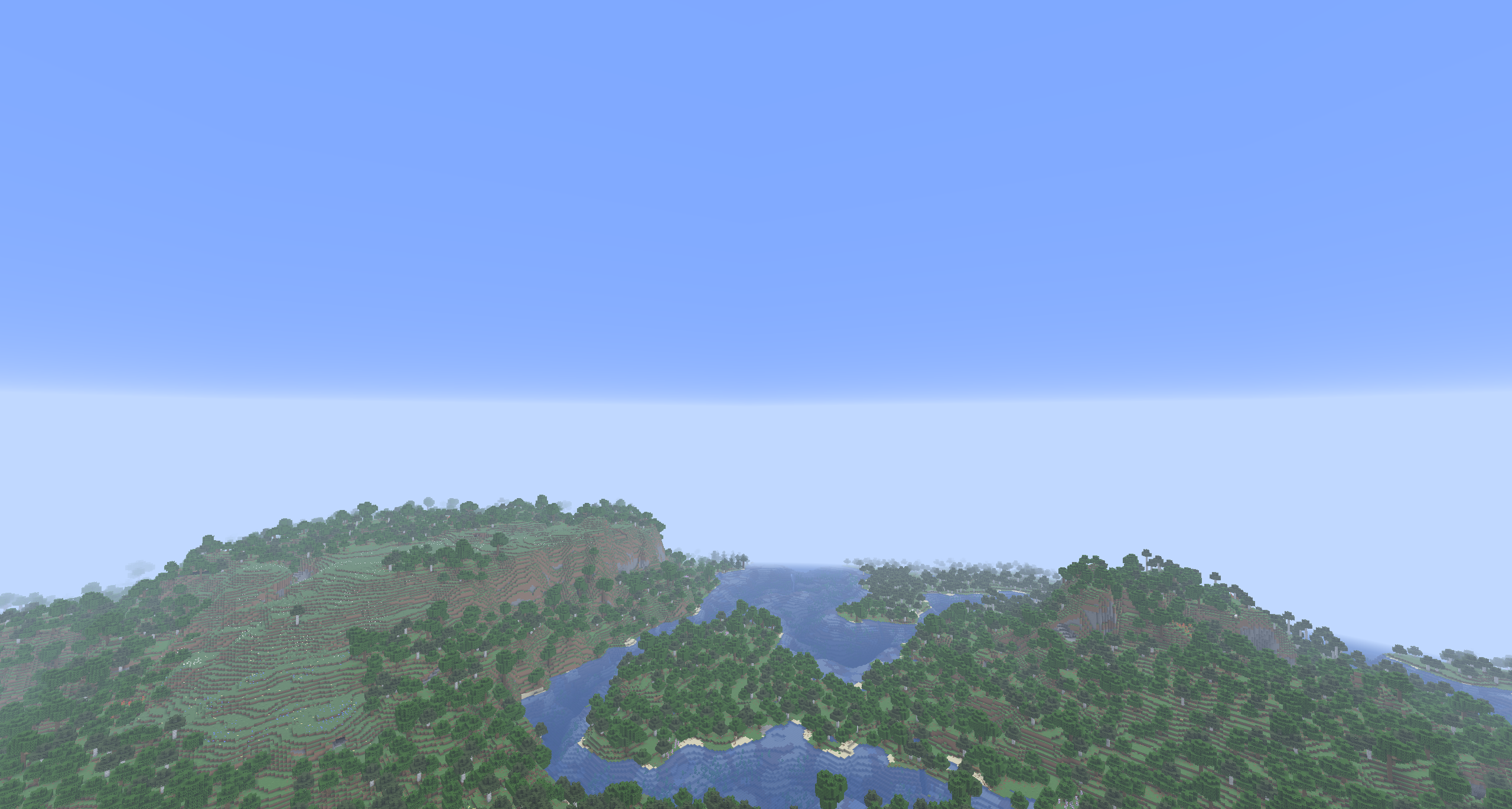
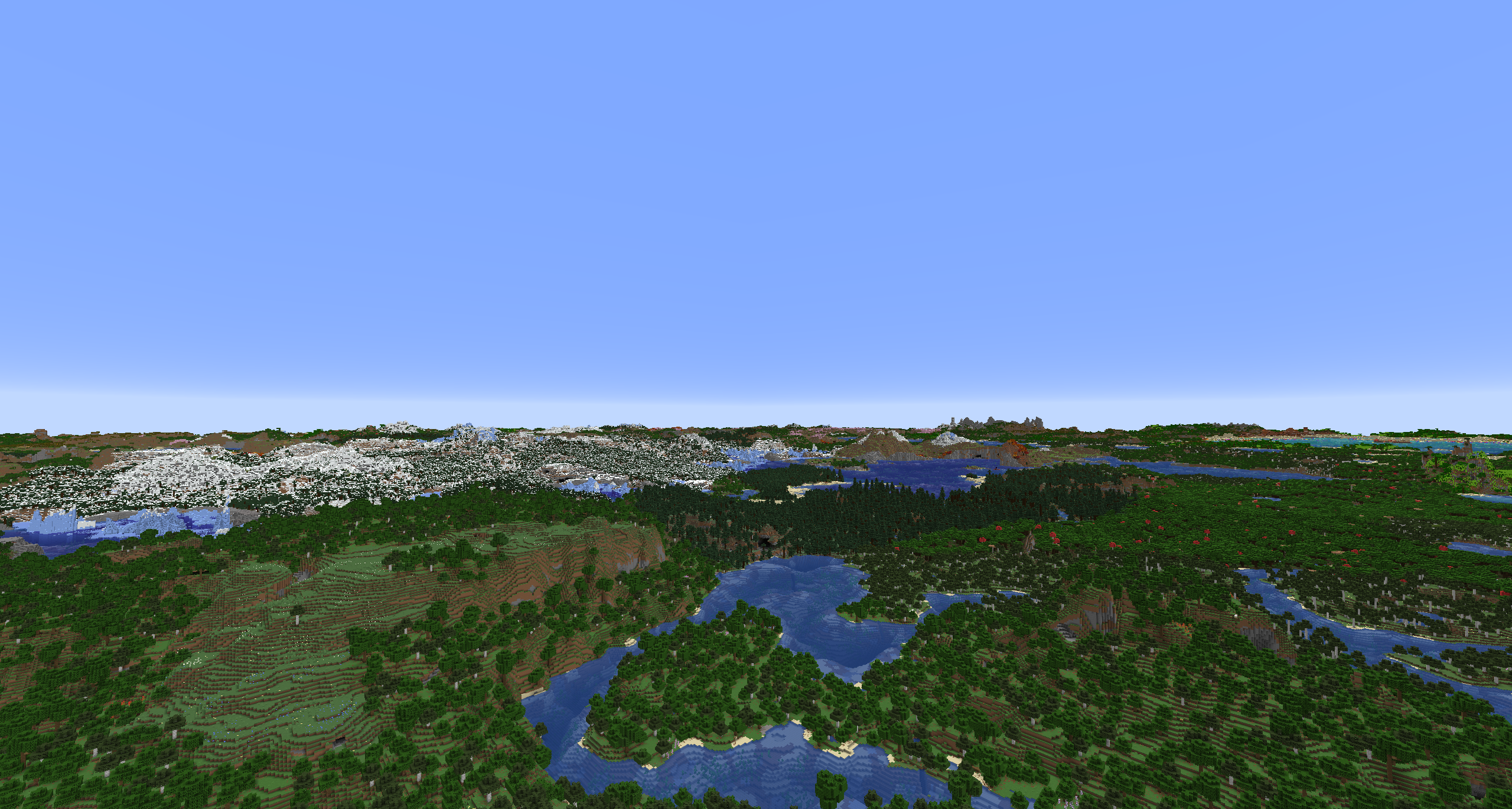
What you get
- Terrain out to 2048 chunks, 512 by default, with water, plants, light and biome colors.
- Works on any server. Nothing is installed on the server side.
Compatibility
NeoForge and Fabric. OpenGL, and Vulkan where the game offers it.
Sodium on both loaders. Mod Menu is optional on Fabric.
Under an Iris or Vitrail shader pack LOD shows in Eminus's own look. An Iris pack can draw LOD itself, with its own light, fog and shadows; no pack does this yet.
Settings
Config on NeoForge, Configure through Mod Menu on Fabric, or the Eminus page in Sodium's video settings. The main ones:
- LOD Quality: Low, Medium, High, Ultra or Custom.
- LOD Distance: 32 to 2048 chunks, 512 by default.
- Detail Distance: how far the finer detail of LOD reaches. Each step up doubles it and costs more video memory.
- Fog: fog over LOD, carried on from the game's own.
- Fade: LOD fades out over its last 512 blocks instead of ending in a hard line.
Every setting has a hint on the screen. The same values live in config/eminus.json.
Before you download
LOD appears only where you have already been. There is no import of existing worlds and no pregeneration.
Bug reports
Found something broken? Report it on the issue tracker.
Project description from CurseForge.
Pick your setup
Eminus by Minecraft version and loader
Choose the version and loader you play, then open the matching release.
Minecraft version
26.2
2 loader buildsMinecraft version
26.1.2
2 loader buildsMinecraft version
1.21.1
2 loader buildsCheck the dependencies, then try the file in a copied instance before changing a world you care about.
Recent files
Eminus versions and loaders
0.9.6+mc26.2
eminus-0.9.6-mc26.2.jar
6 Nov 2026
Client Source doesn’t say Server Source doesn’t say Dependencies No extras listed Listed on Release listing
Check the 26.2 · Fabric setup FabricNeoForge26.2 beta
0.9.6+mc26.3
eminus-0.9.6-mc26.3.jar
6 Nov 2026
Client Source doesn’t say Server Source doesn’t say Dependencies No extras listed Listed on Release listing
Check the 26.3 · Fabric setup FabricNeoForge26.3 beta
0.8.7+mc26.1.2
eminus-0.8.7+mc26.1.2.jar
21 Oct 2026
Client Source doesn’t say Server Source doesn’t say Dependencies No extras listed Listed on Release listing
Check the 26.1.2 · Fabric setup FabricNeoForge26.1.2 beta
0.8.7+mc26.2
eminus-0.8.7+mc26.2.jar
21 Oct 2026
Client Source doesn’t say Server Source doesn’t say Dependencies No extras listed Listed on Release listing
Check the 26.2 · Fabric setup FabricNeoForge26.2 beta
0.8.7+mc26.3
eminus-0.8.7+mc26.3.jar
21 Oct 2026
Client Source doesn’t say Server Source doesn’t say Dependencies No extras listed Listed on Release listing
Check the 26.3 · Fabric setup FabricNeoForge26.3 beta
0.7.5+mc1.21.1
eminus-0.7.5+mc1.21.1.jar
11 Oct 2026
Client Source doesn’t say Server Source doesn’t say Dependencies No extras listed Listed on Release listing
Check the 1.21.1 · Fabric setup Fabric1.21.1NeoForge beta
0.7.5+mc26.1.2
eminus-0.7.5+mc26.1.2.jar
11 Oct 2026
Client Source doesn’t say Server Source doesn’t say Dependencies No extras listed Listed on Release listing
Check the 26.1.2 · Fabric setup FabricNeoForge26.1.2 beta
0.7.5+mc26.2
eminus-0.7.5+mc26.2.jar
11 Oct 2026
Client Source doesn’t say Server Source doesn’t say Dependencies No extras listed Listed on Release listing
Check the 26.2 · Fabric setup FabricNeoForge26.2 beta
0.7.5+mc26.3
eminus-0.7.5+mc26.3.jar
11 Oct 2026
Client Source doesn’t say Server Source doesn’t say Dependencies No extras listed Listed on Release listing
Check the 26.3 · Fabric setup FabricNeoForge26.3 beta
0.6.3+mc1.21.1
eminus-0.6.3+mc1.21.1.jar
29 Sept 2026
Client Source doesn’t say Server Source doesn’t say Dependencies No extras listed Listed on Release listing
Check the 1.21.1 · Fabric setup Fabric1.21.1NeoForge beta
0.6.3+mc26.1.2
eminus-0.6.3+mc26.1.2.jar
29 Sept 2026
Client Source doesn’t say Server Source doesn’t say Dependencies No extras listed Listed on Release listing
Check the 26.1.2 · Fabric setup FabricNeoForge26.1.2 beta
0.6.3+mc26.2
eminus-0.6.3+mc26.2.jar
29 Sept 2026
Client Source doesn’t say Server Source doesn’t say Dependencies No extras listed Listed on Release listing
Check the 26.2 · Fabric setup FabricNeoForge26.2 beta
Looking for an older file? The official CurseForge project page is in Resources.
 mod
CurseForge · Minecraft
Medieval Immersed Quests Data
Zero-code data carrier mod containing the quest library datapack (558 quests / 25 categories). Exists so the quests load in every world — singleplayer and server — with no datapack selection step.
 mod
CurseForge · Minecraft
Medieval Immersed Skills Data
219 custom Pufferfish's Skills for the "Medieval Immersed" Mod-pack .
 mod
CurseForge · Minecraft
kenace's Entity Counter
A client-side HUD that counts nearby mobs, dropped items, and hoppers, with customizable layout, compact cycling, colours, and positioning.