Project MMO Optional for Beasts & Bounties beasts-and-bounties-1.20.1-1.0.2
optionalMatching file found Matched file: pmmo-1.20.1-1.7.43

CurseForge · Minecraft mod
Every creature you slay fills a page of your Hunter’s Bestiary and makes you deadlier against it. Learn to track what you’ve studied, take hunts from the Bounty Board, and turn your thousandth zombie into something that matters.
Quick answer
Beasts & Bounties beasts-and-bounties-1.20.1-1.0.2 targets 1.20.1 with Forge. The project page does not say whether this file belongs on the client, dedicated server, or both. No extra mods listed for this file.
Where it goes
The project page does not say whether this file belongs on the client, dedicated server, or both.
The source does not explicitly classify this release as client-only or server-only.
beasts-and-bounties-1.20.1-1.0.2. Change the file and its required mods may change too.
This file does not list any required mods. Do not add a library just because a different file uses it.
We only count dependency files that match this setup. A file for another loader does not fill the gap.
Before you install it
Built for Beasts & Bounties beasts-and-bounties-1.20.1-1.0.2. Pick another file and the loader, install side or required mods may change.
Use beasts-and-bounties-1.20.1-1.0.2. It targets 1.20.1 with Forge; another release may have different loader, side or dependency requirements.
This file does not list any required mods. Do not add a library just because a different file uses it.
The project page does not say whether this file belongs on the client, dedicated server, or both.
Use the “Get this file” button beside beasts-and-bounties-1.20.1-1.0.2. It opens that exact file at the source.
About this project
Beasts & Bounties does not add any new creatures to Minecraft, but it does give you many reasons to hunt the ones already out there. Every kill is written into a Hunter's Bestiary that reveals a creature's secrets and sharpens you against it. Hunt one long enough and you learn to track it. A Bounty Board posts fresh hunts with real rewards. The hundredth zombie you slay should mean more than the first, and now it does.
Everything is data-driven and works with any creature, vanilla or modded. A default vanilla datapack is included, so you can install it and play right away. It is built to be light on the server and should sit comfortably alongside other mods.
Website: https://mods.silvertide.net/beasts-and-bounties
Requires SilverLib

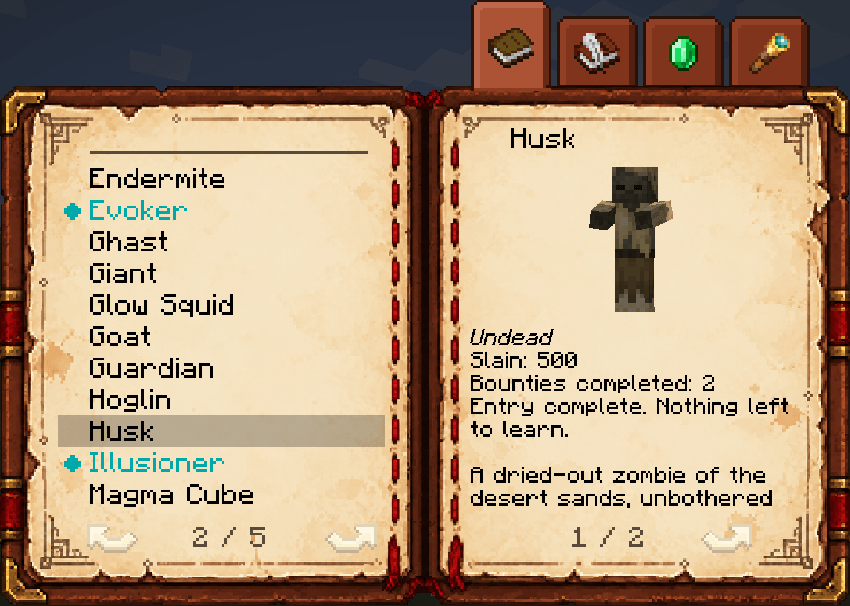
A book that contains all of the notes you've made from hunting the various entities around the world. Every kill or bounty completed on a creature brings you closer to milestones, which is when you unlock new insights or perks in the bestiary.
A new creature starts as a nameless ??? and, milestone by milestone, gives up its name and picture, its stats, how it fights, its strengths and weaknesses, where it dwells, and more. Every player keeps their own book and progress. Here's what all 4 tabs look like for a completed Husk. Most tabs have multiple pages.
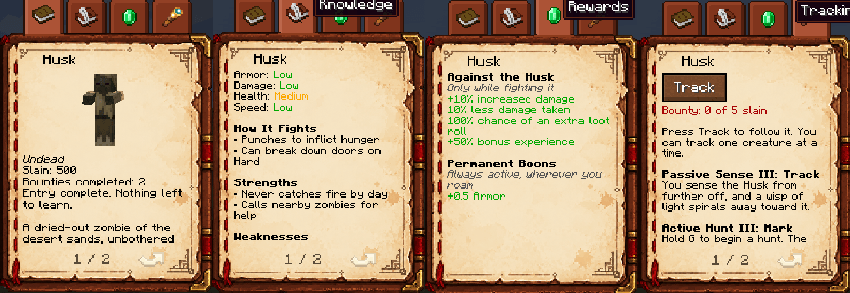
Knowledge is only half the battle. Milestones also grant permanent bonuses: more damage against that creature, less damage taken from it, extra loot rolls and bonus experience when killing it, and possibly permanent attributes. Slay enough creepers and explosions push you around a little less. Finish the spider and you step a little higher. It all stacks, so a seasoned hunter is a tougher one. Milestones can also unlock new ways of finding that creature, allowing you to track it.
Know a creature well enough and you can sense it. Tracking unlocks through milestones and comes in two kinds, each with three levels.
Passive Sense whispers to you now and then when your tracked creature is near: "You sense the Zombie to the left." Higher levels sharpen the direction, add a distance, and at the top send a wisp of light spiralling away from you toward it.

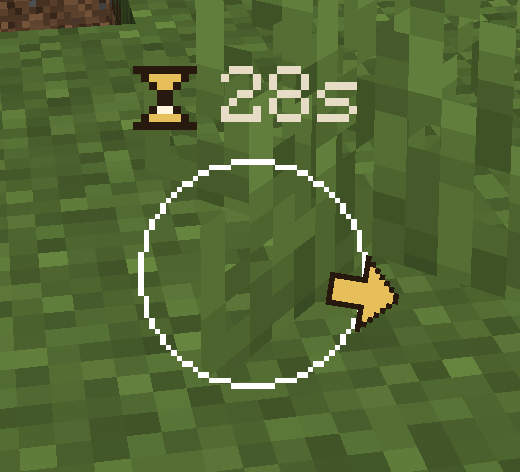
Active Hunt is the chase. Hold the hunt key and a compass rises above your hotbar, giving you much more detailed information of where the creature is than the passive sense. At higher levels the creature glows through walls, for your eyes only. Then the trail goes cold, and you must wait a short while before actively tracking again.
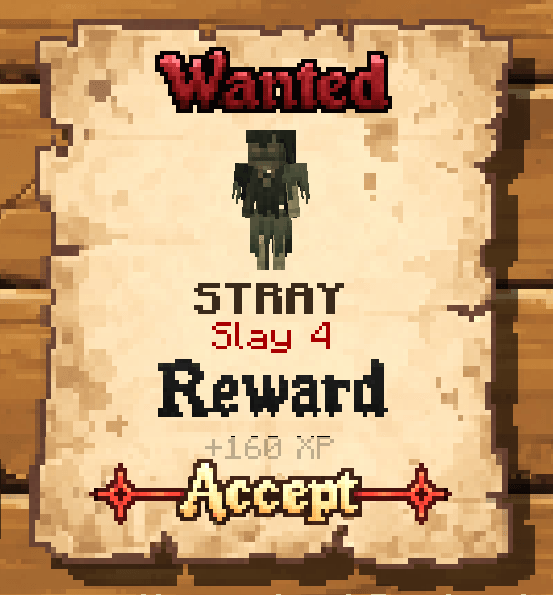
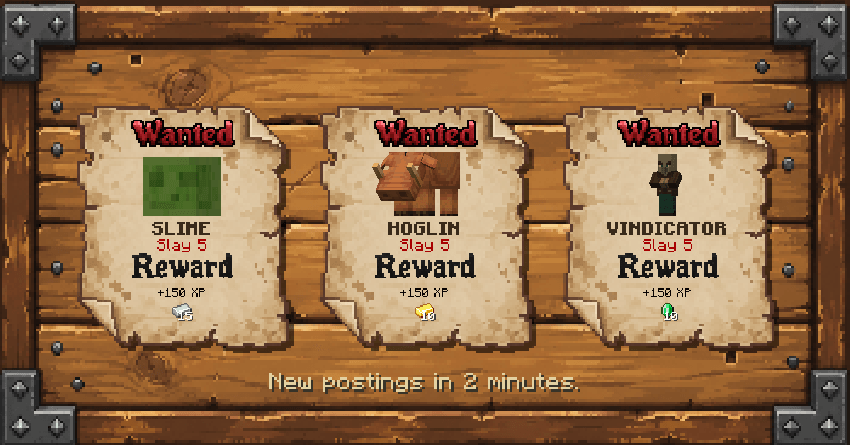
A Bounty Board posts WANTED posters: slay a number of that creature and claim the reward in items and experience. You hold one bounty at a time. Postings refresh every Minecraft day and are the same for everyone on the server, so friends can take the same hunt together. Completing a bounty also feeds your bestiary with a claimed bounty and bonus kills, and entries can require bounties to reach their later milestones.

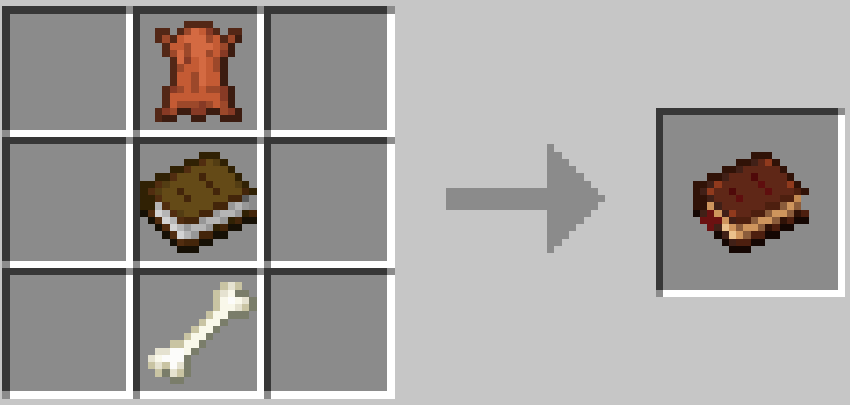
Leather over a book over a bone, stacked in a column. Right-click to open it. You do not need to carry it for kills to count; the book is where you read what you have learned. It also lives in the Tools & Utilities creative tab.
Kill something. Anything with an entry appears in your book after the first kill, with a "New Creature Recorded" toast. Each milestone after that shows "Knowledge Deepened." Everyone who took part in a fight gets credit, including the owner of a pet or summon and anyone who healed the group, so a party hunt moves everyone's book forward as long as you were actively involved.
The left page lists every creature you have found, with a search bar at the top. Elites and bosses stand out with a colored name and an icon. The right page shows the selected creature across tabs:
Tabs with nothing to show stay hidden until you unlock something for them.
Once an entry has unlocked tracking, press Track on its Tracking & Bounties tab. You track one creature at a time, an eye icon marks it in the list, and Stop Tracking is in the same place. The book describes each level you have learned in plain words.
| Passive Sense | What you sense |
|---|---|
| Scent | Whether it is close and roughly which way. |
| Trail | A finer direction and about how far. |
| Track | The same, from further off, plus the wisp that spirals toward it. |
For the hunt, hold the Hunt Tracked Creature key (G by default, rebindable) for two seconds. The compass shows a timer counting the hunt down, with an up or down marker when the creature is above or below you. When the hunt ends the timer shows how long until the next one.
| Active Hunt | What you get |
|---|---|
| Hunt | The compass. |
| Sight | The compass, and once the nearest creature is close it glows through walls. A shorter cooldown. |
| Mark | The compass reaches further and every creature of that type nearby glows. The shortest cooldown. |

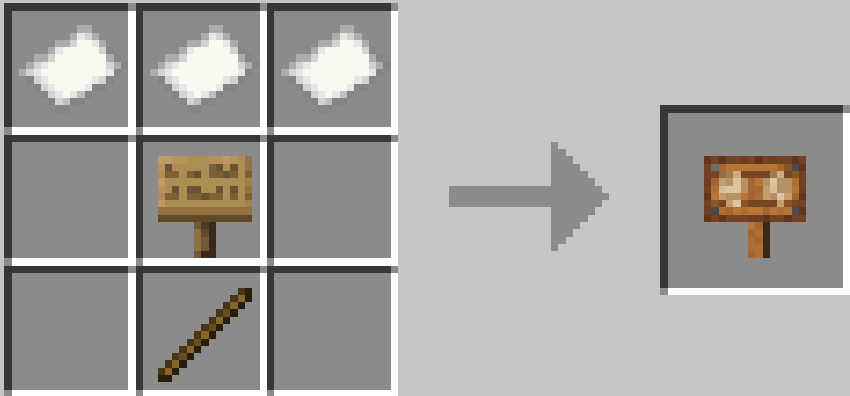
Craft a Bounty Board from three paper across the top, any sign in the middle, and a stick below. Place it anywhere and click the board. Each poster shows the creature, "Slay 5", and the rewards. The poster always names the creature, even if your book still shows ???. Click Accept and the hunt is on.
Every kill reports in on the action bar: "Bounty: 2 of 5 slain." Finish it and the rewards are yours, with a "Bounty Claimed" toast. Then the board goes quiet for a while before it posts again, and the footer tells you how long. Abandoning a bounty is allowed by default, with a longer wait after.
Three advancements mark the big moments: "A Hunter's First Page" when you record your first creature, "Nothing Left to Learn" when you finish an entry, and "Master of Beasts" when every entry is complete. They are trophies only. Nothing is gated behind them.
Everything about a creature lives in the datapack. The mod works for any living entity, including those from other mods. Add a file for it and it is tracked.
One file per creature at data/<namespace>/bestiary/<entity>.json. The file path is the entity id, so data/minecraft/bestiary/zombie.json is minecraft:zombie and data/alexsmobs/bestiary/grizzly_bear.json is alexsmobs:grizzly_bear.
{
  "classification": "normal",
  "milestones": [
    { "kills": 1 },
    { "kills": 3, "name": true, "model": true, "type": "Undead" },
    { "kills": 10,
      "description": "A shambling corpse that never tires.",
      "stats": { "health": "medium", "damage": "medium", "speed": "low" },
      "attack_patterns": ["Melee"],
      "habitat": ["Overworld, at night or in darkness"] },
    { "kills": 25,
      "weaknesses": ["Sunlight", "Smite"],
      "strengths": ["Calls nearby zombies for help"],
      "rewards": [ { "type": "damage_bonus", "amount": 0.05 } ] },
    { "kills": 50,
      "notes": ["Villagers it kills may rise as zombie villagers"],
      "rewards": [
        { "type": "damage_resistance", "amount": 0.1 },
        { "type": "extra_loot", "chance": 0.25 },
        { "type": "passive_tracking", "level": 1 },
        { "type": "attribute", "attribute": "minecraft:generic.max_health",
          "amount": 1, "operation": "add_value" }
      ] }
  ]
}
Top level
| Field | Meaning |
|---|---|
classification |
normal (default), elite, minor_boss, or major_boss. Changes the name colour and icon in the list. |
milestones |
The list of milestones. At least one. |
replace |
true throws away this creature's entry from lower packs so this file is the whole entry. Default false. |
Milestone fields. Everything except the requirement is optional. A milestone needs kills, bounties, or both.
| Field | Meaning |
|---|---|
kills |
Kills needed to reach this milestone. |
bounties |
Bounties claimed for this creature needed to reach this milestone. |
name, model |
true reveals the creature's name or 3D model. Until then it shows as ???. |
type |
A category shown under the name, like Undead or Arthropod. |
description |
The description paragraph. |
stats |
A map of stat name to a number or a tier: low, medium, high, extreme. |
attack_patterns |
A list of lines for How It Fights. |
strengths, weaknesses, habitat, notes |
Lists of lines for their sections. |
rewards |
A list of rewards, below. |
Text fields accept a plain string or a vanilla text component like {"translate": "my.lang.key"}.
Rewards
type |
Fields | Effect |
|---|---|---|
damage_bonus |
amount |
Damage dealt to this creature × (1 + total). 0.05 is +5%. |
damage_resistance |
amount |
Damage taken from this creature × (1 − total). 0.1 is 10% less. |
extra_loot |
chance (0 to 1) |
Chance that a kill rolls the loot table one extra time. |
bonus_experience |
amount |
Experience dropped × (1 + total). |
attribute |
attribute, amount, operation |
A permanent attribute modifier on the player. Operation is add_value, add_multiplied_base, or add_multiplied_total. Any attribute works, including ones from other mods. |
passive_tracking |
level (1 to 3) |
Unlocks that Passive Sense level. |
active_tracking |
level (1 to 3) |
Unlocks that Active Hunt level. |
A few rules worth knowing:
{"kills": 25, "bounties": 1}.name, type, and description values replace earlier ones, and rewards add up.One file per creature at data/<namespace>/bounty/<entity>.json, named the same way. A bounty is only ever posted for a creature that has a bestiary entry.
{
  "kills": 5,
  "weight": 10,
  "bonus_kills": 4,
  "rewards": [
    { "type": "item", "item": "minecraft:iron_ingot", "count": 15 },
    { "type": "experience", "amount": 150 }
  ]
}
| Field | Default | Meaning |
|---|---|---|
kills |
3 | How many the player must slay. |
weight |
10 | How likely it is to be posted, relative to the other bounties. |
bonus_kills |
0 | Kills added to the creature's bestiary entry when the bounty is completed. |
rewards |
none | A list of rewards, below. |
type |
Fields | Effect |
| ---------- | ----------- | ----------------------------------------------------------------------------------------------------------------------------------- |
item |
item, count |
Gives the items. Overflow drops at the player's feet. |
experience |
amount |
Gives experience points. |
pmmo_xp |
xp |
Gives Project MMO skill experience, written as "skill/amount", for example "combat/500". Ignored when Project MMO is not installed. |
Unlike entries, bounty files do not merge. The highest pack's file wins.
The vanilla content is a built-in datapack, enabled by default. If you want to ship your own content from scratch, disable it on the world's datapack screen or with:
/datapack disable "mod/beasts_and_bounties:builtin_data_packs/vanilla_bestiary"
Only kill and bounty counts are saved on the player. Everything else is computed from the datapack, so you can change your data, run /reload, and every player is right with no migration.
Bestiary content is tuned in the datapack, not in config. The config files cover the board and tracking.
beasts_and_bounties-bounty-server.toml| Option | Default | Meaning |
|---|---|---|
refreshMinecraftDays |
1.0 | How often the postings change, in Minecraft days. |
offersShown |
3 | How many postings the board shows at once (1 to 3). |
claimCooldownMinutes |
10 | Real minutes after completing a bounty before the board posts again. |
abandonCooldownMinutes |
20 | Real minutes after abandoning a bounty before the board posts again. |
allowAbandon |
true | Whether a player may abandon an accepted bounty. |
showLastSeen |
false | Hovering a poster shows where the creature was last seen, even before the player has learned it. |
beasts_and_bounties-tracking-server.tomlPer Passive Sense level:
| Option | Scent | Trail | Track | Meaning |
|---|---|---|---|---|
range |
24 | 32 | 48 | How far away, in blocks, a creature can be sensed. |
pingIntervalSeconds |
25 | 19 | 15 | Seconds between pings. |
Per Active Hunt level:
| Option | Hunt | Sight | Mark | Meaning |
|---|---|---|---|---|
durationSeconds |
30 | 30 | 30 | How long a hunt lasts. |
cooldownSeconds |
240 | 180 | 150 | Seconds after a hunt ends before the next can start. |
arrowRange |
48 | 48 | 64 | How far away, in blocks, the compass can find a creature. |
And overall:
| Option | Default | Meaning |
|---|---|---|
heightHintBlocks |
4.0 | Blocks above or below you before a ping or the compass says "above you" or "below you". |
distanceRoundingBlocks |
10 | Pings round the distance to the nearest multiple of this. |
glowRange |
32 | Within this many blocks, Sight makes the nearest creature glow and Mark makes all of them glow. |
huntHoldSeconds |
2 | How long the hunt key must be held. 0 starts the hunt on press. |
huntScanIntervalTicks |
10 | Ticks between scans during a hunt. Lower is more responsive, higher is cheaper. |
beasts_and_bounties-tracking-client.toml| Option | Default | Meaning |
|---|---|---|
blocksPerTick |
0.45 | How fast the wisp travels. |
maxLengthBlocks |
24.0 | The furthest the wisp travels. |
stopShortBlocks |
8.0 | The wisp always stops at least this far before the creature. |
swirlRadius |
0.25 | How wide the wisp's spiral is. 0 flies straight. |
swirlRadiansPerTick |
0.4 | How fast the wisp spirals. |
pingTextSeconds |
4.0 | How long a ping stays readable before it fades. |
All /bestiary commands need operator level 2.
| Command | What it does |
|---|---|
/bestiary kills &lt;set|add|remove&gt; &lt;players&gt; &lt;entity&gt; &lt;amount&gt; |
Change a player's kills for a creature. |
/bestiary bounties &lt;set|add|remove&gt; &lt;players&gt; &lt;entity&gt; &lt;amount&gt; |
Change a player's claimed bounties for a creature. |
/bestiary get &lt;player&gt; &lt;entity&gt; |
Show kills, bounties, and the milestone reached. |
/bestiary reset &lt;players&gt; [entity] |
Clear progress for one creature, or everything. |
/bestiary complete &lt;players&gt; [entity] |
Raise progress to the final milestone for one entry or all of them. |
/bestiary board reroll |
Post a new set of bounties for everyone now. |
/bestiary board clear &lt;players&gt; |
Drop the players' active bounty and cooldown. |
pmmo_xp reward type. The shipped bounties do not use it. It is there for packs that run PMMO.Install on both the client and the server.
Project description from CurseForge.
Pick your setup
Choose the version and loader you play, then open the matching release.
Check the dependencies, then try the file in a copied instance before changing a world you care about.
Recent files
beasts_and_bounties-1.0.2.jar
19 Oct 2026
beasts_and_bounties-1.0.1.jar
19 Oct 2026
beasts_and_bounties-1.0.1.jar
18 Oct 2026
beasts_and_bounties-1.0.0.jar
18 Oct 2026
beasts_and_bounties-1.0.0.jar
18 Oct 2026
Looking for an older file? The official CurseForge project page is in Resources.