Minecraft version
Back to mods 
CurseForge · Minecraft mod
Creative Companion
Adds: Favorite tabs, flight speed slider, block variant swap, advanced tools for builders, mob maker, banner & book editor, placement utilities, block manipulation, and more.
Choose a version Pick your version below, then grab the matching file.
Quick answer
Which Creative Companion release should I use?
Latest stable file creative-companion-0.1.0.jar
Game version 1.21.11
Loader Fabric
Creative Companion creative-companion-0.1.0.jar targets 1.21.11 with Fabric. The project page does not say whether this file belongs on the client, dedicated server, or both. No extra mods listed for this file.
Where it goes
Is Creative Companion required on the client, server, or both?
The project page does not say whether this file belongs on the client, dedicated server, or both.
Client Source doesn’t say
Dedicated server Source doesn’t say
Loader for this release Fabric
Required install it here Optional supported, not mandatory Not supported do not install here Source doesn’t say do not assume
The source does not explicitly classify this release as client-only or server-only.
What else does Creative Companion creative-companion-0.1.0.jar need?
creative-companion-0.1.0.jar. Change the file and its required mods may change too.
This file does not list any required mods. Do not add a library just because a different file uses it.
This file does not list any required or optional mods.
Before you install it
Add Creative Companion without breaking your instance.
Built for Creative Companion creative-companion-0.1.0.jar. Pick another file and the loader, install side or required mods may change.
- 01
Stick to this file
Use creative-companion-0.1.0.jar. It targets 1.21.11 with Fabric; another release may have different loader, side or dependency requirements.
- 02
Bring the mods it needs
This file does not list any required mods. Do not add a library just because a different file uses it.
- 03
Put it on the correct side
The project page does not say whether this file belongs on the client, dedicated server, or both.
- 04
Pick the file you checked
Use the “Get this file” button beside creative-companion-0.1.0.jar. It opens that exact file at the source.
About this project
What does Creative Companion add?
Creative Companion
**Creative Companion** is a Minecraft Fabric mod focused on making Creative Mode more convenient, and more powerful without taking away from the vanilla experience.
It adds a collection of quality-of-life tools and editors directly into the Creative inventory, giving you quick access to features that normally require commands, repetitive inventory work, or external tools.
Full showcase video
Creative Inventory Enhancements
* Improved inventory search with expanded search functionality
* Favorites tabs for both blocks and items
* Quickly add or remove items from Favorites
* Recent items & blocks tracking
* Favorite item indicators in tooltips
* Quick access to CC directly from inventory
* Additional inventory controls and utilities
🛠️ Creative Utilities
* Fast Break
* Fast Place
* Force Place
* Floating Placement
* No Clip
* Debug Hand
* Lock Block Orientation
* Variant Swap
* Adjustable Flight Speed
* Flight Skating
* Block Reach
* And + Creative focused utilities
📋 Gamerules & Gamemodes
A dedicated Gamerules and Gamemodes interface lets you change commonly used options directly from the Creative Companion menu instead of manually typing commands.
🎨 Banner Editor
Create and customize banners directly in-game with:
* Base color selection
* Multiple banner patterns
* Survival and Creative layer limits
* Live banner preview
* Easy item generation
🧪 Dye Hex Generator
Pick a color and generate dyed items directly from the menu, with live color controls and previews.
🧟 Mob Generator
Customize mobs before spawning them with options for:
* Baby mobs
* No AI
* Persistence
* Glowing
* No Gravity
* Silent
* Invulnerability
* Loot pickup
* Custom names
* Equipment
* Enchantments
* Mob previews
* Riding mobs
📚 Book Editor
Create and customize books directly from the Creative Companion interface without having to manually assemble them.
🪑 Armor Stand Editor (Planned for future update)
Customize armor stands directly through the in-game editor.
🎯 Designed for Creative Mode
Creative Companion is built around one goal: **make Creative Mode feel more capable**
Everything is designed to be accessible from the players inventory or the custom keybinds, keeping useful tools close at hand while reducing repetitive commands and inventory management.
Project description from CurseForge.
Pick your setup
Creative Companion by Minecraft version and loader
Choose the version and loader you play, then open the matching release.
Check the dependencies, then try the file in a copied instance before changing a world you care about.
Recent files
Creative Companion versions and loaders
creative-companion-0.1.0.jar
13 Sept 2026
Client Source doesn’t say Server Source doesn’t say Dependencies No extras listed Listed on Release listing
Check the 1.21.11 · Fabric setup Fabric1.21.11 release
Looking for an older file? The official CurseForge project page is in Resources.
 mod
mod CurseForge · Minecraft
Polis
A registry for land, contracts, money and a court - it records what players do and never prevents it.
 mod
mod CurseForge + Modrinth · Minecraft
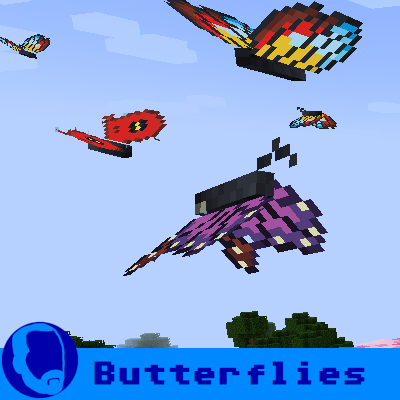
Bok's Banging Butterflies
This mod adds butterflies with a full life cycle to the world of Minecraft. Butterflies can be caught or released using a butterfly net. Once caught, they can be bottled and placed in the world as decorative objects.
 mod
mod CurseForge · Minecraft
Timber Tales | Dynamic Tree System 🪓
Timber Tales’ physics and mechanics make tree cutting feel more alive in Minecraft, turning simple woodcutting into a dynamic experience with trees that weaken, react, and fall in a satisfying, physics-inspired way.