Minecraft version
Back to mods 
CurseForge · Minecraft mod
Progression Locks
A mod that can restrict the player from doing WHAT EVER YOU WANT!
Choose a version Pick your version below, then grab the matching file.
Quick answer
Which Progression Locks release should I use?
Latest stable file progressionlocks-1.0.2.jar
Game version 1.21.1-Snapshot, 1.21.1
Loader NeoForge
Progression Locks progressionlocks-1.0.2.jar targets 1.21.1-Snapshot, 1.21.1 with NeoForge. The project page does not say whether this file belongs on the client, dedicated server, or both. No extra mods listed for this file.
Where it goes
Is Progression Locks required on the client, server, or both?
The project page does not say whether this file belongs on the client, dedicated server, or both.
Client Source doesn’t say
Dedicated server Source doesn’t say
Loader for this release NeoForge
Required install it here Optional supported, not mandatory Not supported do not install here Source doesn’t say do not assume
The source does not explicitly classify this release as client-only or server-only.
What else does Progression Locks progressionlocks-1.0.2.jar need?
progressionlocks-1.0.2.jar. Change the file and its required mods may change too.
This file does not list any required mods. Do not add a library just because a different file uses it.
This file does not list any required or optional mods.
Before you install it
Add Progression Locks without breaking your instance.
Built for Progression Locks progressionlocks-1.0.2.jar. Pick another file and the loader, install side or required mods may change.
- 01
Stick to this file
Use progressionlocks-1.0.2.jar. It targets 1.21.1-Snapshot, 1.21.1 with NeoForge; another release may have different loader, side or dependency requirements.
- 02
Bring the mods it needs
This file does not list any required mods. Do not add a library just because a different file uses it.
- 03
Put it on the correct side
The project page does not say whether this file belongs on the client, dedicated server, or both.
- 04
Pick the file you checked
Use the “Get this file” button beside progressionlocks-1.0.2.jar. It opens that exact file at the source.
About this project
What does Progression Locks add?
ProgressionLocks
ProgressionLocks is a progression-based restriction mod for Minecraft that lets modpack creators control when players gain access to specific items and item interactions.
Instead of simply locking recipes, ProgressionLocks can restrict what players are allowed to pick up, craft, hold, use, place, or insert into inventories until they have unlocked the required progression.
The mod also provides dedicated restrictions for Create, allowing modpack creators to control how items interact with Create's processing and automation systems.
when you want to see info about your locks, you can use "has" to see if its locked or unlocked
lock is what you use to lock the progression
and unlock is to well... unlock it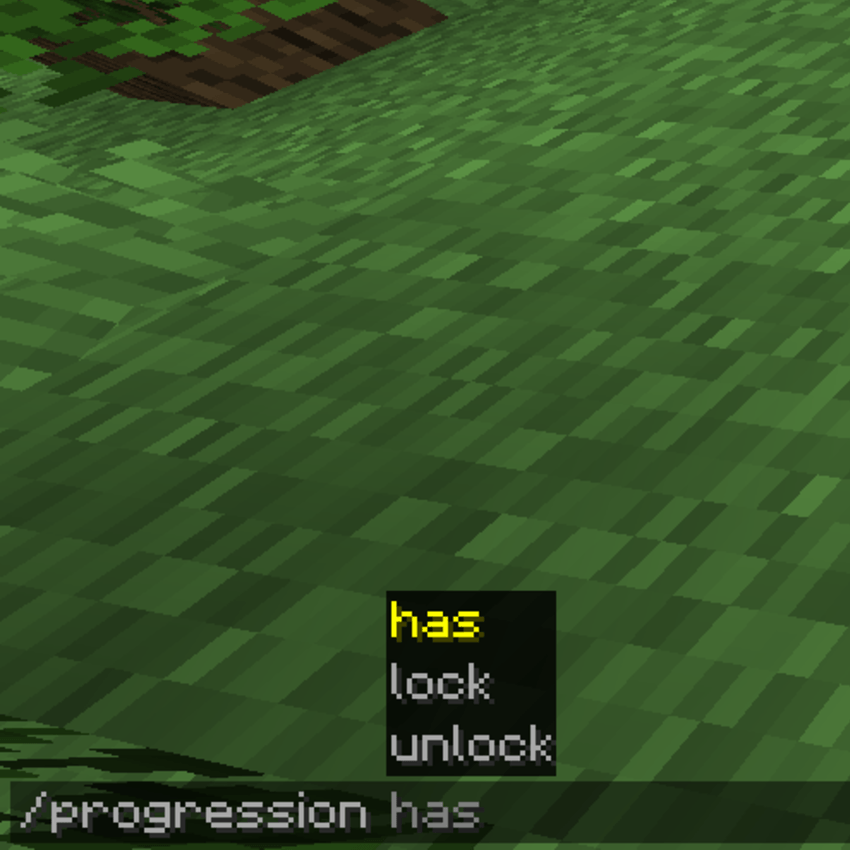
when you have loads of progressions in the game you can see the list of them like you normally would for any other command in mineraft
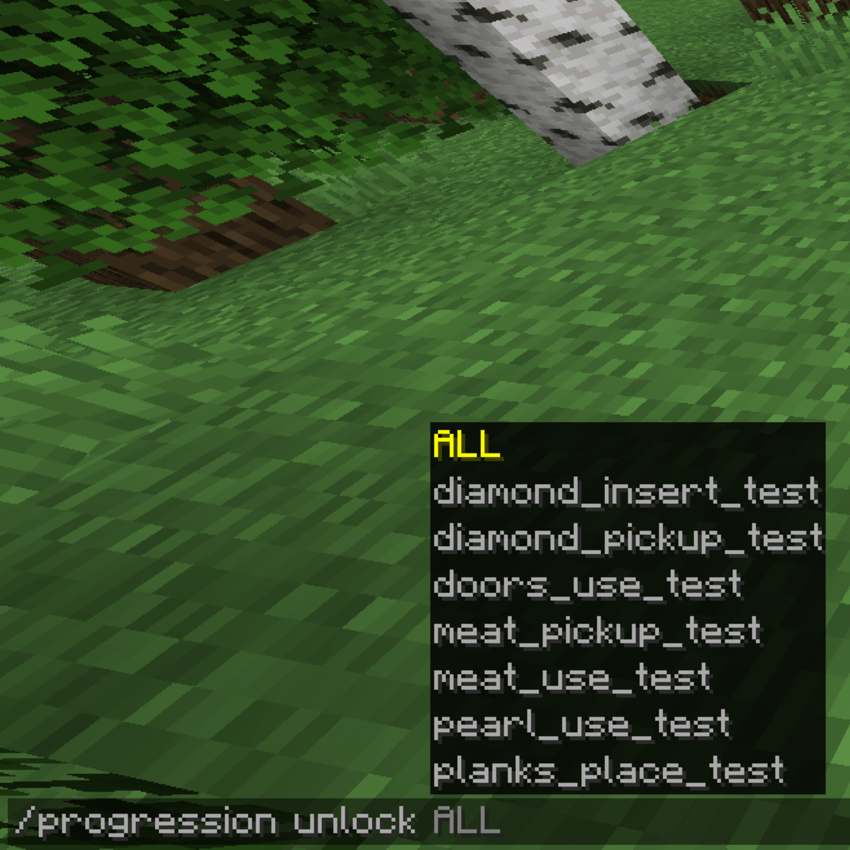
and you can code in any amount of restrictions you need, its all up to you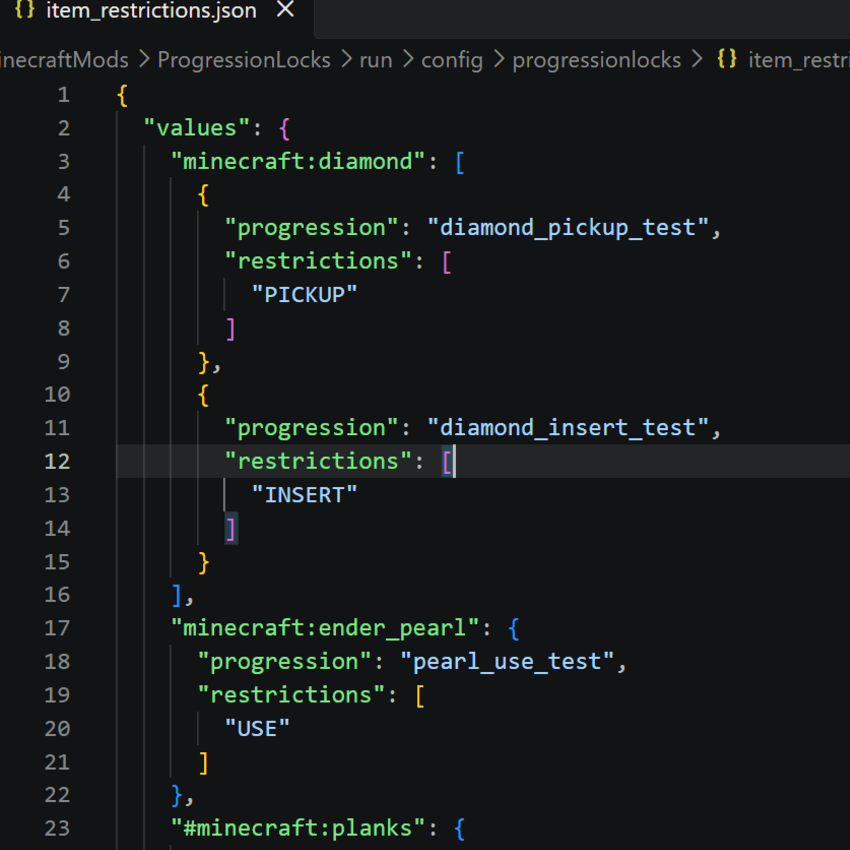
there is create mod restrictions also if you want to block the player from doing things with create mod. (check the images for examples)
Features
Lock items behind custom progression IDs.
Restrict item pickup, crafting, holding, using, placing, and inventory insertion.
Support for external inventories such as chests, barrels, furnaces, hoppers, shulker boxes, and modded containers.
Create-specific restrictions for:
Millstones
Mechanical Mixers
Crushing Wheels
Funnels
Brass Tunnels
Mechanical Arms
Fan processing
Blasting
Haunting
Smoking
Washing
Multiple restrictions can be applied to the same item.
Multiple progression entries can be configured for the same item.
Configuration is handled through a simple JSON file.
Automatically generates a documentation file explaining the available restriction types.
Designed with modpack progression and gated automation in mind.
How It Works
Items are assigned one or more restriction types and a progression ID through the configuration.
For example, an item could require a specific progression before it can be:
Picked up
Crafted
Held
Used
Placed
Inserted into an external inventory
Create items can additionally be restricted from specific processing methods or automation systems.
This allows modpack creators to build progression systems where obtaining an item does not necessarily mean the player can immediately use it everywhere.
Example Use Case
A modpack could allow players to obtain a particular item but prevent them from inserting it into machines until they have reached a later progression stage.
Another progression stage could unlock the ability to use the item, while a separate Create restriction could prevent the item from being processed through specific automation until an even later stage.
ProgressionLocks is intended to give modpack creators more control over how and when items become useful, rather than only controlling whether an item can be crafted.
Project description from CurseForge.
Pick your setup
Progression Locks by Minecraft version and loader
Choose the version and loader you play, then open the matching release.
Minecraft version
1.21.1
1 loader buildCheck the dependencies, then try the file in a copied instance before changing a world you care about.
Recent files
Progression Locks versions and loaders
progressionlocks-1.0.2.jar
6 Oct 2026
Client Source doesn’t say Server Source doesn’t say Dependencies No extras listed Listed on Release listing
Check the 1.21.1-Snapshot · NeoForge setup 1.21.1-Snapshot1.21.1NeoForge release
progressionlocks-1.0.1.jar
16 Sept 2026
Client Source doesn’t say Server Source doesn’t say Dependencies No extras listed Listed on Release listing
Check the 1.21.1-Snapshot · NeoForge setup 1.21.1-Snapshot1.21.1NeoForge release
progressionlocks-1.0.0.jar
13 Sept 2026
Client Source doesn’t say Server Source doesn’t say Dependencies No extras listed Listed on Release listing
Check the 1.21.1-Snapshot · NeoForge setup 1.21.1-Snapshot1.21.1NeoForge release
Looking for an older file? The official CurseForge project page is in Resources.
 mod
mod CurseForge · Minecraft
Create: Improve
This mod adds a series of features and tools that enhance the Create mod experience.
 mod
mod CurseForge + Modrinth · Minecraft
Electrodynamics
Electrodynamics is a Minecraft Mod focused around science and technology that introduces many new machines/blocks and items into the game.
 mod
mod CurseForge · Minecraft
Paper/Arrow Game Gamble Rigger
"Paper/Arrow Game Gamble Rigger" is a multi-purpose Minecraft mod made just for the Donut SMP, designed to secretly change dispenser drop rates so the host always wins.