Minecraft version
Back to mods 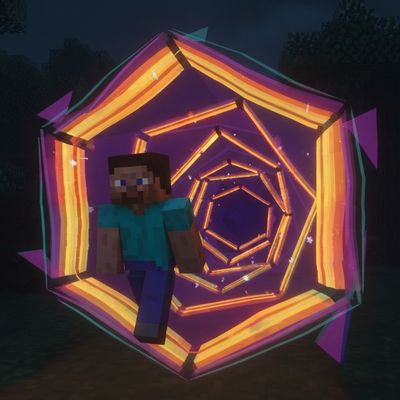
CurseForge · Minecraft mod
Spiderverse's Portals
Craft a dimensional wristwatch, save destinations, and travel through animated hexagonal portals within and across dimensions.
Choose a version Pick your version below, then grab the matching file.
Quick answer
Which Spiderverse's Portals release should I use?
Latest stable file sv-portals-0.2.0.jar
Game version 1.21.1
Loader Fabric
Spiderverse's Portals sv-portals-0.2.0.jar targets 1.21.1 with Fabric. The project page does not say whether this file belongs on the client, dedicated server, or both. No extra mods listed for this file.
Where it goes
Is Spiderverse's Portals required on the client, server, or both?
The project page does not say whether this file belongs on the client, dedicated server, or both.
Client Source doesn’t say
Dedicated server Source doesn’t say
Loader for this release Fabric
Required install it here Optional supported, not mandatory Not supported do not install here Source doesn’t say do not assume
The source does not explicitly classify this release as client-only or server-only.
What else does Spiderverse's Portals sv-portals-0.2.0.jar need?
sv-portals-0.2.0.jar. Change the file and its required mods may change too.
This file does not list any required mods. Do not add a library just because a different file uses it.
This file does not list any required or optional mods.
Before you install it
Add Spiderverse's Portals without breaking your instance.
Built for Spiderverse's Portals sv-portals-0.2.0.jar. Pick another file and the loader, install side or required mods may change.
- 01
Stick to this file
Use sv-portals-0.2.0.jar. It targets 1.21.1 with Fabric; another release may have different loader, side or dependency requirements.
- 02
Bring the mods it needs
This file does not list any required mods. Do not add a library just because a different file uses it.
- 03
Put it on the correct side
The project page does not say whether this file belongs on the client, dedicated server, or both.
- 04
Pick the file you checked
Use the “Get this file” button beside sv-portals-0.2.0.jar. It opens that exact file at the source.
About this project
What does Spiderverse's Portals add?
Your next destination is on your wrist.
Craft a dimensional wristwatch, save your favorite locations, and connect them with animated hexagonal portals.
Features
- Connected portals: travel in both directions, within the same dimension or between dimensions.
- Saved destinations: store up to 32 locations per player, including names, coordinates, and dimensions.
- Wearable wristwatch: equip it on your wrist and open it with a configurable key, without holding it in your hand.
- Reality distortion: adjustable distortion around portals and a dramatic visual transition.
Crafting recipes
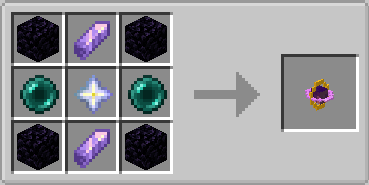
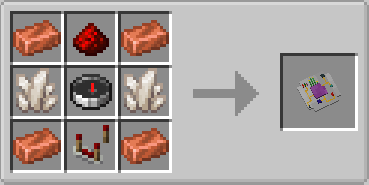
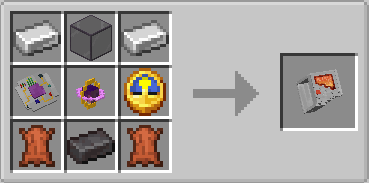
Getting Started
- Craft the dimensional watch.
- Right-click while holding it to equip it.
- Press G by default to open the watch.
- Name and save your current location.
- Select a destination and press the red switch to open a portal.
Both ends need solid ground and enough clear space to exit.
Requirements
- Minecraft Java 1.21.1
- Fabric Loader 0.19.5 or newer
- Fabric API
For multiplayer, install SV Portals and Fabric API on both the server and every client.
Optional Integrations
- Accessories: use its wrist slot to equip the watch.
- Mod Menu: configure distortion intensity and radius.
Default visual settings: 80% intensity and a 6-block radius.
Things that will be fixed
- Portals transport players only.
- Portals remain vertically oriented.
- Sounds currently use Minecraft sound events.
- Some limitations when saving by name.
- Errors when generating the portal if the player is looking in the wrong direction.
- The animations and the position of the watch will be adjusted.
Inspired by the visual style of Spider-Verse, with original models and effects.
This is an unofficial fan project and is not affiliated with Mojang, Microsoft, Marvel, or Sony Pictures.
Project description from CurseForge.
Pick your setup
Spiderverse's Portals by Minecraft version and loader
Choose the version and loader you play, then open the matching release.
Check the dependencies, then try the file in a copied instance before changing a world you care about.
Recent files
Spiderverse's Portals versions and loaders
sv-portals-0.2.0.jar
17 Sept 2026
Client Source doesn’t say Server Source doesn’t say Dependencies No extras listed Listed on Release listing
Check the 1.21.1 · Fabric setup Fabric1.21.1 release
sv-portals-0.1.0.jar
14 Sept 2026
Client Source doesn’t say Server Source doesn’t say Dependencies No extras listed Listed on Release listing
Check the 1.21.1 · Fabric setup Fabric1.21.1 release
Looking for an older file? The official CurseForge project page is in Resources.
 mod
mod CurseForge + Modrinth · Minecraft
Just Coordinates
Just Coordinates shows only XYZ coordinates on your screen — nothing more. Inspired by Bedrock Edition, designed for simplicity and beginners.
 mod
mod CurseForge · Minecraft
Ultimate Difficulty
Enhanced boss and minions
 mod
mod CurseForge · Minecraft
ZhouzhiZz's EmeraldCraft
Added some new uses to emerald. These might contribute to your improvement and make you stronger.