Minecraft version
Back to mods 
CurseForge · Minecraft mod
Liquidum
A dynamic liquid glass UI mod with real-time blur, refraction, lighting, and interactive glass effects
Choose a version Pick your version below, then grab the matching file.
Quick answer
Which Liquidum release should I use?
beta file liquidum-26.2-snapshot-2.jar
Game version 26.2
Loader Fabric
liquidum-26.2-snapshot-2.jar targets 26.2 with Fabric. The project page does not say whether this file belongs on the client, dedicated server, or both. No extra mods listed for this file.
Where it goes
Is Liquidum required on the client, server, or both?
The project page does not say whether this file belongs on the client, dedicated server, or both.
Client Source doesn’t say
Dedicated server Source doesn’t say
Loader for this release Fabric
Required install it here Optional supported, not mandatory Not supported do not install here Source doesn’t say do not assume
The source does not explicitly classify this release as client-only or server-only.
What else does liquidum-26.2-snapshot-2.jar need?
liquidum-26.2-snapshot-2.jar. Change the file and its required mods may change too.
This file does not list any required mods. Do not add a library just because a different file uses it.
This file does not list any required or optional mods.
Before you install it
Add Liquidum without breaking your instance.
Built for liquidum-26.2-snapshot-2.jar. Pick another file and the loader, install side or required mods may change.
- 01
Stick to this file
Use liquidum-26.2-snapshot-2.jar. It targets 26.2 with Fabric; another release may have different loader, side or dependency requirements.
- 02
Bring the mods it needs
This file does not list any required mods. Do not add a library just because a different file uses it.
- 03
Put it on the correct side
The project page does not say whether this file belongs on the client, dedicated server, or both.
- 04
Pick the file you checked
Use the “Get this file” button beside liquidum-26.2-snapshot-2.jar. It opens that exact file at the source.
About this project
What does Liquidum add?
Liquidum — liquid glass interfac
Turns the whole Minecraft interface into liquid glass: buttons, the hotbar and inventory slots become translucent glass that blurs and bends the world behind them, while your items and text stay perfectly sharp on top.
Each snapshot will be released every Wednesday - stay tuned for updates
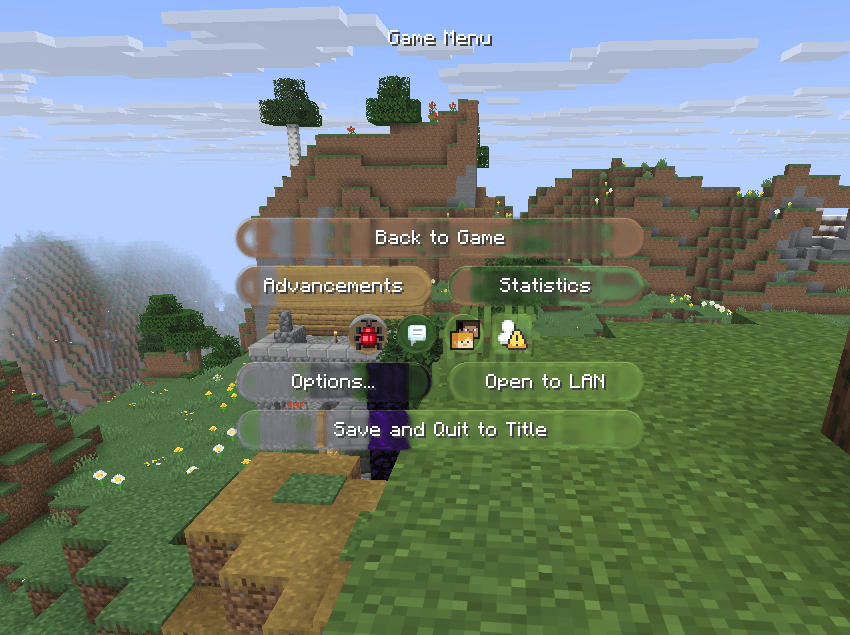
- Glass buttons, sliders and tabs with a soft glow that follows the mouse
- Glass hotbar with a gliding selection frame (shrinks into a Home strip in menus)
- Inventory and container slots as glossy recessed wells on one continuous surface
- Built-in Material Lab (F7): tune the glass live and save your own look
- Russian and English interface, switches automatically
Early beta — the look is still being polished, feedback and screenshots are welcome
Important:
- Do not set the Vulcan renderer just yet, because it crashes when it starts running.
- To restore the correct graphical display, go to the Lab (F7) and click the “Reset” button under “Style”
Project description from CurseForge.
Pick your setup
Liquidum by Minecraft version and loader
Choose the version and loader you play, then open the matching release.
Check the dependencies, then try the file in a copied instance before changing a world you care about.
Recent files
Liquidum versions and loaders
liquidum-26.2-snapshot-2.jar
23 Sept 2026
Client Source doesn’t say Server Source doesn’t say Dependencies No extras listed Listed on Release listing
Check the 26.2 · Fabric setup Fabric26.2 beta
liquidum-26.2-snapshot-1.jar
16 Sept 2026
Client Source doesn’t say Server Source doesn’t say Dependencies No extras listed Listed on Release listing
Check the 26.2 · Fabric setup Fabric26.2 beta
Looking for an older file? The official CurseForge project page is in Resources.
 mod
mod CurseForge + Modrinth · Minecraft
Ksyxis
Speed up your world loading by removing unneeded chunks.
 mod
mod CurseForge + Modrinth · Minecraft
Quick Shulker Multi
Quickly open shulker boxes(and more) without placing them down. Refactor by preprocessor
 mod
mod CurseForge · Minecraft
Parasites HUD
Parasite progress bar