Minecraft version
Back to mods 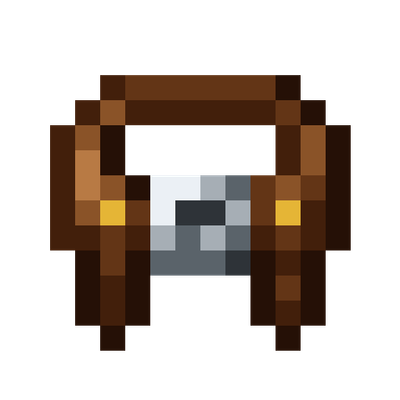
CurseForge · Minecraft mod
True Toolbelt
A toolbelt mod that stays somewhat true to vanilla
Choose a version Pick your version below, then grab the matching file.
Quick answer
Which True Toolbelt release should I use?
Latest stable file truetoolbelt-1.0.0.jar
Game version 1.21.1
Loader NeoForge
True Toolbelt truetoolbelt-1.0.0.jar targets 1.21.1 with NeoForge. The project page does not say whether this file belongs on the client, dedicated server, or both. No extra mods listed for this file.
Where it goes
Is True Toolbelt required on the client, server, or both?
The project page does not say whether this file belongs on the client, dedicated server, or both.
Client Source doesn’t say
Dedicated server Source doesn’t say
Loader for this release NeoForge
Required install it here Optional supported, not mandatory Not supported do not install here Source doesn’t say do not assume
The source does not explicitly classify this release as client-only or server-only.
What else does True Toolbelt truetoolbelt-1.0.0.jar need?
truetoolbelt-1.0.0.jar. Change the file and its required mods may change too.
This file does not list any required mods. Do not add a library just because a different file uses it.
This file does not list any required or optional mods.
Before you install it
Add True Toolbelt without breaking your instance.
Built for True Toolbelt truetoolbelt-1.0.0.jar. Pick another file and the loader, install side or required mods may change.
- 01
Stick to this file
Use truetoolbelt-1.0.0.jar. It targets 1.21.1 with NeoForge; another release may have different loader, side or dependency requirements.
- 02
Bring the mods it needs
This file does not list any required mods. Do not add a library just because a different file uses it.
- 03
Put it on the correct side
The project page does not say whether this file belongs on the client, dedicated server, or both.
- 04
Pick the file you checked
Use the “Get this file” button beside truetoolbelt-1.0.0.jar. It opens that exact file at the source.
About this project
What does True Toolbelt add?
- A clean, lightweight toolbelt that keeps your hotbar clutter-free without forcing you into clunky backpack menus.
- Carry your pickaxe, axe, shovel, and hoe all in a single hotbar slot that seamlessly adapts to whatever block you're looking at.
Features
- All Your Tools in One Slot:
- Your active tool sits directly in your hotbar, so mining speed, weapon damage, enchantments, and durability work 100% like vanilla.
- Smart Auto-Switching:
- Look at stone, and your pickaxe is in your hand. Look at wood, and your axe is ready. Look at dirt, and your shovel takes over. No scrolling needed.
- Manual Cycling (When You Want Control):
- Prefer manual control? Press R while holding your tool to cycle through your stowed tools on the fly.
- Press Shift + R anytime while hovering on the belt hotbar slot to toggle between Auto-Switch and Manual mode.
- Integrated Inventory Drawer:
- Equip your belt in your inventory, and a small toggle button lets you unfold your 4 tool slots (Pickaxe, Axe, Shovel, Hoe) whenever you want to add or swap tools. Close it to keep your screen clean.
- Put It Anywhere on Your Hotbar:
- Use the slider below your hotbar in your inventory to choose which slot your toolbelt uses. You can also swap it with other hotbar items simply by picking them up and clicking your belt slot.
- Lava & Drop Protection:
- Pressing Q is blocked while holding your tool so you never accidentally toss an enchanted pickaxe into lava. Press Ctrl + Q when you actually want to drop it.
Controls
| Key | Action |
|---|---|
| R | Cycle to the next stored tool (Manual Mode) |
| Shift + R | Toggle between Auto-Switch and Manual mode |
| Ctrl + Q | Drop the active tool into the world |
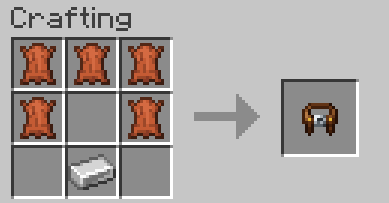
Crafting Recipe
Crafted with 5 Leather and 1 Iron Ingot:
How to Install
- Install NeoForge for Minecraft 1.21.1.
- Drop
truetoolbelt-0.1.0-alpha.jarinto your.minecraft/modsfolder. - Launch the game
Modpacks & Permissions
You are completely free to include True Toolbelt in any modpack on CurseForge and Modrinth.
Project description from CurseForge.
Pick your setup
True Toolbelt by Minecraft version and loader
Choose the version and loader you play, then open the matching release.
Check the dependencies, then try the file in a copied instance before changing a world you care about.
Recent files
True Toolbelt versions and loaders
truetoolbelt-1.0.0.jar
17 Sept 2026
Client Source doesn’t say Server Source doesn’t say Dependencies No extras listed Listed on Release listing
Check the 1.21.1 · NeoForge setup 1.21.1NeoForge release
Looking for an older file? The official CurseForge project page is in Resources.
 mod
mod CurseForge + Modrinth · Minecraft
EnchantmentDisabler
Disable enchantments you don't like, and nerf enchanting in multiple ways with an extensive configuration. Supports both vanilla and modded enchantments.
 mod
mod CurseForge + Modrinth · Minecraft
The Lead Age
A vanilla+ expansion that introduces lead ore, customizable leaded glass & more. Includes compatibility with Create & Farmer's Delight!
 mod
mod CurseForge · Minecraft
SpinCrates
A fully configurable crate/lootbox system: roulette reveal animation, weighted rarities, physical & virtual keys, opening cooldowns, periodic giveaways, and a built-in local web panel to manage everything — no external tools needed.