Minecraft version
Back to mods 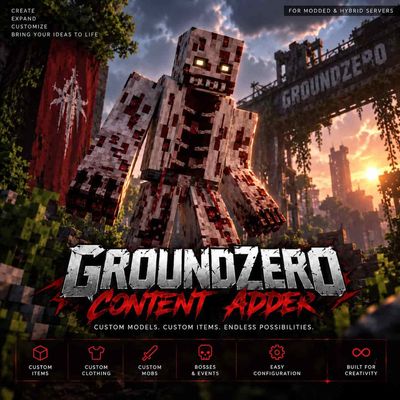
CurseForge · Minecraft mod
GroundZero's Content Adder
This mod allows you to add blockbench models and mobs (Just Drag and Drop)
Choose a version Pick your version below, then grab the matching file.
Quick answer
Which GroundZero's Content Adder release should I use?
Latest stable file GroundZeroContentAdder-1.20.1-0.9.6.jar
Game version 1.20.1
Loader Forge
GroundZero's Content Adder GroundZeroContentAdder-1.20.1-0.9.6.jar targets 1.20.1 with Forge. The project page does not say whether this file belongs on the client, dedicated server, or both. No extra mods listed for this file.
Where it goes
Is GroundZero's Content Adder required on the client, server, or both?
The project page does not say whether this file belongs on the client, dedicated server, or both.
Client Source doesn’t say
Dedicated server Source doesn’t say
Loader for this release Forge
Required install it here Optional supported, not mandatory Not supported do not install here Source doesn’t say do not assume
The source does not explicitly classify this release as client-only or server-only.
What else does GroundZero's Content Adder GroundZeroContentAdder-1.20.1-0.9.6.jar need?
GroundZeroContentAdder-1.20.1-0.9.6.jar. Change the file and its required mods may change too.
This file does not list any required mods. Do not add a library just because a different file uses it.
This file does not list any required or optional mods.
Before you install it
Add GroundZero's Content Adder without breaking your instance.
Built for GroundZero's Content Adder GroundZeroContentAdder-1.20.1-0.9.6.jar. Pick another file and the loader, install side or required mods may change.
- 01
Stick to this file
Use GroundZeroContentAdder-1.20.1-0.9.6.jar. It targets 1.20.1 with Forge; another release may have different loader, side or dependency requirements.
- 02
Bring the mods it needs
This file does not list any required mods. Do not add a library just because a different file uses it.
- 03
Put it on the correct side
The project page does not say whether this file belongs on the client, dedicated server, or both.
- 04
Pick the file you checked
Use the “Get this file” button beside GroundZeroContentAdder-1.20.1-0.9.6.jar. It opens that exact file at the source.
About this project
What does GroundZero's Content Adder add?
🧩 GroundZero Content Adder
Add custom Blockbench content to Minecraft without creating a new mod for every piece of content.
GroundZero Content Adder is a Minecraft 1.20.1 content framework originally developed for the GroundZero Hybrid Server. It allows custom Blockbench models, items, clothing and mobs to be added through one expandable system.
It works on normal Forge modded servers as well as Hybrid servers combining Forge with Bukkit/Spigot plugins.
🧱 Blockbench Content
Content Adder is designed around custom Blockbench models.
The framework can be used for:
⚔️ Custom items & tools
👕 Custom clothing
🧟 Custom mobs
👹 Custom bosses
🎨 Custom models & textures
🎬 Animations
💥 Custom attacks & abilities
⚙️ Configurable stats
The goal is to make adding future content increasingly drag-and-drop and configuration based.
➕ Adding Your Own Items
Custom content is separated into organized Content Adder folders so you don't need to modify the entire mod for every new item.
1. Create your model
Create your item/model in Blockbench and prepare its model and texture files.
2. Add the files
Place the exported model, textures and required Content Adder files into the appropriate Content Adder item folder on your installation/server.
Items, clothing and mobs are kept separately to make larger content packs easier to manage.
3. Configure the item
Create/edit the item's configuration and define its supported properties.
Depending on the content type, this can include things such as:
Name • Model • Texture • Damage • Protection • Effects • Durability • Other supported properties
This means you can rebalance supported content without recreating the entire model.
4. Load the content
Start/reload Content Adder so the new configuration is loaded.
Your registered content can then be tested in-game.
5. Test before publishing
Always test custom models, textures, animations and stats before distributing them to players.
Incorrect model paths or missing textures can prevent your custom content from displaying correctly.
⌨️ Commands
Content Adder includes administrative commands for managing and testing registered content.
Use the mod's help command in-game to see the commands available in your installed version.
These tools are intended for things such as:
Listing registered content
Testing custom items
Spawning registered mobs/bosses
Giving custom items
Reloading supported configuration
Development/testing
Commands require the appropriate server permissions.
⚠️ Command availability can change between Content Adder versions. Always use the help command from your installed build for the current command list.
👹 Content Included
Content Adder is not an empty framework.
The GroundZero release already comes with:
👹 2 custom bosses
⚔️ Custom items & tools
👕 Custom clothing
🎨 Custom Blockbench models
🎬 Boss animations
💥 Custom attacks & abilities
🔥 Multi-stage boss mechanics
🎁 Custom content/rewards
The included content can be used immediately while the framework can also be expanded with your own creations.
🔗 Hybrid Server Support
Content Adder works in a normal Forge environment but was specifically created with Hybrid servers in mind.
On GroundZero, modded content can be combined with the plugin side of the server.
This makes it possible to build experiences such as:
Custom Boss → Server Event → Plugin/Skript Logic → Rewards & Progression
This opens the door for custom content to interact with server systems such as events, quests, economy, jobs and progression instead of existing as isolated mod content.
🚧 Development
Content Adder was originally created specifically for GroundZero and is still actively being expanded.
My goal is to make importing custom Blockbench content increasingly simple, eventually allowing server owners to add much of their custom content through models + textures + configuration instead of developing separate Forge mods.
🧩 GroundZero Content Adder
Create. Configure. Add. Expand.
Project description from CurseForge.
Pick your setup
GroundZero's Content Adder by Minecraft version and loader
Choose the version and loader you play, then open the matching release.
Check the dependencies, then try the file in a copied instance before changing a world you care about.
Recent files
GroundZero's Content Adder versions and loaders
GroundZeroContentAdder-1.20.1-0.9.6.jar
GroundZeroContentAdder-1.20.1-0.9.6-build146.jar
2 Oct 2026
Client Source doesn’t say Server Source doesn’t say Dependencies No extras listed Listed on Release listing
Check the 1.20.1 · Forge setup 1.20.1Forge release
GroundZeroContentAdder-1.20.1-0.7.3.jar
18 Sept 2026
Client Source doesn’t say Server Source doesn’t say Dependencies No extras listed Listed on Release listing
Check the 1.20.1 · Forge setup 1.20.1Forge release
GroundZeroContentAdder-1.20.1-0.7.1.jar
17 Sept 2026
Client Source doesn’t say Server Source doesn’t say Dependencies No extras listed Listed on Release listing
Check the 1.20.1 · Forge setup 1.20.1Forge release
Looking for an older file? The official CurseForge project page is in Resources.