Minecraft version
Back to mods 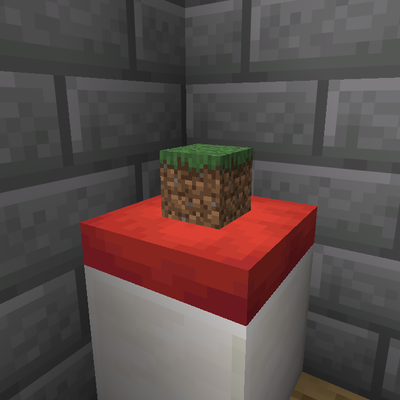
CurseForge · Minecraft mod
Cushion Display
Display items on cushions
Choose a version Pick your version below, then grab the matching file.
Quick answer
Which Cushion Display release should I use?
Latest stable file Cushion_Display-fabric-26.3-1.0.0.jar
Game version 26.3
Loader Fabric
Cushion Display Cushion_Display-fabric-26.3-1.0.0.jar targets 26.3 with Fabric. The project page does not say whether this file belongs on the client, dedicated server, or both. No extra mods listed for this file.
Where it goes
Is Cushion Display required on the client, server, or both?
The project page does not say whether this file belongs on the client, dedicated server, or both.
Client Source doesn’t say
Dedicated server Source doesn’t say
Loader for this release Fabric
Required install it here Optional supported, not mandatory Not supported do not install here Source doesn’t say do not assume
The source does not explicitly classify this release as client-only or server-only.
What else does Cushion Display Cushion_Display-fabric-26.3-1.0.0.jar need?
Cushion_Display-fabric-26.3-1.0.0.jar. Change the file and its required mods may change too.
This file does not list any required mods. Do not add a library just because a different file uses it.
This file does not list any required or optional mods.
Before you install it
Add Cushion Display without breaking your instance.
Built for Cushion Display Cushion_Display-fabric-26.3-1.0.0.jar. Pick another file and the loader, install side or required mods may change.
- 01
Stick to this file
Use Cushion_Display-fabric-26.3-1.0.0.jar. It targets 26.3 with Fabric; another release may have different loader, side or dependency requirements.
- 02
Bring the mods it needs
This file does not list any required mods. Do not add a library just because a different file uses it.
- 03
Put it on the correct side
The project page does not say whether this file belongs on the client, dedicated server, or both.
- 04
Pick the file you checked
Use the “Get this file” button beside Cushion_Display-fabric-26.3-1.0.0.jar. It opens that exact file at the source.
About this project
What does Cushion Display add?
Cushion Display
Cushions were made for sitting. Now they're made for showing off too. Put a book on the reading nook, an apple on the kitchen bench, a sword on the throne cushion — any item, resting right on top of any cushion.
Works on NeoForge and Fabric, for Minecraft 26.3.
Sneak + right-click. That's the whole mod.
| In your hand | On the cushion | Sneak + right-click |
|---|---|---|
| An item | Nothing | Puts one of it on the cushion |
| Nothing | An item | Takes it back into your hand |
| An item | An item | Swaps them |
A normal right-click still does what it always did: you sit down. Sit on a cushion that's holding something and the item politely hides while you're there, then reappears when you stand up.
In creative mode, placing an item doesn't use it up.
It looks like it belongs there
Flat items lie flat on the fabric: apples, books, maps, swords.
Blocks stand upright, shrunk down to a little ornament: a furnace, a chest, a log.
Items turn with the cushion, so a row of cushions stays neat and tidy.
Items rest exactly on the cushion's surface, wherever the cushion is: on the floor, on a slab, on snow, on stairs.
One item per cushion.
Nothing gets lost
Break the cushion and its item drops alongside it: punching it, removing the block underneath, fire, lava, lightning, explosions, pistons.
Stacked cushions? Sneak + right-click always acts on the top one, and the item always sits on top. Add a cushion above an occupied one and the item moves up; break the top cushion and its item drops.
Just like item frames, nothing drops when a creative player breaks the cushion, or when the
entity_dropsgame rule is off.Items are saved with the world and keep everything: enchantments, custom names, all of it.
Multiplayer ready
Everyone sees the same thing, instantly — including players who join later.
Adventure mode and spawn protection are respected: if you can't break the cushion, you can't change its item.
Install it on both the server and the clients. Clients without the mod get a clear message telling them to install it, instead of a cryptic error. A client with the mod can still join servers without it.
Details
No new blocks, items or entities. It works on the vanilla cushion, and no hidden entities are spawned to display items.
No dependencies on NeoForge. Fabric needs Fabric API, as usual.
Want to use the item instead? Look away from the cushion: sneak + right-click while aiming at a cushion always places the item.
A world moved between Fabric and NeoForge keeps its cushions, but not the items on them (each loader stores that data its own way).
A SaturnX Studios (STXS) mod.
Project description from CurseForge.
Pick your setup
Cushion Display by Minecraft version and loader
Choose the version and loader you play, then open the matching release.
Check the dependencies, then try the file in a copied instance before changing a world you care about.
Recent files
Cushion Display versions and loaders
Cushion_Display-fabric-26.3-1.0.0.jar
17 Sept 2026
Client Source doesn’t say Server Source doesn’t say Dependencies No extras listed Listed on Release listing
Check the 26.3 · Fabric setup Fabric26.3 release
Cushion_Display-neoforge-26.3-1.0.0.jar
17 Sept 2026
Client Source doesn’t say Server Source doesn’t say Dependencies No extras listed Listed on Release listing
Check the 26.3 · NeoForge setup NeoForge26.3 release
Looking for an older file? The official CurseForge project page is in Resources.
 mod
CurseForge + Modrinth · Minecraft
LDLib
LDLib is a libarary mod for custom rendering, modular gui.
 mod
CurseForge · Minecraft
Leshy - heart of nature
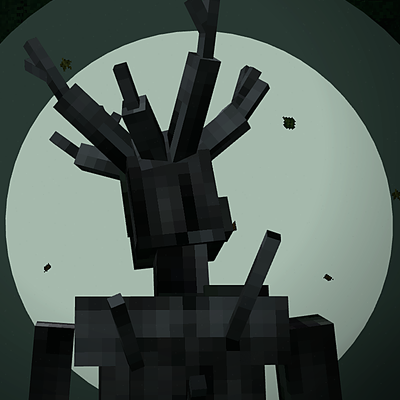
A silent forest spirit, an ancient ritual and a lost explorer's journal. The first chapter of a medieval world of creatures.
 mod
CurseForge · Minecraft
Minekea (Fabric/NeoForge)
Bookshelves, crates, secret doors, and more! Simple, functional, decorative blocks for all your building and storage needs (some assembly required)