Minecraft version
Back to mods 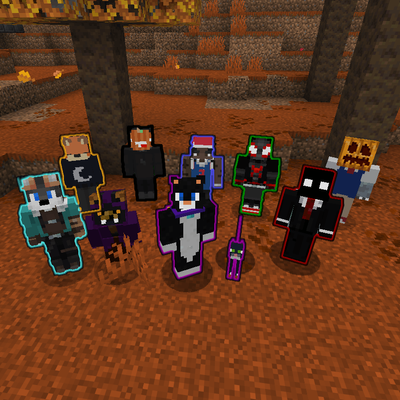
CurseForge · Minecraft mod
Chromaglow
Automatically grants every player and pet a glowing effect, allowing them to customize their outline color and auto-hide it using contextual settings.
Choose a version Pick your version below, then grab the matching file.
Quick answer
Which Chromaglow release matches 26.3 Forge?
Best match for your filters v1.1.0
Game version 1.21, 1.21.8, 1.21.5
Loader Fabric, Forge, NeoForge
Chromaglow v1.1.0 targets 1.21, 1.21.8, 1.21.5 with Fabric, Forge, NeoForge. The project page does not say whether this file belongs on the client, dedicated server, or both. No extra mods listed for this file.
Where it goes
Is Chromaglow required on the client, server, or both?
The project page does not say whether this file belongs on the client, dedicated server, or both.
Client Source doesn’t say
Dedicated server Source doesn’t say
Loader for this release Fabric, Forge, NeoForge
Required install it here Optional supported, not mandatory Not supported do not install here Source doesn’t say do not assume
The source does not explicitly classify this release as client-only or server-only.
What else does Chromaglow v1.1.0 need?
v1.1.0 on 26.3 Forge. Every mod below is checked against that same setup.
This file does not list any required mods. Do not add a library just because a different file uses it.
This file does not list any required or optional mods.
Before you install it
Add Chromaglow without breaking your instance.
Built for Chromaglow v1.1.0 on 26.3 Forge. Pick another file and the loader, install side or required mods may change.
- 01
Stick to this file
Use v1.1.0. It targets 1.21, 1.21.8, 1.21.5 with Fabric, Forge, NeoForge; another release may have different loader, side or dependency requirements.
- 02
Bring the mods it needs
This file does not list any required mods. Do not add a library just because a different file uses it.
- 03
Put it on the correct side
The project page does not say whether this file belongs on the client, dedicated server, or both.
- 04
Pick the file you checked
Use the “Get this file” button beside v1.1.0. It opens that exact file at the source.
About this project
What does Chromaglow add?
Chromaglow
What it does
Chromaglow automatically gives players and their owned pets a glowing outline and lets players customize how it behaves. Player outlines can use Chromaglow team colors, while pets can either follow their owner's color or use their collar color.
Glowing can also be hidden automatically in different situations, with personal settings available through /trigger chromaglow and global controls available to server admins.
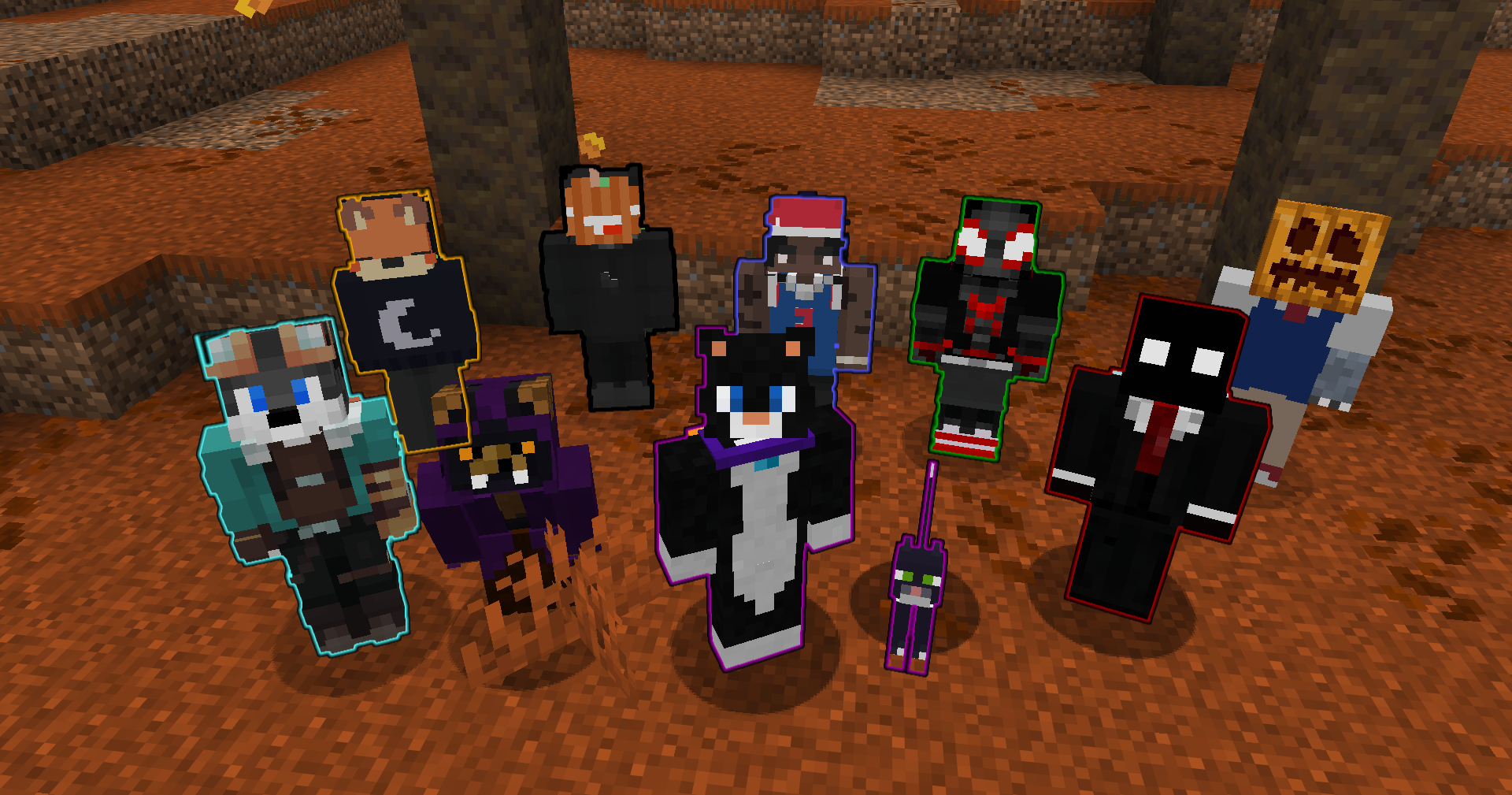
Personal Menu
Run /trigger chromaglow to open your personal menu.
- Colors: Choose from Chromaglow's color teams to change your glowing outline color.
- Player Settings: Choose whether you glow and when your Glowing is hidden.
- Pet Settings: Choose whether your pets glow, when their Glowing is automatically hidden, and where their color comes from.
Personal choices follow the server's global defaults unless overridden, and server admins can force individual settings when needed.
Player Glowing
Players can configure whether Chromaglow applies Glowing and whether it should be hidden in specific situations:
- Crouching: Hide Glowing while sneaking.
- Invisibility: Hide Glowing while under the Invisibility effect.
- Disguises: Hide Glowing while wearing an item from
#chromaglow:disguisesin an armor slot.
These settings can be changed personally unless they are forced by the server configuration.
Pet Glowing
Chromaglow can also automatically apply Glowing to owned pets.
Players can configure:
- Glow Pets: Enable or disable Glowing for their pets.
- Auto Hide: Choose whether pet Glowing is hidden while Sitting, while Standing, or Never automatically hidden.
- Pet Color: Use either the Owner's Chromaglow team color or the pet's Collar color when available.
By default, pets glow using their owner's color and automatically hide their Glowing while sitting.
Customization
Use /function chromaglow:_config to configure global server settings.
Server admins can:
- Control whether players and pets glow by default.
- Force individual player and pet settings.
- Configure contextual player hiding rules.
- Configure pet auto-hide behavior and color source.
- Require the
chromaglow.glowingtag separately for players and pets. - Choose which personal menu categories players can access.
Each setting can be reset individually, while groups and the entire configuration can also be restored to their defaults.
Uninstallation
Use /function chromaglow:uninstall to remove Chromaglow's persistent data before removing the datapack.
What's Next
In a future update I plan to expand glowing granting to other entities by interacting with an item.
Project description from CurseForge.
Pick your setup
Chromaglow by Minecraft version and loader
Choose the version and loader you play, then open the matching release.
Minecraft version
26.2
4 loader buildsMinecraft version
26.1.2
4 loader buildsMinecraft version
26.1.1
4 loader buildsMinecraft version
26.1
4 loader buildsMinecraft version
1.21.11
4 loader buildsMinecraft version
1.21.10
4 loader buildsMinecraft version
1.21.9
4 loader buildsMinecraft version
1.21.8
4 loader buildsMinecraft version
1.21.7
4 loader buildsMinecraft version
1.21.6
4 loader buildsMinecraft version
1.21.5
4 loader buildsShowing the newest 12 of 17 game versions. Older files are in the list below.
Check the dependencies, then try the file in a copied instance before changing a world you care about.
Recent files
Chromaglow versions and loaders
v1.1.0
chromaglow-1.1.0.jar
18 Sept 2026
Client Source doesn’t say Server Source doesn’t say Dependencies No extras listed Listed on Release listing
Check the 26.3 · Forge setup 1.21Fabric1.21.81.21.5 release
Looking for an older file? The official CurseForge project page is in Resources.
 mod
CurseForge · Minecraft
Realistic Walkie-Talkie
Tango-Oscar-November-India; Walkie-talkies for Simple Voice Chat: tune a frequency and talk to everyone on it, with radio sound, beeps, signal bars and a clean HUD.
 mod
CurseForge · Minecraft
Mob Senses: Mobs Hear Sound, Guns, Light & Voice Chat
Mobs hear steps, blocks, TaCZ gunshots (with suppressors!) & Simple Voice Chat through walls, see torchlight and smell blood trails. Zombie awareness, stealth & horror survival for Forge, NeoForge, Fabric & Paper.
 mod
CurseForge · Minecraft
Better UX
Better User Experience, health bar, hunger bar, no more fire all over the screen, customize the HUD how ever you like and more.