Minecraft version
Back to mods 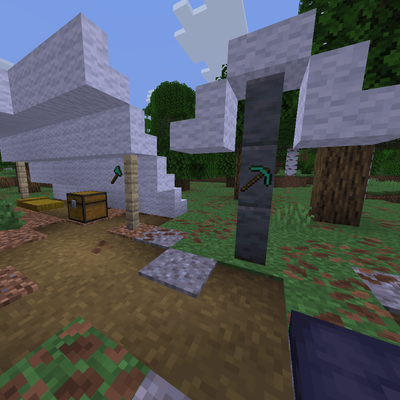
CurseForge · Minecraft mod
Restate
Instantly dye or bleach placed blocks, and strip fences and walls connections.
Choose a version Pick your version below, then grab the matching file.
Quick answer
Which Restate release matches 26.3?
Best match for your filters restate-1.0.4.jar
Game version 26.3
Loader Fabric, Forge, NeoForge
restate-1.0.4.jar targets 26.3 with Fabric, Forge, NeoForge. The project page does not say whether this file belongs on the client, dedicated server, or both. No extra mods listed for this file.
Where it goes
Is Restate required on the client, server, or both?
The project page does not say whether this file belongs on the client, dedicated server, or both.
Client Source doesn’t say
Dedicated server Source doesn’t say
Loader for this release Fabric, Forge, NeoForge
Required install it here Optional supported, not mandatory Not supported do not install here Source doesn’t say do not assume
The source does not explicitly classify this release as client-only or server-only.
What else does restate-1.0.4.jar need?
restate-1.0.4.jar on 26.3. Every mod below is checked against that same setup.
This file does not list any required mods. Do not add a library just because a different file uses it.
This file does not list any required or optional mods.
Before you install it
Add Restate without breaking your instance.
Built for restate-1.0.4.jar on 26.3. Pick another file and the loader, install side or required mods may change.
- 01
Stick to this file
Use restate-1.0.4.jar. It targets 26.3 with Fabric, Forge, NeoForge; another release may have different loader, side or dependency requirements.
- 02
Bring the mods it needs
This file does not list any required mods. Do not add a library just because a different file uses it.
- 03
Put it on the correct side
The project page does not say whether this file belongs on the client, dedicated server, or both.
- 04
Pick the file you checked
Use the “Get this file” button beside restate-1.0.4.jar. It opens that exact file at the source.
About this project
What does Restate add?
Restate
What it does
Restate uses the latest block_transformer component added in 26.3 to allow you to instantly dye or bleach placed blocks, and strip fences and walls connections.
- Dyeing and Bleaching: Right-click placed colored blocks with any dye to change their color. Use a piece of paper to instantly bleach them back to their original white or clear color.
- Fence and Wall Stripping: Use an axe to strip all wooden fences' connections. Or use a pickaxe to do the same for walls.
- Auto-Replanting Harvester: Hoes are upgraded with harvester functionality. Right-click wheat, carrots, potatoes, or beetroots to harvest and automatically replant them.
Compatibility
This data pack is not guaranteed to be compatible with mods or other data packs that modify the same item interactions. Restate adds custom block_transformer components to tools and related items, so any pack that changes those items may conflict with it.
Uninstallation
If you ever need to remove the datapack, run /function restate:uninstall to revoke its advancements and access the optional item cleanup.
Note: Item cleanup only scans direct slots belonging to online players. It does not scan offline players, containers, nested items, or dropped items.
Project description from CurseForge.
Pick your setup
Restate by Minecraft version and loader
Choose the version and loader you play, then open the matching release.
Check the dependencies, then try the file in a copied instance before changing a world you care about.
Recent files
Restate versions and loaders
restate-1.0.4.jar
18 Sept 2026
Client Source doesn’t say Server Source doesn’t say Dependencies No extras listed Listed on Release listing
Check the 26.3 · Fabric setup FabricForgeNeoForgeQuilt release
Looking for an older file? The official CurseForge project page is in Resources.
 mod
CurseForge + Modrinth · Minecraft
World Portal
Create custom world portal to travel between dimensions.
 mod
CurseForge · Minecraft
Quick Drop
Drop every item of the same type from your hotbar and inventory at once with one key combo (Ctrl + Shift + Q). Fully configurable, client-side only.
 mod
CurseForge · Minecraft
Traveler's Lantern
Hang a lantern on your belt: it lights your way hands-free with smooth moving light and swings as you move. Works client-only on any server.