
Minecraft version
Back to mods 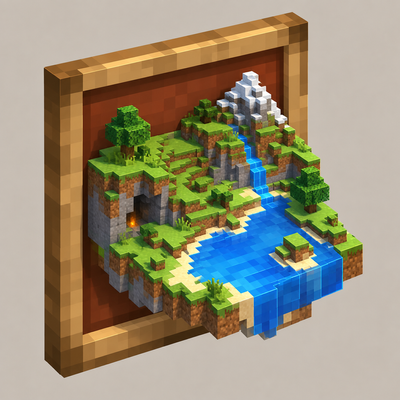
CurseForge · Minecraft mod
Frames Map 3D
Renders the terrain around framed maps in real 3D — an authorized NeoForge 1.21.1 port of 3D Maps.
Choose a version Pick your version below, then grab the matching file.
Quick answer
Which Frames Map 3D release matches 26.3 Forge?
beta file Frames Map 3D (0.0.0-beta.1)
Game version 26.3
Loader Forge
Frames Map 3D (0.0.0-beta.1) targets 26.3 with Forge. The project page does not say whether this file belongs on the client, dedicated server, or both. No extra mods listed for this file.
Where it goes
Is Frames Map 3D required on the client, server, or both?
The project page does not say whether this file belongs on the client, dedicated server, or both.
Client Source doesn’t say
Dedicated server Source doesn’t say
Loader for this release Forge
Required install it here Optional supported, not mandatory Not supported do not install here Source doesn’t say do not assume
The source does not explicitly classify this release as client-only or server-only.
What else does Frames Map 3D (0.0.0-beta.1) need?
Frames Map 3D (0.0.0-beta.1) on 26.3 Forge. Every mod below is checked against that same setup.
This file does not list any required mods. Do not add a library just because a different file uses it.
This file does not list any required or optional mods.
Before you install it
Add Frames Map 3D without breaking your instance.
Built for Frames Map 3D (0.0.0-beta.1) on 26.3 Forge. Pick another file and the loader, install side or required mods may change.
- 01
Stick to this file
Use Frames Map 3D (0.0.0-beta.1). It targets 26.3 with Forge; another release may have different loader, side or dependency requirements.
- 02
Bring the mods it needs
This file does not list any required mods. Do not add a library just because a different file uses it.
- 03
Put it on the correct side
The project page does not say whether this file belongs on the client, dedicated server, or both.
- 04
Pick the file you checked
Use the “Get this file” button beside Frames Map 3D (0.0.0-beta.1). It opens that exact file at the source.
About this project
What does Frames Map 3D add?
🗺️ Frames Map 3D
Maps in item frames render the surrounding terrain in three dimensions, right in front of you. 


✨ Overview
| Frames Map 3D turns a plain framed map into a miniature diorama of the land it was drawn on. Instead of a flat, painted square, the map's surroundings rise and fall in real 3D — hills bulge out of the frame, water sits at its own depth, and the level of detail scales smoothly with how far away you're standing. Rotate a framed map or hang several side by side and the terrain lines up seamlessly across frames, just like the vanilla map itself already does. An authorized Fabric, Forge and NeoForge port of 3D Maps by rainbowtwister7777 (originally a Fabric mod), ported by Stalking Dragons with the original author's explicit permission. The rendering pipeline was rebuilt from scratch against the actual APIs of each supported Minecraft version (1.21.1, 26.1.2, 26.2 and 26.3), while keeping the same look and behavior. Not affiliated with or endorsed by the original author beyond that permission. |
 |
|---|
🎯 Features
🏔 3D terrain in every framed map
Once a map has been walked (or captured server-side) and placed in an item frame, its surroundings are rendered as real 3D geometry — not a flat texture — using the map's own color data, so it always matches what the map shows.
🌊 Distance-based level of detail
Mesh detail scales down automatically the further away the camera is, keeping framed maps cheap to render even when several are visible at once. The aggressiveness of this scaling is configurable from the in-game settings screen.
🏖️ Seamless multi-frame terrain
Adjacent framed maps that belong to the same terrain line up their edges, including water edges, so a wall of framed maps reads as one continuous landscape instead of separate tiles.
⚙️ In-game settings
A settings button next to Video Settings opens a dedicated screen for the mod's client-side options (level-of-detail aggressiveness, enable/disable 3D rendering). Each framed map also has its own per-frame settings (3D on/off, base height) reachable from the map itself.
🏠 Shader-pack aware
Detects when Iris is rendering a shadow pass and skips the 3D mesh for that pass, avoiding double-darkened or duplicated geometry under shader packs.
🌐 Translated
Available in 12 languages: English, Spanish (Spain and Mexico), Portuguese (Brazil), French, German, Italian, Russian, Polish, Japanese, Korean, Simplified Chinese and Traditional Chinese.
🧱 Mod Structure
| Area | What it provides |
|---|---|
Map3DVolume / Map3DSavedData |
Server-side capture and persistent storage of the 3D terrain data around a map. |
Map3DServer / FramedMapServer |
Capture scheduling and item-frame interaction handling (rotate, open settings). |
Map3DMesh / Map3DRenderTypes |
Client-side mesh building and the custom render pipeline used to draw it. |
ItemFrameMixin / ItemFrameRendererMixin / MapRendererMixin |
Hook the vanilla item frame and map renderer to swap in the 3D mesh when available. |
FramedMapSettingsScreen / Map3DSettingsScreen |
Per-frame and global settings UI. |
📋 Requirements
| Minecraft | Loader | Loader version | Java | Mod version | Status |
|---|---|---|---|---|---|
| 1.21.1 | NeoForge | 21.1.259+ | 21 | 1.0.15 |
Release |
| 1.21.1 | Forge | 52.1.21+ | 21 | 0.0.0-beta.1 |
Beta |
| 1.21.1 | Fabric | Loader 0.19.5+ / API 0.116.17+ | 21 | 0.0.0-beta.1 |
Beta |
| 26.1.2 | NeoForge | 26.1.2.78+ | 25 | 0.0.0-beta.2 |
Beta |
| 26.1.2 | Forge | 64.1.4+ | 25 | 0.0.0-beta.2 |
Beta |
| 26.1.2 | Fabric | Loader 0.19.5+ / API 0.155.3+ | 25 | 0.0.0-beta.2 |
Beta |
| 26.2 | NeoForge | 26.2.0.57+ | 25 | 0.0.0-beta.1 |
Beta |
| 26.2 | Forge | 65.1.4+ | 25 | 0.0.0-beta.1 |
Beta |
| 26.2 | Fabric | Loader 0.19.5+ / API 0.161.0+ | 25 | 0.0.0-beta.1 |
Beta |
| 26.3 | NeoForge | 26.3.0.26-beta+ | 25 | 0.0.0-beta.1 |
Beta |
| 26.3 | Forge | 66.0.11+ | 25 | 0.0.0-beta.1 |
Beta |
| 26.3 | Fabric | Loader 0.19.5+ / API 0.161.0+ | 25 | 0.0.0-beta.1 |
Beta |
All builds share this CurseForge project. Pick the file that matches your Minecraft version and mod loader — the features and settings are the same on every loader. Fabric builds also require Fabric API. Beta builds compile but have not been tested in game yet.
| Dependencies | None (Fabric builds: Fabric API) |
|---|---|
| Side | Client and Server (required on both for 3D rendering to work; safe to run server-only, clients without it just see the flat vanilla map) |
🎮 How to Use
- Install a supported mod loader (Fabric, Forge or NeoForge) for your Minecraft version — see the table above — plus Fabric API if you use Fabric.
- Place Frames Map 3D in the
modsfolder. Multiplayer is client-optional: install it on the server to capture terrain, and on any client that should see the 3D relief — clients without it can still join and just see the flat vanilla map. - Fill in a map and place it in an item frame. Give the terrain a moment to be captured, and it will render in 3D automatically.
- Open the map's per-frame settings from the map itself, or the global settings from Options → the button next to Video Settings.
🙏 Credits & License
Frames Map 3D is an authorized Fabric, Forge and NeoForge port of 3D Maps by rainbowtwister7777 (Fabric), ported by Stalking Dragons with the original author's explicit permission to fork and port the mod. Not affiliated with or endorsed by the original author beyond that permission. License: MIT (this port); 3D Maps itself is All Rights Reserved by its author, and this port is published with the original author's explicit permission to fork and port it. The complete corresponding source is published at gitlab.com/stalking-dragons/minecraft/frames-map-3d. The full licence text ships in the jar (META-INF/LICENSE) and in the repository LICENSE/NOTICE files.
https://codex.skdragons.com/
Codex Stalking Dragons — Minecraft Modding
Project description from CurseForge.
Pick your setup
Frames Map 3D by Minecraft version and loader
Choose the version and loader you play, then open the matching release.
Minecraft version
26.2
3 loader buildsMinecraft version
26.1.2
3 loader buildsMinecraft version
1.21.1
3 loader buildsCheck the dependencies, then try the file in a copied instance before changing a world you care about.
Recent files
Frames Map 3D versions and loaders
Frames Map 3D (0.0.0-beta.1)
frames_map_3d-26.3-forge-66.0.11-0.0.0-beta.1.jar
18 Nov 2026
Client Source doesn’t say Server Source doesn’t say Dependencies No extras listed Listed on Release listing
Check the 26.3 · Forge setup Forge26.3 beta
Looking for an older file? The official CurseForge project page is in Resources.
 mod
CurseForge · Minecraft
Wild Reaches
Nature and exploration expansion: new biomes, 30+ flowers, four wood types, butterflies, baskets and wicker crafts. A Forge 1.21.1 port of Terra Incognita. Requires TerraBlender.
 mod
CurseForge · Minecraft
AppleStats :timmer+ AppleSkin+ Jade +GUI Clock+Coordinates+Horse Stat
HUD:A lightweight Jade alternative ,effect timmer ,Target Info,Saturation and Coordinates Monitor ,Waila,HWYLA,show Horse speed and jump stats,death location,Death Finder
 mod
CurseForge · Minecraft
Chat Items: Show Items, Inventory & Ender Chest in Chat
Type [item], [armor], [inv] or [ender] in chat to link held items, armor, Shulker Boxes, Bundles, inventory & Ender chest. Server-side — vanilla clients supported!