Minecraft version
Back to mods 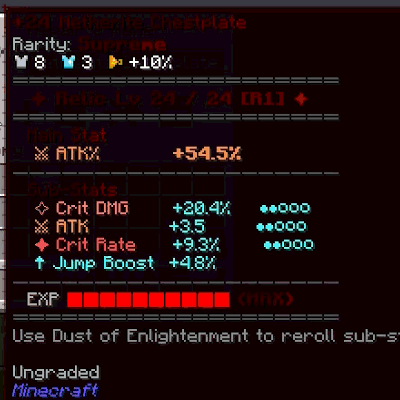
CurseForge · Minecraft mod
Sols Simply Tooptips Fix
Disables Simply Tooltips entirely, restoring plain vanilla item tooltips for every item.
Choose a version Pick your version below, then grab the matching file.
Quick answer
Which Sols Simply Tooptips Fix release should I use?
Latest stable file sols_simplytooltips_fix-1.3.2.jar
Game version 1.20.1
Loader Forge
Sols Simply Tooptips Fix sols_simplytooltips_fix-1.3.2.jar targets 1.20.1 with Forge. The project page does not say whether this file belongs on the client, dedicated server, or both. No extra mods listed for this file.
Where it goes
Is Sols Simply Tooptips Fix required on the client, server, or both?
The project page does not say whether this file belongs on the client, dedicated server, or both.
Client Source doesn’t say
Dedicated server Source doesn’t say
Loader for this release Forge
Required install it here Optional supported, not mandatory Not supported do not install here Source doesn’t say do not assume
The source does not explicitly classify this release as client-only or server-only.
What else does Sols Simply Tooptips Fix sols_simplytooltips_fix-1.3.2.jar need?
sols_simplytooltips_fix-1.3.2.jar. Change the file and its required mods may change too.
This file does not list any required mods. Do not add a library just because a different file uses it.
This file does not list any required or optional mods.
Before you install it
Add Sols Simply Tooptips Fix without breaking your instance.
Built for Sols Simply Tooptips Fix sols_simplytooltips_fix-1.3.2.jar. Pick another file and the loader, install side or required mods may change.
- 01
Stick to this file
Use sols_simplytooltips_fix-1.3.2.jar. It targets 1.20.1 with Forge; another release may have different loader, side or dependency requirements.
- 02
Bring the mods it needs
This file does not list any required mods. Do not add a library just because a different file uses it.
- 03
Put it on the correct side
The project page does not say whether this file belongs on the client, dedicated server, or both.
- 04
Pick the file you checked
Use the “Get this file” button beside sols_simplytooltips_fix-1.3.2.jar. It opens that exact file at the source.
About this project
What does Sols Simply Tooptips Fix add?
Sol's SimplyTooltips Compat
Disables Simply Tooltips' custom tooltip rendering completely. Every item — Simply Swords gear included — falls back to the plain vanilla tooltip. Also restores the one piece of information that had nowhere else to go once Simply Tooltips stops rendering: Simply Swords' Unique-weapon Awakening level.
Why this exists
Simply Tooltips replaces the vanilla tooltip box with its own themed panel for a wide range of items. That's convenient on its own, but it conflicts with other tooltip-styling mods (rarity systems, relic systems, custom tooltip overlays) that expect to draw onto — or fully control — the vanilla tooltip pipeline instead. Rather than patch each conflict individually, this addon turns Simply Tooltips off outright, so whatever else is styling your tooltips (rarity colors, relic stat blocks, etc.) is guaranteed to show correctly.
Simply Tooltips does ship its own global on/off setting (enableTooltipRendering in its config file), which does the same thing — this addon just makes that outcome travel with your modpack automatically, without anyone needing to find and edit that config by hand.
One casualty of turning Simply Tooltips off entirely: Simply Swords' Unique weapons (Dormant Relic, Caelestis, and the rest) have an internal 0–8 Awakening level that governs their stat growth and ability unlocks — normally shown only via Simply Tooltips' own custom icon/ring display, with no plain-tooltip equivalent anywhere in Simply Swords itself. Disabling Simply Tooltips used to make that number invisible. This addon puts it back, in two places.
Features
- Turns off Simply Tooltips' custom rendering for every item, unconditionally
- No config, no per-item exceptions — a straightforward on/off
- Restores Simply Swords' Awakening level as an aqua, italicized line at the top of the item's (now plain vanilla) tooltip
- Also shows it as an always-visible gauge bar along the left edge of the item's icon in your inventory/hotbar (fills bottom-to-top as the weapon awakens further) plus the bare level number in the corner — no need to even hover
- Client-side only; safe to install on a server, where it simply does nothing
Requirements
- Minecraft 1.20.1
- Minecraft Forge 47+
- Simply Tooltips (required dependency)
- Simply Swords (required dependency — the Awakening-level display reads its data directly)
Notes
This is an unofficial third-party addon, not affiliated with the authors of Simply Tooltips or Simply Swords. If you'd rather keep Simply Tooltips for some items, you don't need this addon at all — just leave enableTooltipRendering = true and use Simply Tooltips' own per-item/per-namespace settings instead.
Project description from CurseForge.
Pick your setup
Sols Simply Tooptips Fix by Minecraft version and loader
Choose the version and loader you play, then open the matching release.
Check the dependencies, then try the file in a copied instance before changing a world you care about.
Recent files
Sols Simply Tooptips Fix versions and loaders
sols_simplytooltips_fix-1.3.2.jar
9 Oct 2026
Client Source doesn’t say Server Source doesn’t say Dependencies No extras listed Listed on Release listing
Check the 1.20.1 · Forge setup 1.20.1Forge release
sols_simplytooltips_fix-1.3.1.jar
27 Sept 2026
Client Source doesn’t say Server Source doesn’t say Dependencies No extras listed Listed on Release listing
Check the 1.20.1 · Forge setup 1.20.1Forge release
Looking for an older file? The official CurseForge project page is in Resources.
 mod
mod CurseForge + Modrinth · Minecraft
AntOS Computer | Quests + Guidebook
An immersive and fully functioning computer that provides an anternative to the stale and overused quest book and guide book
 mod
mod CurseForge · Minecraft
Mannequins R Us
Rename vanilla armor stands or Palladium suit stands to use as mannequins!
 mod
mod CurseForge · Minecraft
Dungeons Libraries Port
A port of Dungeons Libraries to modern versions.