Minecraft version
Back to mods 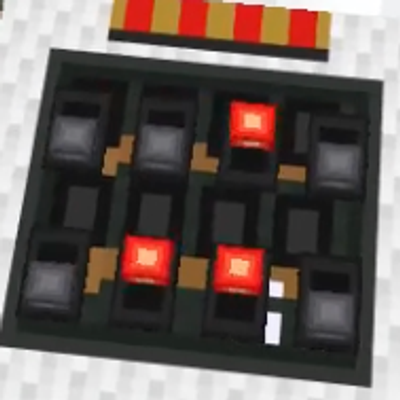
CurseForge · Minecraft mod
PeterWolf's TX/RX Redstone
Tired of long, ugly redstone wire lines across your base? **PeterWolf's TX/RX Redstone** introduces sleek white carpet modules that wirelessly transmit and receive redstone signals across 256 synchronized channels,
Choose a version Pick your version below, then grab the matching file.
Quick answer
Which PeterWolf's TX/RX Redstone release should I use?
Latest stable file peterwolfs-tx-rx-redstone-1.0.0+26.3.jar
Game version 26.3
Loader Fabric
PeterWolf's TX/RX Redstone peterwolfs-tx-rx-redstone-1.0.0+26.3.jar targets 26.3 with Fabric. The project page does not say whether this file belongs on the client, dedicated server, or both. No extra mods listed for this file.
Where it goes
Is PeterWolf's TX/RX Redstone required on the client, server, or both?
The project page does not say whether this file belongs on the client, dedicated server, or both.
Client Source doesn’t say
Dedicated server Source doesn’t say
Loader for this release Fabric
Required install it here Optional supported, not mandatory Not supported do not install here Source doesn’t say do not assume
The source does not explicitly classify this release as client-only or server-only.
What else does PeterWolf's TX/RX Redstone peterwolfs-tx-rx-redstone-1.0.0+26.3.jar need?
peterwolfs-tx-rx-redstone-1.0.0+26.3.jar. Change the file and its required mods may change too.
This file does not list any required mods. Do not add a library just because a different file uses it.
This file does not list any required or optional mods.
Before you install it
Add PeterWolf's TX/RX Redstone without breaking your instance.
Built for PeterWolf's TX/RX Redstone peterwolfs-tx-rx-redstone-1.0.0+26.3.jar. Pick another file and the loader, install side or required mods may change.
- 01
Stick to this file
Use peterwolfs-tx-rx-redstone-1.0.0+26.3.jar. It targets 26.3 with Fabric; another release may have different loader, side or dependency requirements.
- 02
Bring the mods it needs
This file does not list any required mods. Do not add a library just because a different file uses it.
- 03
Put it on the correct side
The project page does not say whether this file belongs on the client, dedicated server, or both.
- 04
Pick the file you checked
Use the “Get this file” button beside peterwolfs-tx-rx-redstone-1.0.0+26.3.jar. It opens that exact file at the source.
About this project
What does PeterWolf's TX/RX Redstone add?
PeterWolf's TX/RX Redstone
Wireless redstone transmission carpets & analog rotary potentiometer dial for Minecraft 26.3!
Tired of long, ugly redstone wire lines across your base? PeterWolf's TX/RX Redstone introduces sleek white carpet modules that wirelessly transmit and receive redstone signals across 256 synchronized channels, plus a precision rotary potentiometer dial to control signal strength from 0% to 100%!
⚡ Features
📡 Wireless TX & RX Carpet Modules
- Transmitter (TX): Thin white wool carpet module that takes redstone input from its front port and broadcasts it wirelessly.
- Receiver (RX): Matching carpet module that receives the broadcast and outputs the exact same signal strength (0–15).
- Directional Ports: Signal enters and exits strictly from one side (the side facing the player when placed), keeping adjacent circuitry clean and isolated.
- 8 DIP Jumpers (256 Channels):
- Two rows of 4 switches directly on the carpet.
- Right-click directly on any switch to toggle it (0 ↔ 1).
- Active switches glow with a bright red illuminated jumper in the dark!
- Matching channel (0–255) synchronizes TX and RX modules instantly worldwide.
🎛️ Rotary Potentiometer (Dial Lever)
- Smooth Analog Control: Select redstone output strength in 10 steps (0% to 100%, corresponding to redstone power 0 to 15).
- Intuitive Mouse Controls:
- LPM (Left Click): Turns down power (-10%) towards the gray bubble (0%).
- PPM (Right Click): Turns up power (+10%) towards the red bubble (100%).
- Break Protection: Left-clicking will never accidentally break the block! To mine/break it, hold Shift + LPM.
- Visual Needle: The pointer rotates clockwise from 0% (left, gray bubble) through 12:00 (50%, straight ahead) to 100% (right, glowing red bubble). The needle itself glows vibrant red when active!
- Full TX/RX Compatibility: Hook a potentiometer directly to a TX module to wirelessly send fine-tuned power levels to remote receivers!
- Mount Anywhere: Place on floors, walls, or ceilings just like a vanilla lever.
🛠️ Survival Crafting Recipes
| Item | Recipe (Crafting Table) |
|---|---|
| Transmitter (TX) | Top: Redstone Torch / Middle: Lever + Repeater + Lever / Bottom: 3x White Carpet |
| Receiver (RX) | Top: Redstone Torch / Middle: Lever + Comparator + Lever / Bottom: 3x White Carpet |
| Potentiometer | Vertical line: Any Button (top) + Lever (middle) + Redstone Dust (bottom) |
All recipes unlock automatically in your Recipe Book as soon as you gather Redstone, Carpet, or Levers!
📋 Requirements
- Minecraft:
26.3 - Fabric Loader:
>= 0.19.5 - Fabric API
- Java:
25
Project description from CurseForge.
Pick your setup
PeterWolf's TX/RX Redstone by Minecraft version and loader
Choose the version and loader you play, then open the matching release.
Check the dependencies, then try the file in a copied instance before changing a world you care about.
Recent files
PeterWolf's TX/RX Redstone versions and loaders
peterwolfs-tx-rx-redstone-1.0.0+26.3.jar
19 Sept 2026
Client Source doesn’t say Server Source doesn’t say Dependencies No extras listed Listed on Release listing
Check the 26.3 · Fabric setup Fabric26.3 release
Looking for an older file? The official CurseForge project page is in Resources.
 mod
mod CurseForge + Modrinth · Minecraft
fweigel-util-lib
Shared client-side utility library for my Fabric mods. Provides common rendering, storage, UI, and sound utilities.
 mod
mod CurseForge · Minecraft
SKY ACES
Fly 26 jets, WWII warbirds, helicopters, warships and submarines! F-22, F-35, Spitfire, Apache, a sailing Nimitz carrier, air refuelling, a campaign, dogfights and airbase defence.
 mod
mod Modrinth · Minecraft
Skullduv's Keystrokes
A fully customizable keystroke mod with FPS, CPS, and Custom Crosshair for PVP. I hope this blows up lol!