Minecraft version
Back to mods 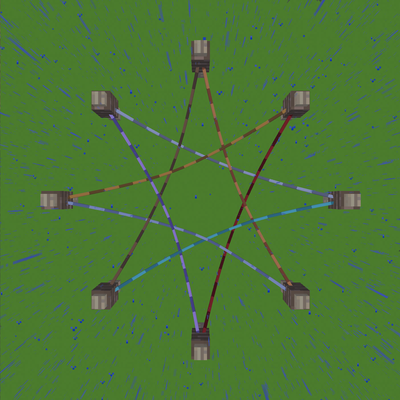
CurseForge · Minecraft mod
SuperLead
One rope. Every connection. Super Lead is a NeoForge mod that turns the humble lead into a universal connection tool. Redstone, energy, items, fluids — all through a single familiar rope.
Choose a version Pick your version below, then grab the matching file.
Quick answer
Which SuperLead release should I use?
beta file super_lead-0.4.9-beta+mc26.1.2-neoforge.jar
Game version 26.1.2
Loader NeoForge
SuperLead super_lead-0.4.9-beta+mc26.1.2-neoforge.jar targets 26.1.2 with NeoForge. The project page does not say whether this file belongs on the client, dedicated server, or both. No extra mods listed for this file.
Where it goes
Is SuperLead required on the client, server, or both?
The project page does not say whether this file belongs on the client, dedicated server, or both.
Client Source doesn’t say
Dedicated server Source doesn’t say
Loader for this release NeoForge
Required install it here Optional supported, not mandatory Not supported do not install here Source doesn’t say do not assume
The source does not explicitly classify this release as client-only or server-only.
What else does SuperLead super_lead-0.4.9-beta+mc26.1.2-neoforge.jar need?
super_lead-0.4.9-beta+mc26.1.2-neoforge.jar. Change the file and its required mods may change too.
This file does not list any required mods. Do not add a library just because a different file uses it.
This file does not list any required or optional mods.
Before you install it
Add SuperLead without breaking your instance.
Built for SuperLead super_lead-0.4.9-beta+mc26.1.2-neoforge.jar. Pick another file and the loader, install side or required mods may change.
- 01
Stick to this file
Use super_lead-0.4.9-beta+mc26.1.2-neoforge.jar. It targets 26.1.2 with NeoForge; another release may have different loader, side or dependency requirements.
- 02
Bring the mods it needs
This file does not list any required mods. Do not add a library just because a different file uses it.
- 03
Put it on the correct side
The project page does not say whether this file belongs on the client, dedicated server, or both.
- 04
Pick the file you checked
Use the “Get this file” button beside super_lead-0.4.9-beta+mc26.1.2-neoforge.jar. It opens that exact file at the source.
About this project
What does SuperLead add?
Super Lead
One rope. Every connection.
Super Lead is a NeoForge mod that turns the humble lead into a universal connection tool. Redstone, energy, items, fluids — all through a single familiar rope.
Lead Kinds
Right-click a rope with the matching material to convert or upgrade it.
| Kind | Convert with | Upgrade with | Effect |
|---|---|---|---|
| Redstone | Redstone Block | — | Bidirectional redstone signal between anchors |
| Energy (FE) | Iron Block | Redstone Block | FE transfer, tiered throughput (1x → 2x → 4x…) |
| Item | Hopper | Chest | Item transport, round-robin routing |
| Fluid | Cauldron | Bucket | Fluid transport between tanks |
| Pressurized | Steel Block | Reinforced Alloy | Mekanism chemical/gas transfer |
| Thermal | Copper Block | Reinforced Alloy | Mekanism heat transfer |
| AE Network | Fluix Block | 16³ Spatial Component | AE2 channel bridging |
Energy
- Base throughput: 256 FE/t at tier 0, doubles per tier
- Maximum tier configurable (default 30)
- Powered ropes glow and emit particles
Item & Fluid
- Toggle extract direction by clicking an endpoint with the conversion item
- Tier 0: 1 item / 1000 mB per pulse; doubles per tier
- Multi-rope fence-knot routing with round-robin
Usage
Placing Ropes
Right-click a block face → set first anchor. Right-click another block → create connection. Ropes attach to any block face, not just fences.
Extending
New ropes: after setting the first anchor, click the same anchor again to spend 1 lead and extend the pending length by 1× (up to 4×). Existing ropes: sneak + right-click an anchor to extend. Extended ropes cost proportionally more to upgrade.
Cutting
Sneak-right-click a rope with shears to cut it. Right-clicking a fence knot with shears cuts all ropes attached to that knot. Cutting refunds the rope and part of its upgrade cost; the current beta has a known duplicate-refund issue documented in the Chinese gameplay guide.
Attachments
Hold an attachable item (lantern, sign, block) in your main hand and String in your offhand. Right-click a rope to hang it. Signs are editable in-world. Toggle block/item display modes.
Ziplines
Bind a zipline-enabled physics preset to a normal or redstone rope, then right-click the rope with a chain. Press Shift to dismount.
Physics
Client-side Verlet simulation with gravity, damping, block collision, rope-to-rope repulsion. Ropes auto-freeze when settled — zero CPU cost at rest.
Configuration
config/super_lead-common.toml:
| Setting | Default | Description |
|---|---|---|
energy.base_transfer_per_tick |
256 | Base FE/t at tier 0 |
energy.tier_max_level |
30 | Maximum energy upgrade tier |
network.max_leash_distance |
12.0 | Blocks per length unit |
network.max_ropes_per_block_face |
8 | Max ropes per block face |
network.item_transfer_interval_ticks |
4 | Ticks between item transfers |
network.fluid_bucket_amount |
1000 | mB per fluid transfer |
Requirements
- Minecraft 26.1.2
- NeoForge 26.1.2.76 (compatible with NeoForge 26.x)
- Java 25
Optional: Mekanism, Applied Energistics 2
License
Apache 2.0
Project description from CurseForge.
Pick your setup
SuperLead by Minecraft version and loader
Choose the version and loader you play, then open the matching release.
Check the dependencies, then try the file in a copied instance before changing a world you care about.
Recent files
SuperLead versions and loaders
super_lead-0.4.9-beta+mc26.1.2-neoforge.jar
20 Sept 2026
Client Source doesn’t say Server Source doesn’t say Dependencies No extras listed Listed on Release listing
Check the 26.1.2 · NeoForge setup NeoForge26.1.2 beta
Looking for an older file? The official CurseForge project page is in Resources.