Minecraft version
Back to mods 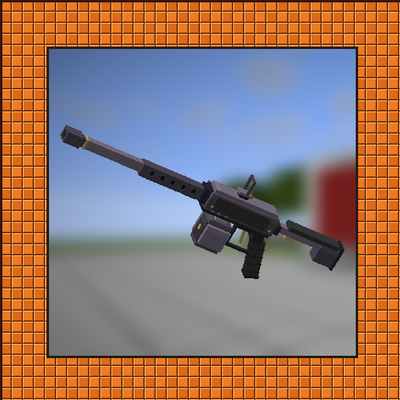
CurseForge · Minecraft mod
Cloudy Armory
Build modular guns in copper, iron, and Netherite. Customize parts and attachments, swap magazines by hand, and unlock camos through combat.
Choose a version Pick your version below, then grab the matching file.
Quick answer
Which Cloudy Armory release matches 26.2 NeoForge?
Best match for your filters cloudy_armory-0.12.4.jar
Game version 26.2
Loader NeoForge
Cloudy Armory cloudy_armory-0.12.4.jar targets 26.2 with NeoForge. The project page does not say whether this file belongs on the client, dedicated server, or both. No extra mods listed for this file.
Where it goes
Is Cloudy Armory required on the client, server, or both?
The project page does not say whether this file belongs on the client, dedicated server, or both.
Client Source doesn’t say
Dedicated server Source doesn’t say
Loader for this release NeoForge
Required install it here Optional supported, not mandatory Not supported do not install here Source doesn’t say do not assume
The source does not explicitly classify this release as client-only or server-only.
What else does Cloudy Armory cloudy_armory-0.12.4.jar need?
cloudy_armory-0.12.4.jar on 26.2 NeoForge. Every mod below is checked against that same setup.
This file does not list any required mods. Do not add a library just because a different file uses it.
This file does not list any required or optional mods.
Before you install it
Add Cloudy Armory without breaking your instance.
Built for Cloudy Armory cloudy_armory-0.12.4.jar on 26.2 NeoForge. Pick another file and the loader, install side or required mods may change.
- 01
Stick to this file
Use cloudy_armory-0.12.4.jar. It targets 26.2 with NeoForge; another release may have different loader, side or dependency requirements.
- 02
Bring the mods it needs
This file does not list any required mods. Do not add a library just because a different file uses it.
- 03
Put it on the correct side
The project page does not say whether this file belongs on the client, dedicated server, or both.
- 04
Pick the file you checked
Use the “Get this file” button beside cloudy_armory-0.12.4.jar. It opens that exact file at the source.
About this project
What does Cloudy Armory add?

Cloudy Armory adds guns that you put together yourself. Pick a receiver in copper, iron, or Netherite, fit a barrel, grip, and stock to it, then add a sight, a muzzle attachment, and a camo you unlocked by getting kills with that gun. Parts change how the gun handles as well as how it looks.
This is the first public release. If something breaks or feels off, tell me in the comments.


Materials and receivers
Copper guns look like scrap builds, with wooden furniture, improvised fittings, and the magazine sticking out of the side. Iron is the factory-made tier, with the magazine underneath. Netherite is dark plate with a bit of gold trim.
Each material comes in the same six receivers:
| Receiver | What it fires |
|---|---|
| Light | Light cartridges, full auto |
| Heavy | Heavy cartridges, full auto |
| Scatter | Buckshot or slugs |
| Launcher | Rockets or grenades, depending on which container you load |
| Coil | Slugs, after a charge-up |
| Harpoon | Darts on a tether that you can reel back in |


Launchers are built the same way as everything else, so a rocket launcher with a rifle stock and a red dot is a perfectly viable build. Barrels, grips, and stocks have to match the receiver's material. Magazines aren't fitted at a table. You load and swap them by hand.
The workstations
Everything starts at the Fabrication Bench, which turns raw materials into receivers, parts, attachments, and ammo. You make it in a normal crafting table: three iron ingots along the top, a crafting table between two copper ingots in the middle, and three planks of any kind along the bottom.

The Weapon Assembly Table is where the barrel, grip, and stock go onto a receiver. It shows a live preview of the gun, and it lists every compatible part, including the ones you haven't made yet, so you can see what you're working toward.

Optics, muzzle attachments, and charms go on at the Attachments Table. A finished gun's inventory icon is drawn from the actual build, so it shows your parts, attachments, and camo.

The fourth station is the Camo Station, which has its own section below. All four are two-block-wide wooden benches with different tools on top.

Shooting and reloading
Guns kick when you fire, sway as you move, and take a moment to come back up after a sprint. Your hands are animated, and everything plays in third person too, so other players see your reloads. Aiming down sights needs your other hand empty.
When you fire from the hip, the reticle follows where the gun is actually pointing. It opens up with spread from your build, your movement, and sustained fire. Bullet guns get a four-line reticle, and scatter and explosive weapons get four arcs. It hides while you're aiming down sights or reloading.


Magazines are real items. To swap, hold a loaded magazine that fits in your other hand and reload. If that hand is empty when you reload, the current magazine comes out into it. If the gun has no magazine in it, you only get the insert animation.

There's no ammo counter on the HUD. To see what a magazine is loaded with and how many rounds are left, check the magazine item itself. To fill one, hold it in one hand and the ammo in the other. Combining them in a crafting grid works too.
You can hold the gun in either hand, but only one gun is active at a time. G moves whatever is in your other hand to a free hotbar slot. All keys can be rebound in Controls.
Coil, Launcher, and Harpoon
The Coil receiver has to charge before each shot. The reticle turns blue while it does, and you can see the coil itself when you aim.

Launchers take rocket or grenade containers. Rockets don't break blocks by default. If you want them to, turn on missilesDestroyBlocks in config/cloudy_armory-server.toml. Grenades do not break blocks and are not affected by this setting.

Harpoons fire a dart on a tether, and you can reel it back in.

Camos and kill tracking
Each receiver counts its own kills, mobs and players alike, and those kills unlock camos for that receiver only. You apply them at the Camo Station. Copper's list tops out at Red DDPAT at 250 kills. Iron and Netherite keep going up to Fall at 1,000. (MW2 anyone?)

The paint lives on the receiver. Any part you install picks up the receiver's camo, and any part you take off comes away bare, so swapping a barrel never leaves you with a mismatched gun.
The KillTrack is a cosmetic attachment that puts a digital kill counter on the side of the gun. You can read it when you inspect the weapon. The Redstone Etched and Gilded finishes also have glowing details.


Enchantments and JEI
Receivers take Infinity, Power, Punch, Flame, Quick Charge, Unbreaking, and Mending. Infinity still needs a magazine with an ammo type loaded. In Creative, ammo is always infinite.
JEI is optional. If it's installed, it shows recipes for fabrication, assembly, attachments, painting, and magazine loading, and it can move the ingredients into the Fabrication Bench for you.
Requirements
- Minecraft 26.2
- NeoForge 26.2.0.77 or newer
- Java 25
- Needed on both client and server
All Rights Reserved.
Project description from CurseForge.
Pick your setup
Cloudy Armory by Minecraft version and loader
Choose the version and loader you play, then open the matching release.
Check the dependencies, then try the file in a copied instance before changing a world you care about.
Recent files
Cloudy Armory versions and loaders
cloudy_armory-0.12.4.jar
20 Sept 2026
Client Source doesn’t say Server Source doesn’t say Dependencies No extras listed Listed on Release listing
Check the 26.2 · NeoForge setup NeoForge26.2 release
Looking for an older file? The official CurseForge project page is in Resources.
 mod
CurseForge · Minecraft
Rats (Unofficial Port)
Unofficial port of Alexthe666's Rats to 1.21.1 and 26.x for NeoForge and Fabric: tame rats, 200+ upgrades, the plague and Ratlantis, with 17 bugs of the original fixed.
 mod
Modrinth · Minecraft
Xisuma's Hermitcraft Music
Adds the Music Discs made by Xisuma for his fellow Hermits to your game.
 mod
CurseForge · Minecraft
Colored Light
This mod turns the light from light sources the color they really are and adds adjustable custom light colors for any block. Works with colored dynamic lights.