Minecraft version
Back to mods 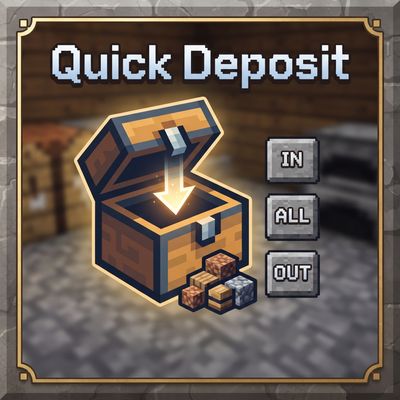
CurseForge · Minecraft mod
Quick Deposit Plus
A Minecraft utility mod that adds quick-action buttons to chests for depositing, withdrawing, and sorting items in seconds.
Choose a version Pick your version below, then grab the matching file.
Quick answer
Which Quick Deposit Plus release should I use?
Latest stable file quickdepositplus-1.0.1.jar
Game version 1.20.1
Loader Forge
Quick Deposit Plus quickdepositplus-1.0.1.jar targets 1.20.1 with Forge. The project page does not say whether this file belongs on the client, dedicated server, or both. No extra mods listed for this file.
Where it goes
Is Quick Deposit Plus required on the client, server, or both?
The project page does not say whether this file belongs on the client, dedicated server, or both.
Client Source doesn’t say
Dedicated server Source doesn’t say
Loader for this release Forge
Required install it here Optional supported, not mandatory Not supported do not install here Source doesn’t say do not assume
The source does not explicitly classify this release as client-only or server-only.
What else does Quick Deposit Plus quickdepositplus-1.0.1.jar need?
quickdepositplus-1.0.1.jar. Change the file and its required mods may change too.
This file does not list any required mods. Do not add a library just because a different file uses it.
This file does not list any required or optional mods.
Before you install it
Add Quick Deposit Plus without breaking your instance.
Built for Quick Deposit Plus quickdepositplus-1.0.1.jar. Pick another file and the loader, install side or required mods may change.
- 01
Stick to this file
Use quickdepositplus-1.0.1.jar. It targets 1.20.1 with Forge; another release may have different loader, side or dependency requirements.
- 02
Bring the mods it needs
This file does not list any required mods. Do not add a library just because a different file uses it.
- 03
Put it on the correct side
The project page does not say whether this file belongs on the client, dedicated server, or both.
- 04
Pick the file you checked
Use the “Get this file” button beside quickdepositplus-1.0.1.jar. It opens that exact file at the source.
About this project
What does Quick Deposit Plus add?
📦 Quick Deposit
Quick Deposit is a utility mod for Minecraft that adds quick inventory actions when opening chests and containers, allowing you to move items in seconds without dragging stack by stack.
🚀 Main Features
- IN (Smart Deposit): Deposits only items that already have a compatible stack inside the container. It does not fill empty slots (ideal for sorting without cluttering the chest).
- ALL (All In): Deposits everything possible from your inventory into the container. It first completes existing stacks and then fills empty slots.
- OUT (All Out / Withdraw): Pulls everything that fits from the container into the player's inventory, respecting available space (prevents item duplication or loss).
- RST (Restock): Refills the player's inventory stacks using items from the container. Very useful for getting back to the maximum stack size without messing things up.
🖥️ UI & User Experience
- Integrated buttons directly into the container GUI:
IN|ALL|OUT(+RST). - Compact and clean design for ultra-fast access.
- Designed to streamline looting and chest organization flows without opening extra menus.
⌨️ Keybinds
You can configure or change the keys from the options menu (Options → Controls):
- K = Smart Deposit (
IN) - L = All In (
ALL) - O = All Out (
OUT) - ; = Restock (
RST)
⚙️ Technical Behavior
- Inventory logic executed entirely on the server-side (server-authoritative).
- Secure client-server communication via a dedicated network packet.
- Specifically designed to prevent desyncs and duplication glitches during inventory operations.
📌 Compatibility
- Minecraft: 1.20.1
- Mod Loader: Forge (Tested on Forge 47.3.0)
- Mod ID:
quickdeposit
Project description from CurseForge.
Pick your setup
Quick Deposit Plus by Minecraft version and loader
Choose the version and loader you play, then open the matching release.
Check the dependencies, then try the file in a copied instance before changing a world you care about.
Recent files
Quick Deposit Plus versions and loaders
quickdepositplus-1.0.1.jar
23 Sept 2026
Client Source doesn’t say Server Source doesn’t say Dependencies No extras listed Listed on Release listing
Check the 1.20.1 · Forge setup 1.20.1Forge release
quickdepositplus-1.0.0.jar
21 Sept 2026
Client Source doesn’t say Server Source doesn’t say Dependencies No extras listed Listed on Release listing
Check the 1.20.1 · Forge setup 1.20.1Forge release
Looking for an older file? The official CurseForge project page is in Resources.
 mod
mod CurseForge + Modrinth · Minecraft
Structurify - Structure Control
A structure configuration mod that eliminates the need for datapacks. Spread out structures, prevent overlap, enforce flat terrain, customize size and biomes.
 mod
mod CurseForge + Modrinth · Minecraft
Antique Atlas Auto Marker
Various QoL upgrades to the Antique Atlas
 mod
mod CurseForge + Modrinth · Minecraft
End-Parasitize and Convert All
This is an infection mod with magical elements.