Fabric API Needed by Quick Command Shortcuts (QCS) commandshotcuts-1.0.0.jar
requiredMatching file found Matched file: [26.3] Fabric API 0.166.0+26.3
CurseForge · Minecraft mod
Allows you to add Quick Shortcuts with the /qs command, can store up to 10 commands.
Quick answer
Quick Command Shortcuts (QCS) commandshotcuts-1.0.0.jar targets 26.3 with Fabric. The project page does not say whether this file belongs on the client, dedicated server, or both. All 1 required mods have matching files.
Where it goes
The project page does not say whether this file belongs on the client, dedicated server, or both.
The source does not explicitly classify this release as client-only or server-only.
commandshotcuts-1.0.0.jar on 26.3. Every mod below is checked against that same setup.
Install Fabric API first. We found matching files for this game-version and loader setup.
We only count dependency files that match this setup. A file for another loader does not fill the gap.
Before you install it
Built for Quick Command Shortcuts (QCS) commandshotcuts-1.0.0.jar on 26.3. Pick another file and the loader, install side or required mods may change.
Use commandshotcuts-1.0.0.jar. It targets 26.3 with Fabric; another release may have different loader, side or dependency requirements.
Install Fabric API first. We found matching files for this game-version and loader setup.
The project page does not say whether this file belongs on the client, dedicated server, or both.
Use the “Get this file” button beside commandshotcuts-1.0.0.jar. It opens that exact file at the source.
About this project
this mod adds the /qs command
allows you to add quick shortcuts that you can use as commands
can store up to 10 commands at once
use this:
/qs add <name> <command1> <command2> <command3> <command4> <command5> <command6> <command7> <command8> <command9> <command10>
every command has to be typed inside curly brackets {}
adding more than one command is optional
example:
this will adds a shorcut that will summon a zombie:
/qs add shortcut1 {summon zombie}
and this will make a shorcut that would summon a zombie and give you a diamond sword:
/qs add shortcut1 {summon zombie} {/give @s diamond_sword}
you can go to the pause menu and find the quick shortcuts button:
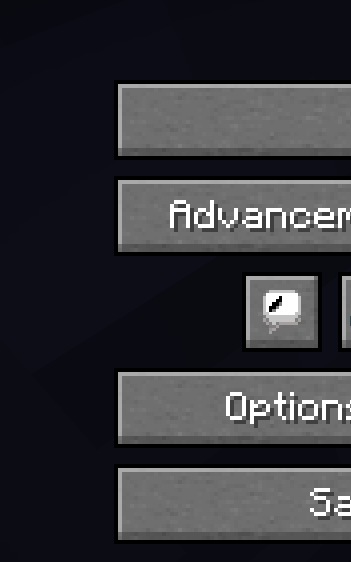
or to run the shortcut you will have to do /name
the name will be the name you gave to the shortcut
example:
if the qs command you ran was for example:
/qs add shortcut1 {summon zombie}
then if you want to run the shortcut you will have to do:
/shortcut1
to remove shortcuts you will have to do /qs remove <name>
example
if the qs command you ran was for example:
/qs add shortcut1 {summon zombie}
then to remove it you will have to do:
/qs remove shortcut1
now you wont be able to do:
/shortcut1
to change existing shortcuts you will have to do
/qs modify <name> <command1> <command2> <command3> <command4> <command5> <command6> <command7> <command8> <command9> <command10>
example:
if the qs command you ran was for example:
/qs add shortcut1 {summon zombie}
then to change the commands you will have to do:
/qs modify shortcut1 {give @s diamond_sword}
now when you run the shortcut it will give you a diamond sword
if your shortcut had more than one command and you want to keep some of the commands
the same then you will have to use {same} in the command you want to keep the same
Project description from CurseForge.
Pick your setup
Choose the version and loader you play, then open the matching release.
Check the dependencies, then try the file in a copied instance before changing a world you care about.
Recent files
22 Sept 2026
Looking for an older file? The official CurseForge project page is in Resources.
 mod
Shoulder Surfing Reloaded is a highly configurable third person camera mod for Minecraft
 mod
A Vanilla-Friendly Archery Overhaul!
 mod
This mod adds the possibility to grab villager, easy transportation no more boat or minecart.