Minecraft version
Back to mods 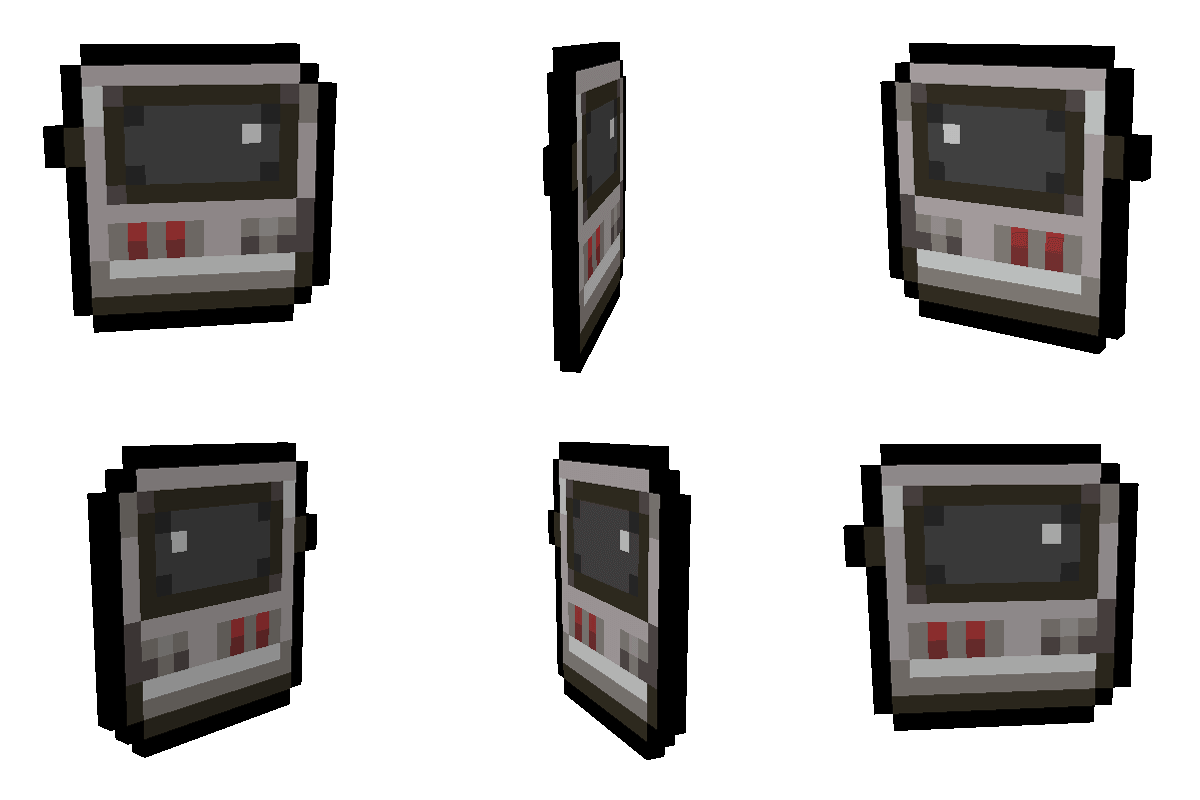
CurseForge · Minecraft mod
Mob - Dex
Capture, catalog, and manage any living mob in a Pokédex-style handheld device with live 3D preview and deployable cartridges.
Choose a version Pick your version below, then grab the matching file.
Quick answer
Which Mob - Dex release should I use?
Latest stable file mobdex-neoforge-2.5.0.jar
Game version 1.21.1
Loader NeoForge
Mob - Dex mobdex-neoforge-2.5.0.jar targets 1.21.1 with NeoForge. The project page does not say whether this file belongs on the client, dedicated server, or both. No extra mods listed for this file.
Where it goes
Is Mob - Dex required on the client, server, or both?
The project page does not say whether this file belongs on the client, dedicated server, or both.
Client Source doesn’t say
Dedicated server Source doesn’t say
Loader for this release NeoForge
Required install it here Optional supported, not mandatory Not supported do not install here Source doesn’t say do not assume
The source does not explicitly classify this release as client-only or server-only.
What else does Mob - Dex mobdex-neoforge-2.5.0.jar need?
mobdex-neoforge-2.5.0.jar. Change the file and its required mods may change too.
This file does not list any required mods. Do not add a library just because a different file uses it.
This file does not list any required or optional mods.
Before you install it
Add Mob - Dex without breaking your instance.
Built for Mob - Dex mobdex-neoforge-2.5.0.jar. Pick another file and the loader, install side or required mods may change.
- 01
Stick to this file
Use mobdex-neoforge-2.5.0.jar. It targets 1.21.1 with NeoForge; another release may have different loader, side or dependency requirements.
- 02
Bring the mods it needs
This file does not list any required mods. Do not add a library just because a different file uses it.
- 03
Put it on the correct side
The project page does not say whether this file belongs on the client, dedicated server, or both.
- 04
Pick the file you checked
Use the “Get this file” button beside mobdex-neoforge-2.5.0.jar. It opens that exact file at the source.
About this project
What does Mob - Dex add?
📱 MobDex
MobDex is a handheld device for Minecraft that lets you capture, store and manage living mobs.
You can keep mobs inside your MobDex, inspect them through the catalog, move them into physical cartridges, and release them back into the world whenever you need them.
It also works with living entities added by other mods, so you can use it with much more than just vanilla mobs.
✨ Features
🎯 Capture Mobs
Right-click a living mob with the MobDex to capture it.
MobDex keeps the mob's data when storing it, including things like:
Health
Custom names
Equipment
Villager professions and trades
Baby/adult state
Sheep colors
Other entity NBT data
Modded living entities are supported as well.
🖥️ MobDex Catalog
Open the MobDex interface to see the mobs you've collected.
The catalog includes:
Custom MobDex UI
Multiple mobs per page
Pagination
Grouped view
Capture order view
Mob name
Entity ID
Current health
You can select a mob from the catalog to inspect it without having to release it into the world.
🔮 3D Mob Preview
The catalog includes a live 3D preview of the selected mob.
You can rotate and look at the entity directly inside the MobDex interface, making it easier to identify what you've stored.
💾 Mob Cartridges
Mobs stored in the MobDex can also be turned into physical Mob Cartridges.
Eject a mob from the catalog to create a cartridge.
Then:
Right-click the ground to release the mob.
Put the cartridge back into the MobDex to store it again.
Reinsert cartridges directly from your inventory.
The mob's stored data is preserved when moving between the MobDex and its cartridge.
🔧 Crafting
The MobDex is crafted through several components:
MobDex Plate → MobDex Circuit → MobDex Core → MobDex
This gives the MobDex a small progression instead of making it immediately available at the start of a world.
🧩 Mod Compatibility
MobDex is designed to work with living entities from other mods.
If a mod adds a living entity, MobDex can generally capture and store it as long as it is a supported LivingEntity.
This makes it useful in modpacks with large numbers of different creatures.
📋 Compatibility
Minecraft: 1.21.1
Mod Loaders:
Fabric
Forge
NeoForge
Java: 21
Environment: Client & Server
Multiplayer: Supported
🐛 Feedback & Suggestions
MobDex is still being developed, and I'm planning to keep adding features and improving the system.
If you find a bug, have an idea, or have a suggestion for something you'd like to see added, feel free to leave a comment or create a support post.
Have fun collecting!
Project description from CurseForge.
Pick your setup
Mob - Dex by Minecraft version and loader
Choose the version and loader you play, then open the matching release.
Check the dependencies, then try the file in a copied instance before changing a world you care about.
Recent files
Mob - Dex versions and loaders
mobdex-neoforge-2.5.0.jar
6 Oct 2026
Client Source doesn’t say Server Source doesn’t say Dependencies No extras listed Listed on Release listing
Check the 1.21.1 · NeoForge setup 1.21.1NeoForge release
mobdex-forge-2.5.0.jar
6 Oct 2026
Client Source doesn’t say Server Source doesn’t say Dependencies No extras listed Listed on Release listing
Check the 1.21.1 · Forge setup Forge1.21.1 release
mobdex-fabric-2.5.0.jar
6 Oct 2026
Client Source doesn’t say Server Source doesn’t say Dependencies No extras listed Listed on Release listing
Check the 1.21.1 · Fabric setup Fabric1.21.1 release
mobdex-forge-2.0.0.jar
2 Oct 2026
Client Source doesn’t say Server Source doesn’t say Dependencies No extras listed Listed on Release listing
Check the 1.21.1 · Forge setup Forge1.21.1 release
mobdex-fabric-2.0.0.jar
2 Oct 2026
Client Source doesn’t say Server Source doesn’t say Dependencies No extras listed Listed on Release listing
Check the 1.21.1 · Fabric setup Fabric1.21.1 release
mobdex-2.0.jar
2 Oct 2026
Client Source doesn’t say Server Source doesn’t say Dependencies No extras listed Listed on Release listing
Check the 1.21.1 · NeoForge setup 1.21.1NeoForge release
mobdex-1.0.jar
22 Sept 2026
Client Source doesn’t say Server Source doesn’t say Dependencies No extras listed Listed on Release listing
Check the 1.21.1 · NeoForge setup 1.21.1NeoForge beta
Looking for an older file? The official CurseForge project page is in Resources.