Fabric Language Kotlin Needed by Strata UI Strata 0.3.4 for Minecraft 1.20
requiredMatching file found Matched file: Fabric Language Kotlin 1.14.2+kotlin.2.4.21

CurseForge · Minecraft mod
Declarative, reusable Minecraft UI with headless rendering and exact versioned Fabric adapters.
Quick answer
Strata UI Strata 0.3.4 for Minecraft 1.20 targets 1.20 with Fabric. The project page does not say whether this file belongs on the client, dedicated server, or both. 1 required mod needs a matching file.
Where it goes
The project page does not say whether this file belongs on the client, dedicated server, or both.
The source does not explicitly classify this release as client-only or server-only.
Strata 0.3.4 for Minecraft 1.20 on 1.20. Every mod below is checked against that same setup.
Install Fabric Language Kotlin, Fabric API first, but 1 required mod has no matching file for this setup. Do not mix loader builds to force a match.
We only count dependency files that match this setup. A file for another loader does not fill the gap.
Before you install it
Built for Strata UI Strata 0.3.4 for Minecraft 1.20 on 1.20. Pick another file and the loader, install side or required mods may change.
Use Strata 0.3.4 for Minecraft 1.20. It targets 1.20 with Fabric; another release may have different loader, side or dependency requirements.
Install Fabric Language Kotlin, Fabric API first, but 1 required mod has no matching file for this setup. Do not mix loader builds to force a match.
The project page does not say whether this file belongs on the client, dedicated server, or both.
Use the “Get this file” button beside Strata 0.3.4 for Minecraft 1.20. It opens that exact file at the source.
About this project
Strata is a declarative UI library for Minecraft Fabric Mods. Build screens from reusable components, keep application state in your own code, and test UI behavior without launching Minecraft. A separately installed runtime connects those definitions to the client version and its resources.
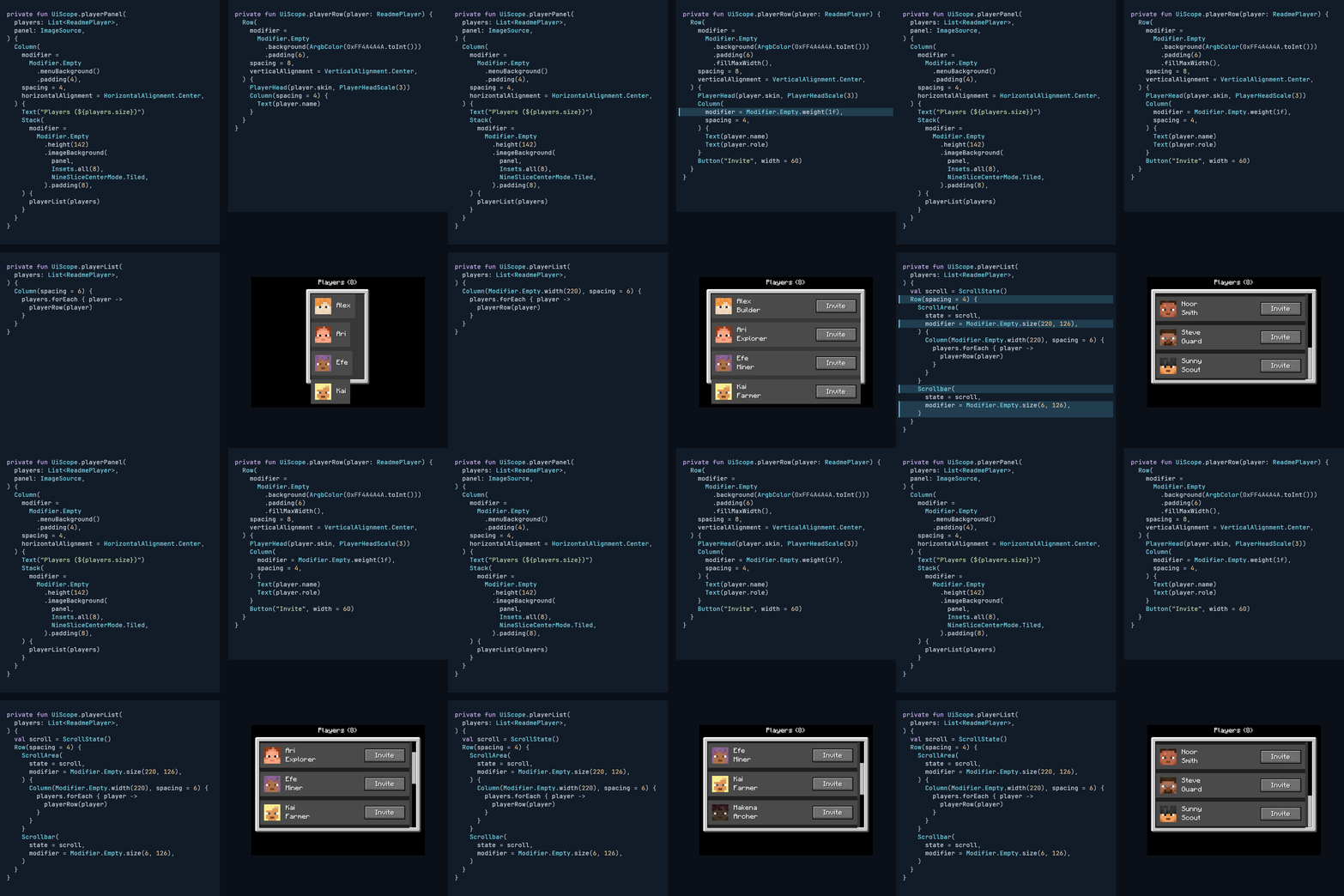
Browse the component catalog for images, compiled examples, and individual API links.
Compile ordinary Mod source against the API only, then install the runtime matching the active Minecraft version together with Fabric Language Kotlin.
dependencies {
    compileOnly("dev.s7a.strata:strata-api:0.1.6")
    modRuntimeOnly("dev.s7a.strata:strata-runtime-minecraft-fabric-<minecraft-version>:0.1.6")
    modRuntimeOnly("net.fabricmc:fabric-language-kotlin:<compatible-version>")
}
Declare strata as a required dependency in the consuming Mod's fabric.mod.json. The following exact example is compiled against strata-api alone and is also used by the README and public Strata skill:
import dev.s7a.strata.component.Button
import dev.s7a.strata.component.Column
import dev.s7a.strata.component.Text
import dev.s7a.strata.layout.HorizontalAlignment
import dev.s7a.strata.modifier.Modifier
import dev.s7a.strata.modifier.menuBackground
import dev.s7a.strata.modifier.onActivate
import dev.s7a.strata.modifier.padding
import dev.s7a.strata.modifier.size
import dev.s7a.strata.screen.ScreenDefinition

/**
 * Opens a confirmation screen on the installed runtime's owner thread.
 */
internal fun openConfirmationScreen(onConfirm: () -> Unit) {
    ScreenDefinition("Confirm action") {
        Column(
            modifier =
                Modifier.Empty
                    .size(320, 180)
                    .menuBackground()
                    .padding(12),
            spacing = 8,
            horizontalAlignment = HorizontalAlignment.Center,
        ) {
            Text("Continue with this action?")
            Button(
                "Yes",
                modifier = Modifier.Empty.onActivate(onConfirm),
            )
        }
    }.open()
}
1.20, 1.20.1, 1.20.2, 1.20.3, 1.20.4, 1.20.5, 1.20.6, 1.21, 1.21.1, 1.21.2, 1.21.3, 1.21.4, 1.21.5, 1.21.6, 1.21.7, 1.21.8, 1.21.9, 1.21.10, 1.21.11, 26.1, 26.2
Install exactly one Strata runtime matching the client version. See Minecraft compatibility for artifact names and Java requirements.
Generative AI substantially assisted implementation, review, tests, documentation, and release-page text. The maintainer directed the design and validates release artifacts through the public test suite.
Project description from CurseForge.
Pick your setup
Choose the version and loader you play, then open the matching release.
Showing the newest 12 of 22 game versions. Older files are in the list below.
Check the dependencies, then try the file in a copied instance before changing a world you care about.
Recent files
strata-runtime-minecraft-fabric-1.20-0.3.4.jar
15 Nov 2026
strata-runtime-minecraft-fabric-1.20-0.3.3.jar
27 Oct 2026
Looking for an older file? The official CurseForge project page is in Resources.
 mod
The platform-agnostic, Architectury based library used in all of JamCoreModding's mods
 mod
Improves your keys & controls setup by providing modifier keys and making multi-functional keys a thing.
 mod
Allows you to add alternative key combinations to every key binding!