D3dykce's library Needed by After the end: Decorations After the end Decorations-NeoForge-1.21.1.jar
requiredMatching file found Matched file: D3_lib-NeoForge-1.21.1.jar
CurseForge · Minecraft mod
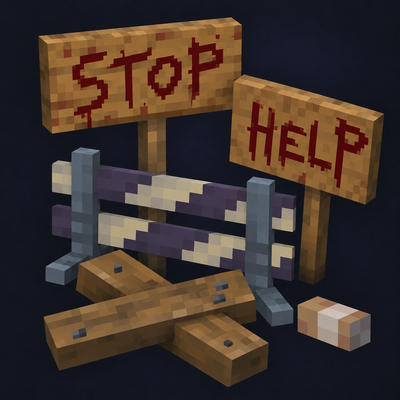
The mod adds new blocks in a horror‑themed style.
Quick answer
After the end: Decorations After the end Decorations-NeoForge-1.21.1.jar targets 1.21.1 with NeoForge. The project page does not say whether this file belongs on the client, dedicated server, or both. All 1 required mods have matching files.
Where it goes
The project page does not say whether this file belongs on the client, dedicated server, or both.
The source does not explicitly classify this release as client-only or server-only.
After the end Decorations-NeoForge-1.21.1.jar. Change the file and its required mods may change too.
Install D3dykce's library first. We found matching files for this game-version and loader setup.
We only count dependency files that match this setup. A file for another loader does not fill the gap.
Before you install it
Built for After the end: Decorations After the end Decorations-NeoForge-1.21.1.jar. Pick another file and the loader, install side or required mods may change.
Use After the end Decorations-NeoForge-1.21.1.jar. It targets 1.21.1 with NeoForge; another release may have different loader, side or dependency requirements.
Install D3dykce's library first. We found matching files for this game-version and loader setup.
The project page does not say whether this file belongs on the client, dedicated server, or both.
Use the “Get this file” button beside After the end Decorations-NeoForge-1.21.1.jar. It opens that exact file at the source.
About this project
After the end: Decorations adds decorations for abandoned places and post-apocalyptic builds. The idea is simple: making a building look abandoned takes more than broken windows and a few cobwebs. It needs little details that show people once lived there.
Some decorations are interactive: you can open them, store items inside, or pick them up. Others have different appearances and poses that you can change using the mod’s tools.
Smoking is depicted solely as a fictional gameplay mechanic. This mod does not promote tobacco use.
After the end: Decorations добавляет декорации для заброшенных мест и постапокалиптических построек. Идея простая: чтобы здание выглядело заброшенным, недостаточно выбить окна и поставить пару блоков паутины. Нужны мелочи, по которым видно, что здесь когда-то жили люди.
Часть декораций можно использовать: открывать, складывать внутрь предметы или подбирать. У некоторых есть несколько вариантов внешнего вида и поз — их можно менять инструментами из мода.
Курение представлено исключительно как вымышленная игровая механика. Мод не пропагандирует употребление табака.
Project description from CurseForge.
Pick your setup
Choose the version and loader you play, then open the matching release.
Check the dependencies, then try the file in a copied instance before changing a world you care about.
Recent files
After-the-end-Decorations-NeoForge-1.21.1.jar
8 Nov 2026
After-the-end-Decorations-1.1.jar
8 Nov 2026
After-the-end-Decorations-beta-1.0.1.jar
1 Nov 2026
23 Oct 2026
After the end Decorations.jar
22 Oct 2026
7 Oct 2026
23 Sept 2026
Looking for an older file? The official CurseForge project page is in Resources.
 mod
HoloGui is an immersive way to add holographic gui's to Minecraft
 mod
Cooking expansion focus on Thai's Food. An addon mod for Farmer's Delight.
 mod
Jujutsu Kaisen Mod, Continuation of sorcery age