Minecraft version
Back to mods 
CurseForge · Minecraft mod
Creative Tab Optimizer
Save and reorder favorite creative tabs , and reduce creative inventory loading time with safe tab caching for haveay modpacks
Choose a version Pick your version below, then grab the matching file.
Quick answer
Which Creative Tab Optimizer release should I use?
Latest stable file creative_tab_optimizer-fabric-1.21.1-0.1.7.jar
Game version 1.21.1
Loader Fabric
Creative Tab Optimizer creative_tab_optimizer-fabric-1.21.1-0.1.7.jar targets 1.21.1 with Fabric. The project page does not say whether this file belongs on the client, dedicated server, or both. No extra mods listed for this file.
Where it goes
Is Creative Tab Optimizer required on the client, server, or both?
The project page does not say whether this file belongs on the client, dedicated server, or both.
Client Source doesn’t say
Dedicated server Source doesn’t say
Loader for this release Fabric
Required install it here Optional supported, not mandatory Not supported do not install here Source doesn’t say do not assume
The source does not explicitly classify this release as client-only or server-only.
What else does Creative Tab Optimizer creative_tab_optimizer-fabric-1.21.1-0.1.7.jar need?
creative_tab_optimizer-fabric-1.21.1-0.1.7.jar. Change the file and its required mods may change too.
This file does not list any required mods. Do not add a library just because a different file uses it.
This file does not list any required or optional mods.
Before you install it
Add Creative Tab Optimizer without breaking your instance.
Built for Creative Tab Optimizer creative_tab_optimizer-fabric-1.21.1-0.1.7.jar. Pick another file and the loader, install side or required mods may change.
- 01
Stick to this file
Use creative_tab_optimizer-fabric-1.21.1-0.1.7.jar. It targets 1.21.1 with Fabric; another release may have different loader, side or dependency requirements.
- 02
Bring the mods it needs
This file does not list any required mods. Do not add a library just because a different file uses it.
- 03
Put it on the correct side
The project page does not say whether this file belongs on the client, dedicated server, or both.
- 04
Pick the file you checked
Use the “Get this file” button beside creative_tab_optimizer-fabric-1.21.1-0.1.7.jar. It opens that exact file at the source.
About this project
What does Creative Tab Optimizer add?
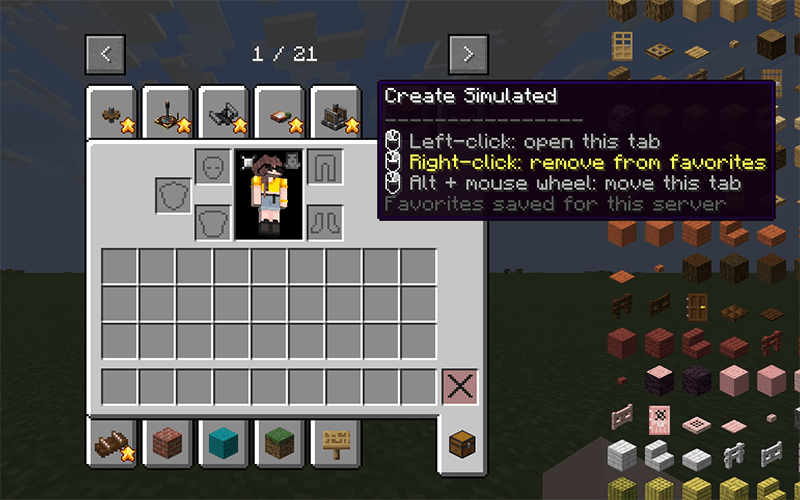
Creative Tab Optimizer is a client-side NeoForge mod for large creative inventories.
It adds global favorite tabs and caches creative tab contents after their first build to reduce later loading times.
Features:
- Add or remove favorites with right-click
- Reorder favorites with Alt + mouse wheel
- Share favorites across all servers and singleplayer worlds
- Move favorite tabs to the front of the creative inventory
- Cache complete creative tab contents
- Improve switching between a creative tab and the inventory tab
- Report slow tabs and mod namespaces in the client log
- Support optional JEI 19.53.x, JEIOptimizer, and ModernFix
- Clear invalid caches after reloads and disconnections
- Fall back to normal Minecraft behavior if the cached data cannot be used
How it works:
The first tab build runs normally on the client thread. The mod stores an immutable snapshot of the generated items and reuses it only when the server context, registries, permissions, feature flags, and reload state match.
Tab generators are never parallelized. Only safe operations on already generated data, such as indexing and deduplication, may run outside the client thread.
The mod is client-side only. It does not need to be installed on the server.
Platform: NeoForge/forge/fabric 1.21.1.
Project description from CurseForge.
Pick your setup
Creative Tab Optimizer by Minecraft version and loader
Choose the version and loader you play, then open the matching release.
Check the dependencies, then try the file in a copied instance before changing a world you care about.
Recent files
Creative Tab Optimizer versions and loaders
creative_tab_optimizer-fabric-1.21.1-0.1.7.jar
23 Sept 2026
Client Source doesn’t say Server Source doesn’t say Dependencies No extras listed Listed on Release listing
Check the 1.21.1 · Fabric setup Fabric1.21.1 release
creative_tab_optimizer-forge-1.21.1-0.1.7.jar
23 Sept 2026
Client Source doesn’t say Server Source doesn’t say Dependencies No extras listed Listed on Release listing
Check the 1.21.1 · Forge setup Forge1.21.1 release
creative_tab_optimizer-neoforge-1.21.1-0.1.7.jar
23 Sept 2026
Client Source doesn’t say Server Source doesn’t say Dependencies No extras listed Listed on Release listing
Check the 1.21.1 · NeoForge setup 1.21.1NeoForge release
Looking for an older file? The official CurseForge project page is in Resources.
 mod
mod CurseForge · Minecraft
Look Info
A compact in-world info panel for blocks and entities, with visual machine progress and per-target controls.
 mod
mod CurseForge · Minecraft
Kestramon Onboarding
A guided first-launch setup screen that picks your keybinds, video quality, audio and shader settings for you, with a custom loading screen and title screen.
 mod
mod CurseForge · Minecraft
FermiumBooter
A simplistic mixin mod utility for loading early and late mixins