Minecraft version
Back to mods 
CurseForge · Minecraft mod
MultiScreen X-ray
MultiScreen X-ray adds up to eight independent X-ray windows beside your normal Minecraft view.
Choose a version Pick your version below, then grab the matching file.
Quick answer
Which MultiScreen X-ray release should I use?
Latest stable file multiscreenxray-neoforge-26.3-1.0.2.jar
Game version 26.3
Loader NeoForge
MultiScreen X-ray multiscreenxray-neoforge-26.3-1.0.2.jar targets 26.3 with NeoForge. The project page does not say whether this file belongs on the client, dedicated server, or both. No extra mods listed for this file.
Where it goes
Is MultiScreen X-ray required on the client, server, or both?
The project page does not say whether this file belongs on the client, dedicated server, or both.
Client Source doesn’t say
Dedicated server Source doesn’t say
Loader for this release NeoForge
Required install it here Optional supported, not mandatory Not supported do not install here Source doesn’t say do not assume
The source does not explicitly classify this release as client-only or server-only.
What else does MultiScreen X-ray multiscreenxray-neoforge-26.3-1.0.2.jar need?
multiscreenxray-neoforge-26.3-1.0.2.jar. Change the file and its required mods may change too.
This file does not list any required mods. Do not add a library just because a different file uses it.
This file does not list any required or optional mods.
Before you install it
Add MultiScreen X-ray without breaking your instance.
Built for MultiScreen X-ray multiscreenxray-neoforge-26.3-1.0.2.jar. Pick another file and the loader, install side or required mods may change.
- 01
Stick to this file
Use multiscreenxray-neoforge-26.3-1.0.2.jar. It targets 26.3 with NeoForge; another release may have different loader, side or dependency requirements.
- 02
Bring the mods it needs
This file does not list any required mods. Do not add a library just because a different file uses it.
- 03
Put it on the correct side
The project page does not say whether this file belongs on the client, dedicated server, or both.
- 04
Pick the file you checked
Use the “Get this file” button beside multiscreenxray-neoforge-26.3-1.0.2.jar. It opens that exact file at the source.
About this project
What does MultiScreen X-ray add?
MultiScreen X-ray
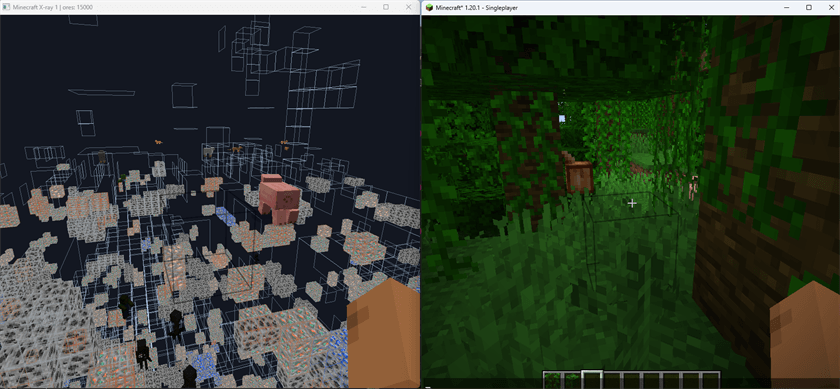
MultiScreen X-ray adds up to eight independent X-ray windows beside your normal Minecraft view. Each window can use a different block list, entity list, preset, visual style, scan range, size, and position.
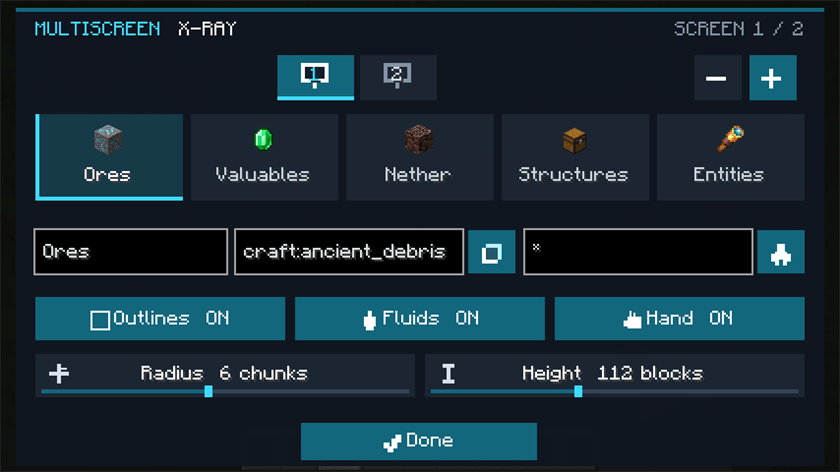
Use the modern in-game settings screen to browse blocks and entities by icon and name, search registry entries, select common tags, or enter modded IDs directly. Built-in presets cover ores, valuables, Nether targets, structures, and entities.
Controls: F8 adds a window, Shift+F8 removes one, and F9 opens settings.
The mod runs entirely on the client and works in singleplayer and multiplayer. Server anti X-ray systems may limit hidden block data. Follow each server's rules.
Project description from CurseForge.
Pick your setup
MultiScreen X-ray by Minecraft version and loader
Choose the version and loader you play, then open the matching release.
Minecraft version
26.2
2 loader buildsMinecraft version
1.21.11
3 loader buildsMinecraft version
1.21.1
3 loader buildsMinecraft version
1.20.4
3 loader buildsMinecraft version
1.20.1
2 loader buildsCheck the dependencies, then try the file in a copied instance before changing a world you care about.
Recent files
MultiScreen X-ray versions and loaders
multiscreenxray-neoforge-26.3-1.0.2.jar
25 Sept 2026
Client Source doesn’t say Server Source doesn’t say Dependencies No extras listed Listed on Release listing
Check the 26.3 · NeoForge setup NeoForge26.3 release
multiscreenxray-fabric-26.3-1.0.2.jar
25 Sept 2026
Client Source doesn’t say Server Source doesn’t say Dependencies 1 required · 1 unchecked Listed on Release listing
Check the 26.3 · Fabric setup Fabric26.3 release
multiscreenxray-neoforge-26.2-1.0.2.jar
25 Sept 2026
Client Source doesn’t say Server Source doesn’t say Dependencies No extras listed Listed on Release listing
Check the 26.2 · NeoForge setup NeoForge26.2 release
multiscreenxray-fabric-26.2-1.0.2.jar
25 Sept 2026
Client Source doesn’t say Server Source doesn’t say Dependencies 1 required · 1 unchecked Listed on Release listing
Check the 26.2 · Fabric setup Fabric26.2 release
multiscreenxray-neoforge-1.21.11-1.0.2.jar
23 Sept 2026
Client Source doesn’t say Server Source doesn’t say Dependencies No extras listed Listed on Release listing
Check the 1.21.11 · NeoForge setup NeoForge1.21.11 release
multiscreenxray-forge-1.21.11-1.0.2.jar
23 Sept 2026
Client Source doesn’t say Server Source doesn’t say Dependencies No extras listed Listed on Release listing
Check the 1.21.11 · Forge setup Forge1.21.11 release
multiscreenxray-fabric-1.21.11-1.0.2.jar
23 Sept 2026
Client Source doesn’t say Server Source doesn’t say Dependencies 1 required · 1 unchecked Listed on Release listing
Check the 1.21.11 · Fabric setup Fabric1.21.11 release
multiscreenxray-neoforge-1.21.1-1.0.2.jar
23 Sept 2026
Client Source doesn’t say Server Source doesn’t say Dependencies No extras listed Listed on Release listing
Check the 1.21.1 · NeoForge setup 1.21.1NeoForge release
multiscreenxray-forge-1.21.1-1.0.2.jar
23 Sept 2026
Client Source doesn’t say Server Source doesn’t say Dependencies No extras listed Listed on Release listing
Check the 1.21.1 · Forge setup Forge1.21.1 release
multiscreenxray-fabric-1.21.1-1.0.2.jar
23 Sept 2026
Client Source doesn’t say Server Source doesn’t say Dependencies 1 required · 1 unchecked Listed on Release listing
Check the 1.21.1 · Fabric setup Fabric1.21.1 release
multiscreenxray-fabric-1.20.4-1.0.2.jar
23 Sept 2026
Client Source doesn’t say Server Source doesn’t say Dependencies 1 required · 1 unchecked Listed on Release listing
Check the 1.20.4 · Fabric setup Fabric1.20.4 release
multiscreenxray-neoforge-1.20.4-1.0.2.jar
23 Sept 2026
Client Source doesn’t say Server Source doesn’t say Dependencies No extras listed Listed on Release listing
Check the 1.20.4 · NeoForge setup 1.20.4NeoForge release
Looking for an older file? The official CurseForge project page is in Resources.
 mod
CurseForge + Modrinth · Minecraft
Immersive Farming
Addon for immersive engineering focused on agriculture by adding new mechanics and blocks.
 mod
CurseForge + Modrinth · Minecraft
Lost Loot Upgraded
Saves despawned items so players can fish them up or brush them out of suspicious sand/gravel. With admin tools and optional filters and limits.
 mod
CurseForge · Minecraft
Re:Magic - Yet another Magic System
A mod that adds Re:Zero Magic System to minecraft!