
Minecraft version
Back to mods 
CurseForge · Minecraft mod
Photo Album Camera
Capture your adventures with a vintage instant camera and store your photos, maps, and journal notes in an elegant keepsake album!
Choose a version Pick your version below, then grab the matching file.
Quick answer
Which Photo Album Camera release should I use?
Latest stable file PAC v1.4.2 Mc 26.3
Game version 26.3
Loader Fabric
Photo Album Camera PAC v1.4.2 Mc 26.3 targets 26.3 with Fabric. The project page does not say whether this file belongs on the client, dedicated server, or both. No extra mods listed for this file.
Where it goes
Is Photo Album Camera required on the client, server, or both?
The project page does not say whether this file belongs on the client, dedicated server, or both.
Client Source doesn’t say
Dedicated server Source doesn’t say
Loader for this release Fabric
Required install it here Optional supported, not mandatory Not supported do not install here Source doesn’t say do not assume
The source does not explicitly classify this release as client-only or server-only.
What else does Photo Album Camera PAC v1.4.2 Mc 26.3 need?
PAC v1.4.2 Mc 26.3. Change the file and its required mods may change too.
This file does not list any required mods. Do not add a library just because a different file uses it.
This file does not list any required or optional mods.
Before you install it
Add Photo Album Camera without breaking your instance.
Built for Photo Album Camera PAC v1.4.2 Mc 26.3. Pick another file and the loader, install side or required mods may change.
- 01
Stick to this file
Use PAC v1.4.2 Mc 26.3. It targets 26.3 with Fabric; another release may have different loader, side or dependency requirements.
- 02
Bring the mods it needs
This file does not list any required mods. Do not add a library just because a different file uses it.
- 03
Put it on the correct side
The project page does not say whether this file belongs on the client, dedicated server, or both.
- 04
Pick the file you checked
Use the “Get this file” button beside PAC v1.4.2 Mc 26.3. It opens that exact file at the source.
About this project
What does Photo Album Camera add?
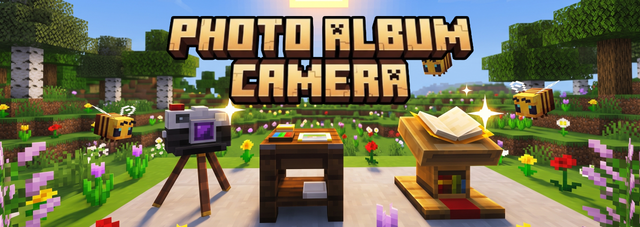



Stop losing your F2 screenshots in an unsorted folder!
Photo Album Camera brings physical photography to your survival world: take photos, set up the camera on a block for group shots, develop and retouch your prints in a darkroom studio, and showcase your albums on a lectern.

📸 Features
1. The Instant Camera & Viewfinder
- Viewfinder & Framing: Hold Right-Click to look through the lens. Use WASD / Arrow Keys to adjust your framing.
- Zoom: Adjust focal length smoothly to capture landscapes or close-ups.
- Selfie Mode: Press F5 or Tab while aiming to flip the lens toward yourself.
- Flash System: Switch between AUTO, ON, and OFF. In AUTO, the camera senses darkness and illuminates dark caves and night scenes with real multiplayer light burst and particles.
- Print: Press SPACE to shoot. Prints directly onto a piece of Paper from your inventory.

2. Camera Placement & 10-Second Timer
Take group photos without leaving anyone behind:
- Placeable on Any Block: Hold your camera and Shift + Right-Click to set it down. Supports 16 rotation angles (just like player heads) to get the angle right.
- 10s Timer: Right-Click the placed camera while holding a piece of Paper (consumed on use) to start the countdown. Walk over, pose with your friends, and the camera takes the shot automatically.
- Pickup: Shift + Right-Click the placed camera anytime to pick it back up.

3. The Photo Studio
A dedicated workstation to develop and retouch your pictures:
- Adjustments: Modify Brightness, Contrast, Saturation, Temperature, Film Grain, and Vignetting.
- Filters: Cycle through Natural, Cyanotype, Retro, Sepia, Black & White, and Night Vision.
- Inspect & Reprint: Click any photo to preview it full-size on parchment, or spend a sheet of paper to print a revised copy.

4. The Photo Album
- 3 Tabs: Store your printed Photos, archive your Exploration Maps (with live previews), and write notes in your Travel Journal.
- Captions & Stamps: Click under any slot to write descriptions, record the current in-game day, or stamp your page.
- Lectern Sharing: Place your album on a Lectern so anyone on your server can flip through your travels.

5. In-Game Calibration & Privacy (ModMenu)
- Live Settings Preview: Uses your last shot as an instant preview inside the settings menu.
- Color Engines & Dithering: Choose between Oklab (natural tones) and RGB, and adjust dithering (Floyd-Steinberg, Blue Noise, Bayer) to your liking.
- SMP Privacy Mode: Hide X/Y/Z coordinates on prints so you don't leak secret base locations on multiplayer servers.
🛠️ Crafting Recipes
| Camera | Photo Album | Photo Studio Workstation |
|---|---|---|
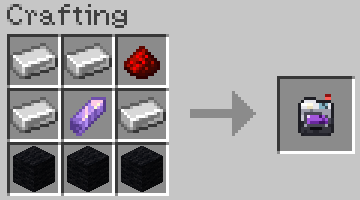 |
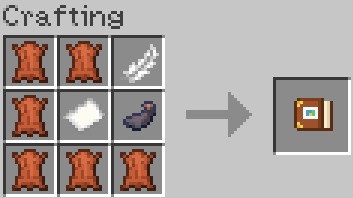 |
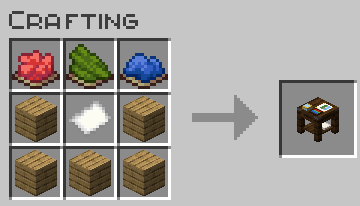 |
Note: Always keep Paper in your inventory — the camera needs it to print photos.
🎮 Quick Start
- Craft your Camera, Album, and keep some Paper in your inventory.
- Aim with Right-Click and shoot with SPACE (or Shift + Right-Click to place it on a block with the 10s timer).
- Bring your photo to the Photo Studio if you want to tweak colors, exposure, or apply filters.
- Place your prints in your Photo Album, write captions, and put it on a Lectern for other players to read!
⚙️ Requirements & Compatibility
- Minecraft: 1.21.11 | 26.3+
- Loader: Fabric
- Dependencies: Fabric API & Java 25+
- Multiplayer: Required on both client and server.
- As for version 1.21.11, it won't receive any future updates. It will remain on mod version 1.4.1, except for bug fixes.
☕ A Note from the Author
I’m an amateur developer and originally put this mod together simply because I really wanted these features for my own survival adventure. Since I don't have deep modding experience, I used AI tools to help me write the code and bring the mechanics to life.
It turned out to be super fun in my own world, so I decided to polish it up and share it with the community. If you run into any bugs or quirks, feel free to report them—I'm learning as I go!
Project description from CurseForge.
Pick your setup
Photo Album Camera by Minecraft version and loader
Choose the version and loader you play, then open the matching release.
Minecraft version
1.21.11
1 loader buildCheck the dependencies, then try the file in a copied instance before changing a world you care about.
Recent files
Photo Album Camera versions and loaders
PAC v1.4.2 Mc 26.3
photoalbum-1.4.2.jar
6 Oct 2026
Client Source doesn’t say Server Source doesn’t say Dependencies No extras listed Listed on Release listing
Check the 26.3 · Fabric setup Fabric26.3 release
PAC v1.4.2 Mc 1.21.11
photoalbum-1.21.11-1.4.2.jar
6 Oct 2026
Client Source doesn’t say Server Source doesn’t say Dependencies No extras listed Listed on Release listing
Check the 1.21.11 · Fabric setup Fabric1.21.11 release
PAC v1.4.1 Mc 1.21.11
photoalbum-1.21.11-1.4.1.jar
4 Oct 2026
Client Source doesn’t say Server Source doesn’t say Dependencies No extras listed Listed on Release listing
Check the 1.21.11 · Fabric setup Fabric1.21.11 release
PAC v1.4.1 Mc 26.3
photoalbum-1.4.1.jar
4 Oct 2026
Client Source doesn’t say Server Source doesn’t say Dependencies No extras listed Listed on Release listing
Check the 26.3 · Fabric setup Fabric26.3 release
Photo Album v1.3.0
photoalbum-1.3.0.jar
1 Oct 2026
Client Source doesn’t say Server Source doesn’t say Dependencies No extras listed Listed on Release listing
Check the 26.3 · Fabric setup Fabric26.3 release
Photo Album v1.2.0
photoalbum-1.2.0.jar
29 Sept 2026
Client Source doesn’t say Server Source doesn’t say Dependencies No extras listed Listed on Release listing
Check the 26.3 · Fabric setup Fabric26.3 release
Photo Album v1.1.1
photoalbum-1.1.1.jar
27 Sept 2026
Client Source doesn’t say Server Source doesn’t say Dependencies No extras listed Listed on Release listing
Check the 26.3 · Fabric setup Fabric26.3 release
Photo Album v1.1.0
photoalbum-1.1.0.jar
26 Sept 2026
Client Source doesn’t say Server Source doesn’t say Dependencies No extras listed Listed on Release listing
Check the 26.3 · Fabric setup Fabric26.3 release
Photo Album v1.0.0
PhotoAlbum-26.3.jar
24 Sept 2026
Client Source doesn’t say Server Source doesn’t say Dependencies No extras listed Listed on Release listing
Check the 26.3 · Fabric setup Fabric26.3 release
Looking for an older file? The official CurseForge project page is in Resources.