Quick answer
Which Smart workbench release should I use?
Latest stable file smart_workbench-1.5.0.jar
Game version 1.20.1
Loader Forge
Smart workbench smart_workbench-1.5.0.jar targets 1.20.1 with Forge. The project page does not say whether this file belongs on the client, dedicated server, or both. No extra mods listed for this file.
Where it goes
Is Smart workbench required on the client, server, or both?
The project page does not say whether this file belongs on the client, dedicated server, or both.
Client Source doesn’t say
Dedicated server Source doesn’t say
Loader for this release Forge
Required install it here Optional supported, not mandatory Not supported do not install here Source doesn’t say do not assume
The source does not explicitly classify this release as client-only or server-only.
What else does Smart workbench smart_workbench-1.5.0.jar need?
smart_workbench-1.5.0.jar. Change the file and its required mods may change too.
This file does not list any required mods. Do not add a library just because a different file uses it.
6 listed on this file 16 pulled in by those mods
Matching file found Matched file: sophisticatedstorage-1.20.1-1.5.0.2137.jar
Matching file found Matched file: [Forge 1.20(.1)] v12.1.785
Matching file found Matched file: 15.62.0.217 for Forge 1.20.1
EMI Optional for Smart workbench smart_workbench-1.5.0.jar optionalMatching file found Matched file: emi-1.1.24+1.20.1+forge
Polymorph Optional for Smart workbench smart_workbench-1.5.0.jar optionalMatching file found Matched file: polymorph-forge-0.49.11+1.20.1.jar
Matching file found Matched file: sophisticatedbackpacks-1.20.1-3.26.6.2176.jar
Matching file found Matched file: sophisticatedcore-1.20.1-1.5.2.2346.jar
Matching file found Matched file: craftingtweaks-forge-1.20.1-18.2.9.jar
Quark Needed by Sophisticated Storage pulled inMatching file found Matched file: Quark-4.0-462.jar
Matching file found Matched file: ItemBorders-1.20.1-forge-1.2.2.jar
Matching file found Matched file: trashslot-forge-1.20.1-15.1.5.jar
Chipped Needed by Sophisticated Storage pulled inMatching file found Matched file: [Forge] Chipped 3.0.7
Matching file found Matched file: [Forge 1.20(.1)] v11.1.136
Matching file found Matched file: [Forge 1.20.1] v12.0.93
Matching file found Matched file: [Forge 1.20(.1)] v9.2.14
Matching file found Matched file: MezzConfig GUI mc1.20.1-0.5.10 for Forge
Matching file found Matched file: MezzConfig 0.6.6 for Forge 1.20.1
Matching file found Matched file: curios-forge-5.14.1+1.20.1.jar
Balm Needed by Crafting Tweaks pulled inMatching file found Matched file: balm-forge-1.20.1-7.3.44.jar
Matching file found Matched file: Zeta-1.0-31.jar
Matching file found Matched file: [Forge] Resourceful Lib 2.1.29
Matching file found Matched file: [Forge] Athena 3.1.2
16
extra mods were pulled in by other dependencies.
Indented rows show who needs each one. We only count dependency files that match this setup. A file for another loader does not fill the gap.
Before you install it
Add Smart workbench without breaking your instance.
Built for Smart workbench smart_workbench-1.5.0.jar. Pick another file and the loader, install side or required mods may change.
- 01
Stick to this file
Use smart_workbench-1.5.0.jar. It targets 1.20.1 with Forge; another release may have different loader, side or dependency requirements.
- 02
Bring the mods it needs
This file does not list any required mods. Do not add a library just because a different file uses it.
- 03
Put it on the correct side
The project page does not say whether this file belongs on the client, dedicated server, or both.
- 04
Pick the file you checked
Use the “Get this file” button beside smart_workbench-1.5.0.jar. It opens that exact file at the source.
About this project
What does Smart workbench add?
Smart Workbench
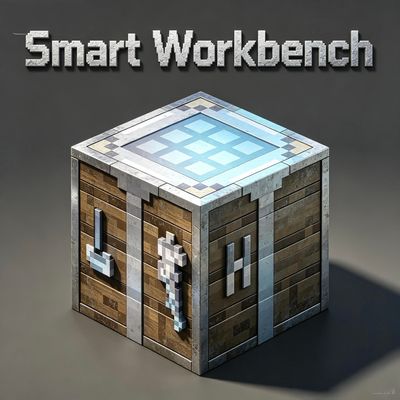
Smart Workbench is an advanced automation and quality-of-life crafting mod for Minecraft. It adds a fully functional smart workbench block that connects to your storage system, automates complex crafting processes, and supports AFK item production — drastically improving your crafting efficiency in survival and large-scale automation builds.
Features
Automatic Container Connection & GUI Crafting
The smart workbench can automatically detect and link nearby storage containers. Its built-in GUI displays all craftable items based on your stored resources. You can fill recipes instantly with materials from your linked chests without manually picking up or placing items.
Flexible Crafting Controls
- Left Click — Auto-fill materials into the crafting grid
- Shift + Left Click — Quick single craft
- Ctrl + Left Click — Batch continuous crafting
- Alt + Left Click — Set target item for AFK auto-crafting
Recursive Chain Crafting (Auto Craft Intermediate Items)
When crafting an item with missing ingredients, the workbench will automatically detect whether the missing materials can be crafted. After confirmation, it will recursively craft all required intermediate items automatically until you get your final product. No more tedious manual step-by-step crafting.
AFK Auto Crafting
Set a crafting target with Alt + Left Click, and the workbench will keep crafting continuously even when you leave the interface or move away. You can bind dedicated output containers to create fully automatic item production pipelines.
Wrench Binding System (Input / Output Separation)
Use the mod’s custom wrench to manually link containers. Press Shift + Right Click to switch binding modes between input container and output container. Separate your material supply and item output to build clean and stable automated systems.
Fully Customizable Range & Limits
All detection ranges and container limits are configurable:
- Container scan range: 5×5×5 (default) up to 50×50×50
- Max bound input/output containers: 1–50
- Player backpack detection range: 3×3×3 (default) up to 50×50×50
Sophisticated Backpacks Compatibility
This mod fully supports Sophisticated Backpacks. The smart workbench can read and use items from backpacks stored in linked chests, as well as backpacks worn or held by players inside the configurable range. Unify your chest storage and portable backpack resources for seamless crafting.
Full JEI / REI / EMI Support
Perfectly compatible with all mainstream recipe viewer mods. Inside the workbench GUI, you can open any recipe directly from JEI, REI or EMI and start crafting instantly. Look up recipes and craft in one place with zero extra operations.
Project description from CurseForge.
Pick your setup
Smart workbench by Minecraft version and loader
Choose the version and loader you play, then open the matching release.
Minecraft version
1.20.1
1
loader build Check the dependencies, then try the file in a copied instance before changing a world you care about.
Recent files
Smart workbench versions and loaders
 mod
mod mod
mod mod
mod