Minecraft version
Back to mods 
CurseForge · Minecraft mod
OreSense
OreSense adds one item, the Ore Sensor. It is a compass-style dial with a red needle, two indicator lamps for ore above or below you, a charge gauge, and a window that shows what you are looking for.
Choose a version Pick your version below, then grab the matching file.
Quick answer
Which OreSense release should I use?
Latest stable file OreSense 1.0.2 - 26.3 (NeoForge)
Game version 26.3
Loader NeoForge
OreSense 1.0.2 - 26.3 (NeoForge) targets 26.3 with NeoForge. The project page does not say whether this file belongs on the client, dedicated server, or both. No extra mods listed for this file.
Where it goes
Is OreSense required on the client, server, or both?
The project page does not say whether this file belongs on the client, dedicated server, or both.
Client Source doesn’t say
Dedicated server Source doesn’t say
Loader for this release NeoForge
Required install it here Optional supported, not mandatory Not supported do not install here Source doesn’t say do not assume
The source does not explicitly classify this release as client-only or server-only.
What else does OreSense 1.0.2 - 26.3 (NeoForge) need?
OreSense 1.0.2 - 26.3 (NeoForge). Change the file and its required mods may change too.
This file does not list any required mods. Do not add a library just because a different file uses it.
This file does not list any required or optional mods.
Before you install it
Add OreSense without breaking your instance.
Built for OreSense 1.0.2 - 26.3 (NeoForge). Pick another file and the loader, install side or required mods may change.
- 01
Stick to this file
Use OreSense 1.0.2 - 26.3 (NeoForge). It targets 26.3 with NeoForge; another release may have different loader, side or dependency requirements.
- 02
Bring the mods it needs
This file does not list any required mods. Do not add a library just because a different file uses it.
- 03
Put it on the correct side
The project page does not say whether this file belongs on the client, dedicated server, or both.
- 04
Pick the file you checked
Use the “Get this file” button beside OreSense 1.0.2 - 26.3 (NeoForge). It opens that exact file at the source.
About this project
What does OreSense add?
OreSense
A prospecting compass powered by amethyst shards.
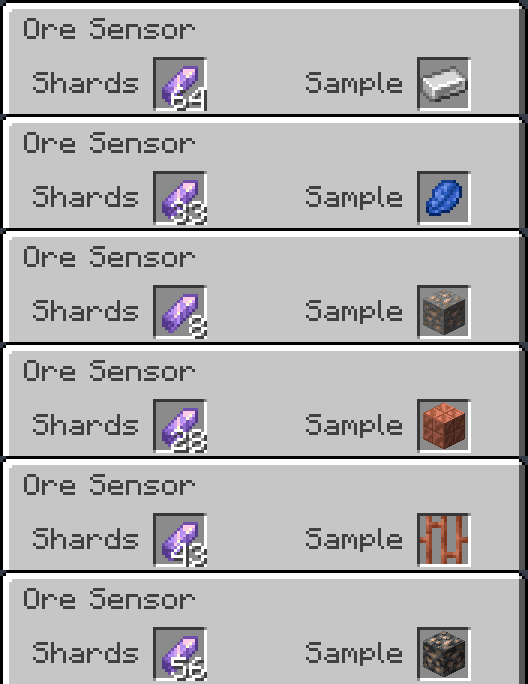
Tune the Ore Sensor with a sample, load it with amethyst shards, and follow the needle to the vein. Samples can be ore blocks, their drops, or items made purely from that material.
Available for Forge, Fabric, Quilt, and NeoForge. Current mod version: 1.0.2.
Features
- A compass-style dial at vanilla pixel scale, with a red needle, above/below lamps, a charge gauge, and a window showing your sample.
- Find coal, copper, iron, gold, redstone, lapis, diamond, emerald, quartz, ancient debris, and amethyst geodes—including deepslate and Nether ore variants where available.
- Use samples such as ingots, nuggets, storage blocks, raw ore blocks, cut copper, netherite scrap, and amethyst shards. Mixed-material recipes, such as pickaxes and golden apples, are not followed.
- Supports modded ores through the ore tags used by each loader, with samples discovered from their drops and recipes.
- Hold up to 64 amethyst shards. The gently pulsing charge gauge shows your remaining charge even when the Sample slot is empty.
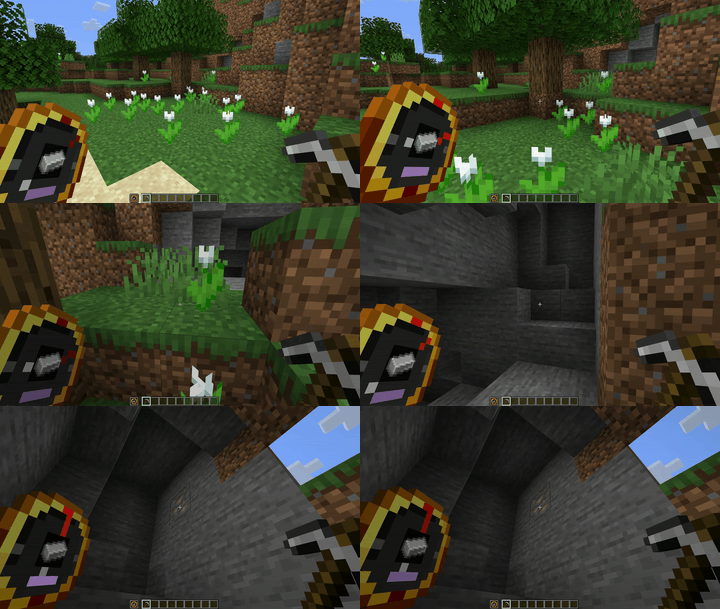
- The needle pulses faster as you approach a vein. Indicator lamps show whether it is above or below you, and cyan sonar rings show the sensor is searching.
- Data-pack friendly: add your own item-to-block targets under data/<namespace>/sample_aliases/.
How to use it
- Tune it: Right-click to open the sensor and place a sample in the Sample slot.
- Charge it: Put amethyst shards in the Shards slot.
- Follow it: Hold the sensor in either hand. A chime announces a lock, and the needle points toward the vein.
- Mine it: Swap to your pickaxe—the lock stays while the sensor is in your inventory. Mining the first block spends one shard; the remaining blocks in that lock cost no additional charge.
- Skip it: Sneak-right-click to release a lock and search for another vein. Releasing within four blocks spends one shard if that lock has not already been paid for.
Spending about ten seconds outside scan range releases the lock without spending another shard. Creative mode never consumes charges.
Recipe
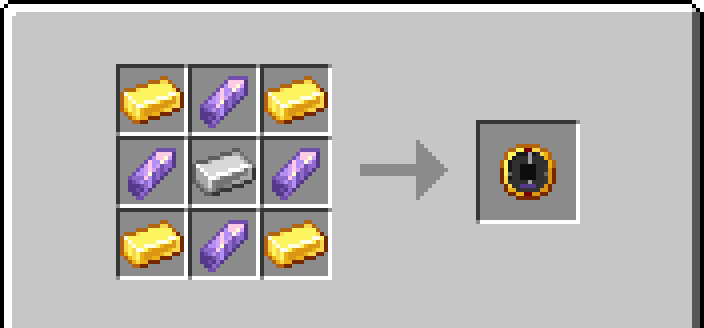
Four gold ingots, four amethyst shards, and one iron ingot.
Place gold ingots in the corners, amethyst shards on the edges, and an iron ingot in the middle. The recipe unlocks when you pick up an amethyst shard.
Supported versions
| Loader | Minecraft versions |
|---|---|
| Forge | 1.17.1–26.3, except 1.20.5 and 1.21.2 |
| Fabric | Every stable release from 1.17–26.3 |
| Quilt | Every stable release from 1.17–26.3 |
| NeoForge | Every stable release from 1.20.1–26.3 |
Download the file for your exact Minecraft version and loader. Each combination has its own build. Snapshots and Minecraft pre-releases are excluded.
Requirements
- Install OreSense on both the client and server.
- Fabric and Quilt require Fabric API for the same Minecraft version.
- Quilt builds for 1.17, 1.17.1, 1.18, and 1.18.1 require exactly Quilt Loader 0.26.4. Later Quilt builds require 0.30.1 or newer.
- Check each file’s release notes for its specific loader and dependency requirements.
Configuration
Configuration files are created on first launch:
| Loader | Configuration file |
|---|---|
| Forge / NeoForge | config/oresense-common.toml |
| Fabric / Quilt | config/oresense.json |
Adjust scan range, scan interval, optional text readings, and whether samples must point to ores.
The default scan range is 32 blocks horizontally and 16 blocks vertically.
Restart after editing. In multiplayer, the server configuration controls scanning and the optional text readings.
Links
Project description from CurseForge.
Pick your setup
OreSense by Minecraft version and loader
Choose the version and loader you play, then open the matching release.
Minecraft version
26.2
2 loader buildsMinecraft version
26.1.2
2 loader buildsMinecraft version
26.1.1
2 loader buildsMinecraft version
26.1
2 loader buildsMinecraft version
1.21.11
2 loader buildsMinecraft version
1.21.10
2 loader buildsMinecraft version
1.21.9
2 loader buildsMinecraft version
1.21.8
2 loader buildsMinecraft version
1.21.7
2 loader buildsMinecraft version
1.21.6
2 loader buildsMinecraft version
1.21.5
2 loader buildsShowing the newest 12 of 27 game versions. Older files are in the list below.
Check the dependencies, then try the file in a copied instance before changing a world you care about.
Recent files
OreSense versions and loaders
OreSense 1.0.2 - 26.3 (NeoForge)
oresense-neoforge-26.3-1.0.2.jar
9 Oct 2026
Client Source doesn’t say Server Source doesn’t say Dependencies No extras listed Listed on Release listing
Check the 26.3 · NeoForge setup NeoForge26.3 release
OreSense 1.0.2 - 26.2 (NeoForge)
oresense-neoforge-26.2-1.0.2.jar
9 Oct 2026
Client Source doesn’t say Server Source doesn’t say Dependencies No extras listed Listed on Release listing
Check the 26.2 · NeoForge setup NeoForge26.2 release
OreSense 1.0.2 - 26.1.2 (NeoForge)
oresense-neoforge-26.1.2-1.0.2.jar
9 Oct 2026
Client Source doesn’t say Server Source doesn’t say Dependencies No extras listed Listed on Release listing
Check the 26.1.2 · NeoForge setup NeoForge26.1.2 release
OreSense 1.0.2 - 26.1.1 (NeoForge)
oresense-neoforge-26.1.1-1.0.2.jar
9 Oct 2026
Client Source doesn’t say Server Source doesn’t say Dependencies No extras listed Listed on Release listing
Check the 26.1.1 · NeoForge setup NeoForge26.1.1 release
OreSense 1.0.2 - 26.1 (NeoForge)
oresense-neoforge-26.1-1.0.2.jar
9 Oct 2026
Client Source doesn’t say Server Source doesn’t say Dependencies No extras listed Listed on Release listing
Check the 26.1 · NeoForge setup NeoForge26.1 release
OreSense 1.0.2 - 26.3 (Quilt)
oresense-quilt-26.3-1.0.2.jar
9 Oct 2026
Client Source doesn’t say Server Source doesn’t say Dependencies 1 required · 1 unchecked Listed on Release listing
Check the 26.3 · Quilt setup Quilt26.3 release
OreSense 1.0.2 - 26.2 (Quilt)
oresense-quilt-26.2-1.0.2.jar
9 Oct 2026
Client Source doesn’t say Server Source doesn’t say Dependencies 1 required · 1 unchecked Listed on Release listing
Check the 26.2 · Quilt setup Quilt26.2 release
OreSense 1.0.2 - 26.1.2 (Quilt)
oresense-quilt-26.1.2-1.0.2.jar
9 Oct 2026
Client Source doesn’t say Server Source doesn’t say Dependencies 1 required · 1 unchecked Listed on Release listing
Check the 26.1.2 · Quilt setup Quilt26.1.2 release
OreSense 1.0.2 - 26.1.1 (Quilt)
oresense-quilt-26.1.1-1.0.2.jar
9 Oct 2026
Client Source doesn’t say Server Source doesn’t say Dependencies 1 required · 1 unchecked Listed on Release listing
Check the 26.1.1 · Quilt setup Quilt26.1.1 release
OreSense 1.0.2 - 26.1 (Quilt)
oresense-quilt-26.1-1.0.2.jar
9 Oct 2026
Client Source doesn’t say Server Source doesn’t say Dependencies 1 required · 1 unchecked Listed on Release listing
Check the 26.1 · Quilt setup Quilt26.1 release
OreSense 1.0.2 - 1.21.11 (NeoForge)
oresense-neoforge-1.21.11-1.0.2.jar
9 Oct 2026
Client Source doesn’t say Server Source doesn’t say Dependencies No extras listed Listed on Release listing
Check the 1.21.11 · NeoForge setup NeoForge1.21.11 release
OreSense 1.0.2 - 1.21.10 (NeoForge)
oresense-neoforge-1.21.10-1.0.2.jar
9 Oct 2026
Client Source doesn’t say Server Source doesn’t say Dependencies No extras listed Listed on Release listing
Check the 1.21.10 · NeoForge setup NeoForge1.21.10 release
Looking for an older file? The official CurseForge project page is in Resources.
 mod
mod CurseForge · Minecraft
Polis
A registry for land, contracts, money and a court - it records what players do and never prevents it.
 mod
mod CurseForge · Minecraft
Sonaris
SONARIS is a horror mod for Minecraft that replaces ordinary vision with lidar scanning. Explore the darkness, map the unknown, and uncover strange anomalies. Every scan reveals more of the world — but something might be listening.
 mod
mod CurseForge · Minecraft
Tick Weave
An experimental multicore entity mod, aimed at easing server lag when worlds have many mobs and players.