Minecraft version
Back to mods 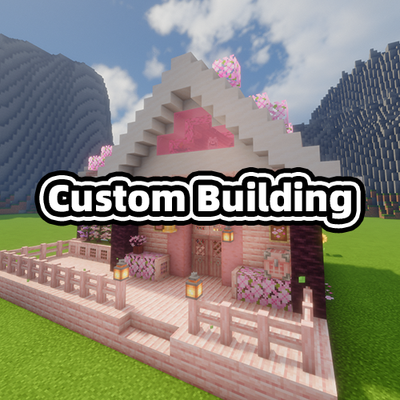
CurseForge · Minecraft mod
Plume's Custom Building
Create your own building blueprint items from a datapack: structure, preview image, item texture, display name and tooltip.
Choose a version Pick your version below, then grab the matching file.
Quick answer
Which Plume's Custom Building release should I use?
Latest stable file custom_building-1.20.1-1.0.1.jar
Game version 1.20.1
Loader Forge
Plume's Custom Building custom_building-1.20.1-1.0.1.jar targets 1.20.1 with Forge. The project page does not say whether this file belongs on the client, dedicated server, or both. No extra mods listed for this file.
Where it goes
Is Plume's Custom Building required on the client, server, or both?
The project page does not say whether this file belongs on the client, dedicated server, or both.
Client Source doesn’t say
Dedicated server Source doesn’t say
Loader for this release Forge
Required install it here Optional supported, not mandatory Not supported do not install here Source doesn’t say do not assume
The source does not explicitly classify this release as client-only or server-only.
What else does Plume's Custom Building custom_building-1.20.1-1.0.1.jar need?
custom_building-1.20.1-1.0.1.jar. Change the file and its required mods may change too.
This file does not list any required mods. Do not add a library just because a different file uses it.
This file does not list any required or optional mods.
Before you install it
Add Plume's Custom Building without breaking your instance.
Built for Plume's Custom Building custom_building-1.20.1-1.0.1.jar. Pick another file and the loader, install side or required mods may change.
- 01
Stick to this file
Use custom_building-1.20.1-1.0.1.jar. It targets 1.20.1 with Forge; another release may have different loader, side or dependency requirements.
- 02
Bring the mods it needs
This file does not list any required mods. Do not add a library just because a different file uses it.
- 03
Put it on the correct side
The project page does not say whether this file belongs on the client, dedicated server, or both.
- 04
Pick the file you checked
Use the “Get this file” button beside custom_building-1.20.1-1.0.1.jar. It opens that exact file at the source.
About this project
What does Plume's Custom Building add?
Custom Building
Create your own building blueprint items entirely from a datapack. One JSON file describes a structure, its preview image, its item texture, its name and its tooltips - reload the datapack and the blueprint shows up in its own creative tab, ready to be placed in the world.
No resource pack, no model files, no code: if you can write a datapack, you can add a building.
Features
- Fully data driven blueprints - structure, preview image, item texture, display name and tooltip all come from a single file under
data/<namespace>/custom_building/blueprint/. - Appears right after
/reload- no game restart, no resource pack. - A proper building panel, copied from MC-Prefab: a control panel on the left, the preview image on the right, Preview / Cancel / Build along the bottom.
- Choose the orientation before you build - cycle 北/东/南/西 and the panel remembers the last orientation you used.
- A translucent ghost preview in the world, rendered with the same technique Litematica uses: per section vertex buffers, unlit quads at full brightness, drawn through the translucent block layer at 0.5 alpha. What you see is exactly what gets placed.
- Left click cancels the preview.
- Right click builds it right where the ghost stands.
- Sneak + mouse wheel turns it in place.
- Sensible failure messages, yellow, worded like MC-Prefab's: protected blocks, unbreakable blocks, spawn protection, missing structure file. Success is reported in green with a chime.
- Forgiving texture paths - five different spellings of the same path all work,
textures/and.pngare added when missing, and an unconfigured texture falls back to the bundled default blueprint icon. - Forgiving structures - block ids this version does not know (a block from an optional mod, or one that was renamed) become air instead of breaking the whole blueprint, and are listed once in the log.
- Names and tooltips accept translation keys or plain text, including legacy
§colour codes. - Works on dedicated servers - the structure is streamed to each client on demand, so the preview works even though the client never sees the datapack.
- A written, in-game guide ships inside the creative tab, signed by the author.
- A built-in example (the initial house) so the tab is never empty.
Requirements
| Minecraft | Loader | Java | Download |
|---|---|---|---|
| 1.21.1 | NeoForge 21.1+ | 21 | custom_building-1.21.1-*.jar |
| 1.20.1 | Forge 47+ | 17 | custom_building-1.20.1-*.jar |
Client and server both need the mod for the preview and the build panel. Everything the mod adds is server-authoritative: the server decides what is built, the client only renders.
Datapack reference
Where the files go
data/<namespace>/custom_building/blueprint/<name>.json     the blueprint definition
data/<namespace>/structure/<name>.nbt                      the structure to build
assets/<namespace>/textures/...                            the preview image and the item texture
The blueprint id is <namespace>:<name>, for example custom_building:initial_house. A non-JSON template file (blueprint_template.txt) ships next to the built-in example and is never parsed - copy it, rename the copy to .json and edit it.
The definition
{
    "structure": "custom_building:initial_house",
    "preview":   "assets/custom_building/textures/blueprint/initial_house.png",
    "texture":   "assets/custom_building/textures/item/initial_house.png",
    "name":      "§6初始小屋蓝图",
    "tooltip":   ["§a右键地面来使用"]
}
| field | required | meaning |
|---|---|---|
structure |
yes | structure template id. A bare name is resolved against the namespace of the file. |
preview |
no | image shown while hovering the item; always stretched into a 4:3 box. |
texture |
no | inventory texture. Empty, missing or default uses the bundled blueprint icon. |
name |
no | item name - a translation key, or plain text with § colour codes. Defaults to the id. |
tooltip |
no | one string or an array of strings, same rules as name. |
Texture paths are forgiving; all of these mean the same file:
custom_building:textures/item/initial_house.png            full resource location
assets/custom_building/textures/item/initial_house.png     the path as it appears in the jar
textures/item/initial_house.png                            relative to the file's namespace
item/initial_house.png                                     "textures/" is added for you
item/initial_house                                         ".png" is added for you
Building a structure
Put a structure in the world, save it with a structure block (or any tool that writes vanilla structure/*.nbt), and drop the file into data/<namespace>/structure/. The blueprint builds it facing south; the panel rotates it from there.
Using it in game
- Right-click the ground with a blueprint. The building panel opens.
- Pick the orientation on the left (朝向 / Facing), check the preview image on the right.
- Press 预览! / Preview! to place a translucent ghost in the world, then:
- left click to cancel,
- right click to build it,
- sneak + mouse wheel to turn it. Or press 建造! / Build! straight away.
- Success is reported in chat; survival consumes one blueprint, creative does not.
Notes and limits
- All blueprints share one item id (
custom_building:blueprint). Minecraft freezes its item registry at startup, so an item per blueprint is impossible; instead each stack carries the blueprint it belongs to and the creative tab, name, tooltip, texture and behaviour all follow from that. In practice you get distinct items in the tab, and adding or removing blueprints never breaks existing items. - Preview meshes are capped at 60,000 blocks per structure. Larger structures still build, they just do not get a ghost.
- A structure whose bounding box contains air will clear that space, exactly like a vanilla structure block.
- The built-in example is a vanilla-only cottage so it renders in full on every supported version.
Credits and permissions
- Mod by Plume Jade.
- Building panel, its textures and the placement messages are modelled on MC-Prefab by WuestMan (MIT).
- The ghost preview rendering technique follows Litematica by masa.
- You may include this mod in modpacks, and edit the bundled example datapack as you like.
Project description from CurseForge.
Pick your setup
Plume's Custom Building by Minecraft version and loader
Choose the version and loader you play, then open the matching release.
Minecraft version
1.20.1
1 loader buildCheck the dependencies, then try the file in a copied instance before changing a world you care about.
Recent files
Plume's Custom Building versions and loaders
custom_building-1.20.1-1.0.1.jar
26 Sept 2026
Client Source doesn’t say Server Source doesn’t say Dependencies No extras listed Listed on Release listing
Check the 1.20.1 · Forge setup 1.20.1Forge release
custom_building-1.21.1-1.0.1.jar
26 Sept 2026
Client Source doesn’t say Server Source doesn’t say Dependencies No extras listed Listed on Release listing
Check the 1.21.1 · NeoForge setup 1.21.1NeoForge release
custom_building-1.21.1-1.0.0.jar
24 Sept 2026
Client Source doesn’t say Server Source doesn’t say Dependencies No extras listed Listed on Release listing
Check the 1.21.1 · NeoForge setup 1.21.1NeoForge release
custom_building-1.20.1-1.0.0.jar
24 Sept 2026
Client Source doesn’t say Server Source doesn’t say Dependencies No extras listed Listed on Release listing
Check the 1.20.1 · Forge setup 1.20.1Forge release
Looking for an older file? The official CurseForge project page is in Resources.
 mod
CurseForge + Modrinth · Minecraft
lwjgl3ify
Run Minecraft 1.7.10 using LWJGL3 and Modern Java (17 and newer)
 mod
CurseForge + Modrinth · Minecraft
Just Enough Backups (JEB)
Backup mod that keeps your worlds safe with automatic and manual backups, with an easy in-game UI to create, manage, and restore them.
 mod
CurseForge · Minecraft
Phoenix Domains
An easy to use Claims mod to manage player's interactions with the world.