Fabric API Needed by Legacy Bugs v1.3.0
requiredMatching file found Matched file: 0.166.2+26.3

CurseForge · Minecraft mod
Restores selected historical Minecraft bugs as accurately as possible.
Quick answer
Legacy Bugs v1.3.0 targets 26.3 with Fabric. The project page does not say whether this file belongs on the client, dedicated server, or both. All 1 required mods have matching files.
Where it goes
The project page does not say whether this file belongs on the client, dedicated server, or both.
The source does not explicitly classify this release as client-only or server-only.
Legacy Bugs v1.3.0. Change the file and its required mods may change too.
Install Fabric API first. We found matching files for this game-version and loader setup. 1 comes through another mod in the chain.
1 extra mod was pulled in by another dependency. Indented rows show who needs each one. We only count dependency files that match this setup. A file for another loader does not fill the gap.
Before you install it
Built for Legacy Bugs v1.3.0. Pick another file and the loader, install side or required mods may change.
Use Legacy Bugs v1.3.0. It targets 26.3 with Fabric; another release may have different loader, side or dependency requirements.
Install Fabric API first. We found matching files for this game-version and loader setup. 1 comes through another mod in the chain.
The project page does not say whether this file belongs on the client, dedicated server, or both.
Use the “Get this file” button beside Legacy Bugs v1.3.0. It opens that exact file at the source.
About this project
Legacy Bugs is a research-based Fabric mod that restores selected historical Minecraft bugs as accurately as possible.
Rather than simply imitating old glitches, each bug is researched from its original snapshot behavior, documented, tested, and carefully reimplemented for modern Minecraft.
The main development target is Minecraft Java Edition 26.2, using Java 25. A separate branch is maintained for Minecraft Java Edition 1.21.11, using Java 21. Compatibility with other Minecraft versions is not guaranteed because updates can change internal classes, methods, mappings, Fabric APIs, networking behavior, or Mixin targets.
Original snapshot: 24w11a
Status: Implemented / Tested
This bug was introduced during the Item Data Components refactoring in snapshot 24w11a. It restores the historical grindstone behavior where enchantments from the second input item can be copied into the first input item under specific conditions. This can produce an illegally merged enchanted item, including combinations of normally incompatible enchantments.
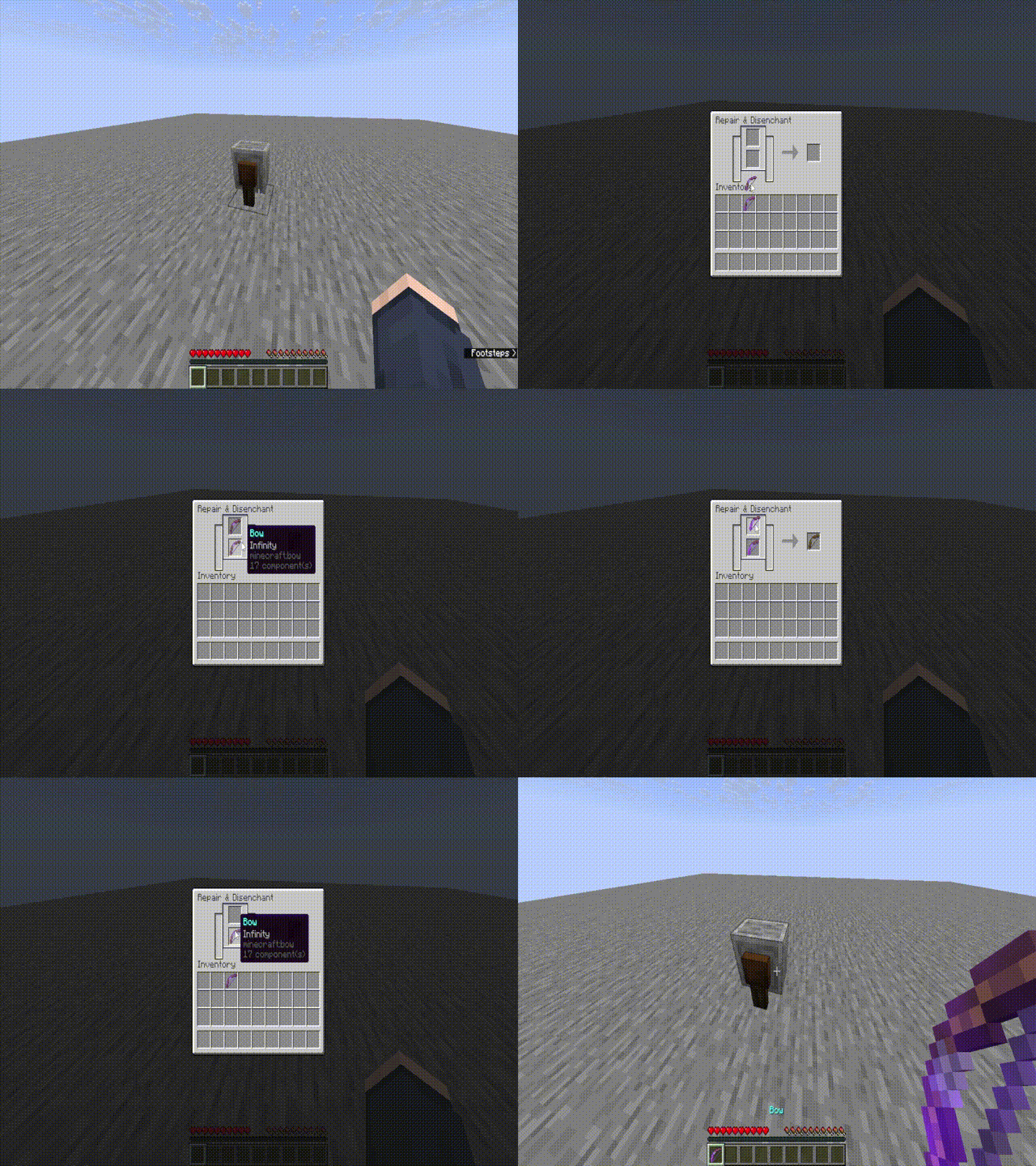
Confirmed behavior:
Confirmed test examples:
Original snapshot: 24w18a
Status: Implemented / Tested
This bug restores the crafting-remainder behavior found in snapshot 24w18a. When a recipe is positioned away from the top-left corner of the crafting grid, remaining items can be returned to the wrong crafting-grid position.
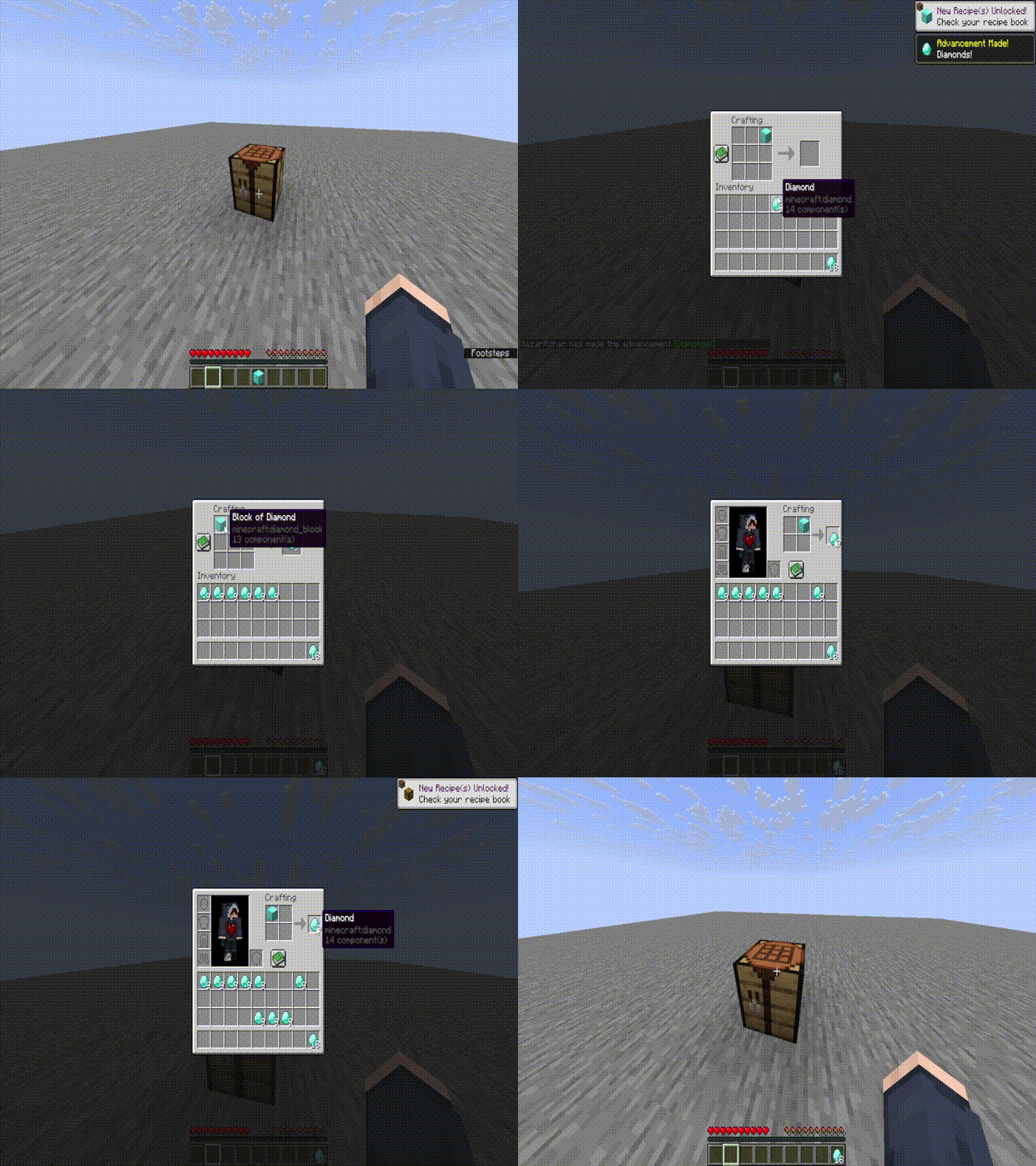
Confirmed behavior:
Confirmed test examples:
Relevant implementation areas:
ResultSlot.onTakeCraftingInput.PositionedgetRemainingItemsLegacy Bugs includes an in-game configuration screen for controlling the mod without manually editing the configuration file.
The configuration screen includes:
TRUE or FALSE.Default keybind: -. The keybind can be assigned or changed in Minecraft's Controls / Key Binds menu.
In singleplayer worlds, the world owner can change Legacy Bugs settings directly through the configuration screen.
On dedicated Fabric servers:
Legacy Bugs allows restored bug behavior to be enabled or disabled globally or individually. The configuration file is created automatically after the game or server is launched once with the mod installed.
Singleplayer / client configuration path:
.minecraft/config/legacy-bugs.json
Dedicated server configuration path:
config/legacy-bugs.json
Default configuration:
{
  "enabled": true,
  "lb001GrindstoneMerge": true,
  "lb002CraftingResultBug": true
}
enabled controls the entire mod globally.lb001GrindstoneMerge controls LB-001.lb002CraftingResultBug controls LB-002.If enabled is set to false, all restored bug behavior is disabled even if the individual bug options remain set to true.
Legacy Bugs also provides in-game commands for controlling the restored bugs.
/legacybugs status
/legacybugs enable
/legacybugs disable
/legacybugs lb001 enable
/legacybugs lb001 disable
/legacybugs lb002 enable
/legacybugs lb002 disable
/legacybugs status shows the current Legacy Bugs settings./legacybugs enable enables Legacy Bugs globally./legacybugs disable disables Legacy Bugs globally./legacybugs lb001 enable enables the grindstone bug./legacybugs lb001 disable disables the grindstone bug./legacybugs lb002 enable enables the crafting result bug./legacybugs lb002 disable disables the crafting result bug.On dedicated servers, Legacy Bugs commands are restricted to operators / moderators. Changes made through commands are saved to the active Legacy Bugs configuration file.
Legacy Bugs has been tested on a Fabric dedicated server running Minecraft Java Edition 26.2.
Confirmed server behavior:
legacy-bugs.json is created in the server configuration directory.The current main branch targets:
A separate branch, version/1.21.11, is maintained for:
Use the correct JAR for your Minecraft version. Compatibility with unlisted or untested versions is not guaranteed.
Detailed bug research, documentation, and testing progress are available in BUGS.md.
Legacy Bugs is intended for singleplayer research, historical preservation, testing, and educational purposes.
Some restored behaviors may be considered unfair, unintended, or unwanted on multiplayer servers. Do not use this mod on a server without explicit permission from the server owner or administrators.
This project is not intended to be a cheat mod, hacked client, or general-purpose exploit tool. Its purpose is to document and reproduce selected historical Minecraft bugs for learning, preservation, and controlled experimentation.
For Minecraft 1.21.11, use the JAR built for the separate version/1.21.11 branch and its corresponding requirements.
Project description from CurseForge.
Pick your setup
Choose the version and loader you play, then open the matching release.
Check the dependencies, then try the file in a copied instance before changing a world you care about.
Recent files
legacy-bugs-1.3.0.jar
26 Sept 2026
legacy-bugs-1.2.1.jar
26 Sept 2026
Looking for an older file? The official CurseForge project page is in Resources.
 mod
Saves despawned items so players can fish them up or brush them out of suspicious sand/gravel. With admin tools and optional filters and limits.
 mod
Cushions are a tad clunky, shall we make them a bit more convenient?
 mod
Removes the shield slot from the client-side on Modern Minecraft.