Simple Voice Chat Needed by Simple Voice Chat: Voice Physics 2.10.0 · Fabric/Quilt/Forge/NeoForge for 26.1 – 26.3
requiredMatching file found Matched file: [FABRIC][26.3] Simple Voice Chat 2.6.24+26.3
CurseForge · Minecraft mod
Voices that sound real: they fade with distance, echo in caves and sound muffled behind walls. A HUD shows who is talking and who hears you. Servers get sound zones, game rules and walls even for players without the addon
Quick answer
Simple Voice Chat: Voice Physics 2.10.0 · Fabric/Quilt/Forge/NeoForge for 26.1 – 26.3 targets 26.1, 26.1.1, 26.1.2 with Fabric, Forge, NeoForge. The project page does not say whether this file belongs on the client, dedicated server, or both. All 1 required mods have matching files.
Where it goes
The project page does not say whether this file belongs on the client, dedicated server, or both.
The source does not explicitly classify this release as client-only or server-only.
2.10.0 · Fabric/Quilt/Forge/NeoForge for 26.1 – 26.3. Change the file and its required mods may change too.
Install Simple Voice Chat first. We found matching files for this game-version and loader setup. 7 come through another mod in the chain.
7 extra mods were pulled in by other dependencies. Indented rows show who needs each one. We only count dependency files that match this setup. A file for another loader does not fill the gap.
Before you install it
Built for Simple Voice Chat: Voice Physics 2.10.0 · Fabric/Quilt/Forge/NeoForge for 26.1 – 26.3. Pick another file and the loader, install side or required mods may change.
Use 2.10.0 · Fabric/Quilt/Forge/NeoForge for 26.1 – 26.3. It targets 26.1, 26.1.1, 26.1.2 with Fabric, Forge, NeoForge; another release may have different loader, side or dependency requirements.
Install Simple Voice Chat first. We found matching files for this game-version and loader setup. 7 come through another mod in the chain.
The project page does not say whether this file belongs on the client, dedicated server, or both.
Use the “Get this file” button beside 2.10.0 · Fabric/Quilt/Forge/NeoForge for 26.1 – 26.3. It opens that exact file at the source.
About this project
An addon for Simple Voice Chat that makes proximity voice chat sound real: voices fade with distance, get muffled behind walls (occlusion), come round corners through doorways and echo in caves.
Install it on your client, on the server, or on both. Each works on its own. On Paper, Purpur, Folia and Spigot servers use the Voice Physics plugin instead.
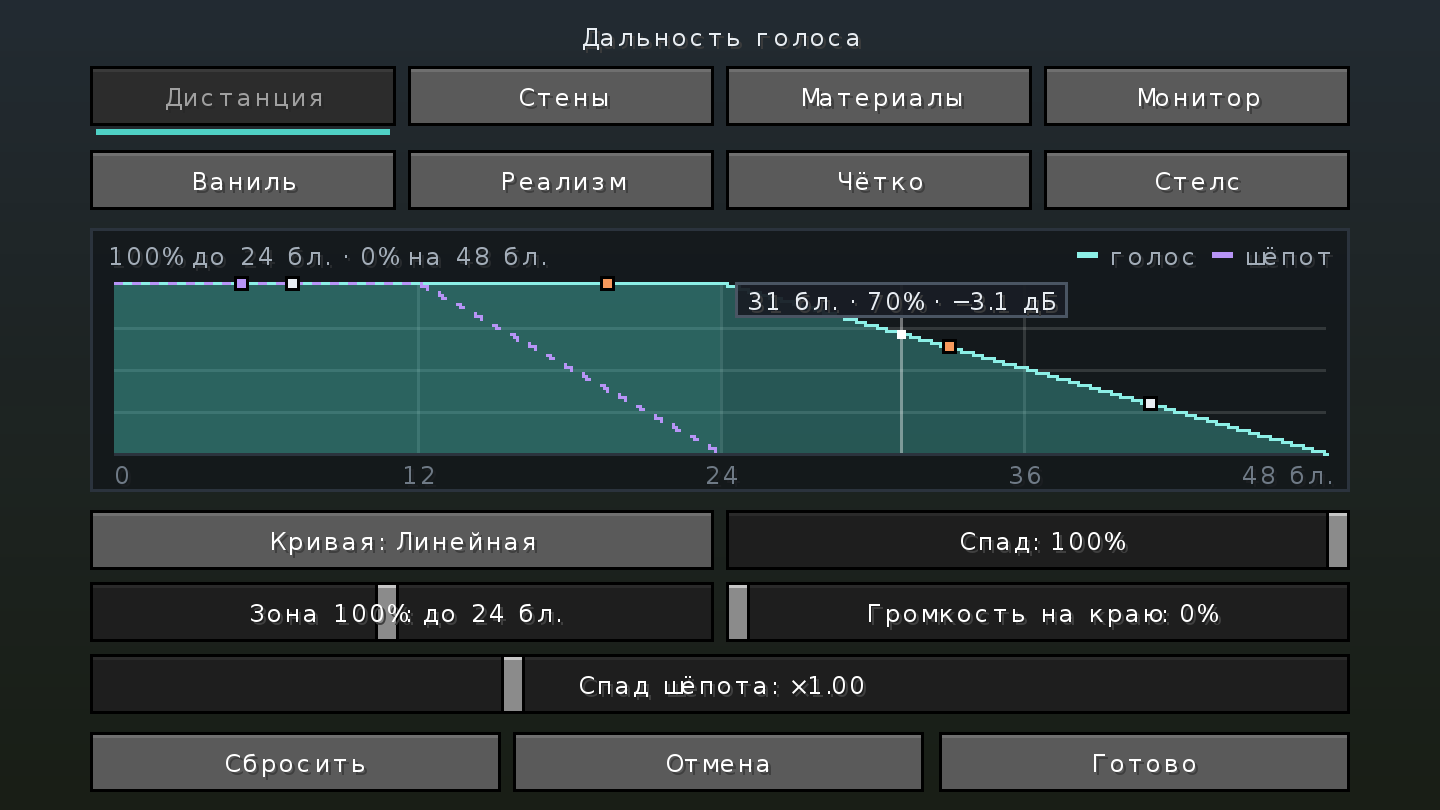
🗣️ Distance
🧱 Walls and corners
🌊 Echo, water, rain
👀 HUD and monitor
🔗 Also: share your settings with a friend as one code, send a bug report with one click (/voicephysics report). Seven languages.
These need Voice Physics on the server: this mod on Fabric, Forge or NeoForge, or the plugin on Paper, Purpur, Folia and Spigot.
Players without the addon also hear voices muffled through walls.
/vcd mute./vcd extras lists the switches./voice for every player (talk quietly or shout, walls off for yourself, per-player volume) and PlaceholderAPI placeholders for scoreboards and tab lists./vcd commands with undo and a log of who changed what.| You play on | File |
|---|---|
| Fabric, Quilt | full, needs Fabric API |
| Forge 1.20 – 1.20.4, 1.20.6, 1.21 – 1.21.11, 26.x | full |
| NeoForge 1.20.1, 1.20.2 – 1.21.11, 26.x | full |
| Paper, Purpur, Folia, Spigot | the plugin, a separate project |
Minecraft 1.20 – 1.20.6, 1.21 – 1.21.11 and 26.1 – 26.3.
All settings, commands and what works where → · Changelog · Questions and problems · Report a bug
Project description from CurseForge.
Pick your setup
Choose the version and loader you play, then open the matching release.
Showing the newest 12 of 24 game versions. Older files are in the list below.
Check the dependencies, then try the file in a copied instance before changing a world you care about.
Recent files
voice-physics-2.10.0+mc26.x.jar
30 Sept 2026
voice-physics-forge-2.10.0+mc1.21.11.jar
30 Sept 2026
voice-physics-forge-2.10.0+mc1.21.9-1.21.10.jar
30 Sept 2026
voice-physics-forge-2.10.0+mc1.21.6-1.21.8.jar
30 Sept 2026
voice-physics-forge-2.10.0+mc1.21.3-1.21.5.jar
30 Sept 2026
voice-physics-forge-2.10.0+mc1.21-1.21.1.jar
30 Sept 2026
voice-physics-neoforge-2.10.0+mc1.21.11.jar
30 Sept 2026
voice-physics-neoforge-2.10.0+mc1.21.9-1.21.10.jar
30 Sept 2026
voice-physics-neoforge-2.10.0+mc1.21.6-1.21.8.jar
30 Sept 2026
voice-physics-neoforge-2.10.0+mc1.21.2-1.21.5.jar
30 Sept 2026
voice-physics-neoforge-2.10.0+mc1.21-1.21.1.jar
30 Sept 2026
voice-physics-2.10.0+mc1.21.x.jar
30 Sept 2026
Looking for an older file? The official CurseForge project page is in Resources.
 mod
modPress ESC in the world options screen to apply changes and exit
 mod
modA mod that lets you throw axes.
 mod
modA registry for land, contracts, money and a court - it records what players do and never prevents it.