CurseForge · Minecraft mod
LightLevelOverlay
A mod to showcase places where hostile mobs can spawn.
Quick answer
Which LightLevelOverlay release matches 1.21.7 NeoForge?
lightleveloverlay-neoforge-1.21.7-1.1.1-java21.jar targets 1.21.7 with NeoForge. The project page does not say whether this file belongs on the client, dedicated server, or both. No extra mods listed for this file.
Where it goes
Is LightLevelOverlay required on the client, server, or both?
The project page does not say whether this file belongs on the client, dedicated server, or both.
The source does not explicitly classify this release as client-only or server-only.
What else does lightleveloverlay-neoforge-1.21.7-1.1.1-java21.jar need?
lightleveloverlay-neoforge-1.21.7-1.1.1-java21.jar on 1.21.7 NeoForge. Every mod below is checked against that same setup.
This file does not list any required mods. Do not add a library just because a different file uses it.
This file does not list any required or optional mods.
Before you install it
Add LightLevelOverlay without breaking your instance.
Built for lightleveloverlay-neoforge-1.21.7-1.1.1-java21.jar on 1.21.7 NeoForge. Pick another file and the loader, install side or required mods may change.
- 01
Stick to this file
Use lightleveloverlay-neoforge-1.21.7-1.1.1-java21.jar. It targets 1.21.7 with NeoForge; another release may have different loader, side or dependency requirements.
- 02
Bring the mods it needs
This file does not list any required mods. Do not add a library just because a different file uses it.
- 03
Put it on the correct side
The project page does not say whether this file belongs on the client, dedicated server, or both.
- 04
Pick the file you checked
Use the “Get this file” button beside lightleveloverlay-neoforge-1.21.7-1.1.1-java21.jar. It opens that exact file at the source.
About this project
What does LightLevelOverlay add?
Light Level Overlay
Version 1.1.1 | Client-side spawn-risk markers
See nearby surfaces where darkness could allow hostile mobs to spawn. Red and yellow markers help you find areas that need lighting, both now and after nightfall.
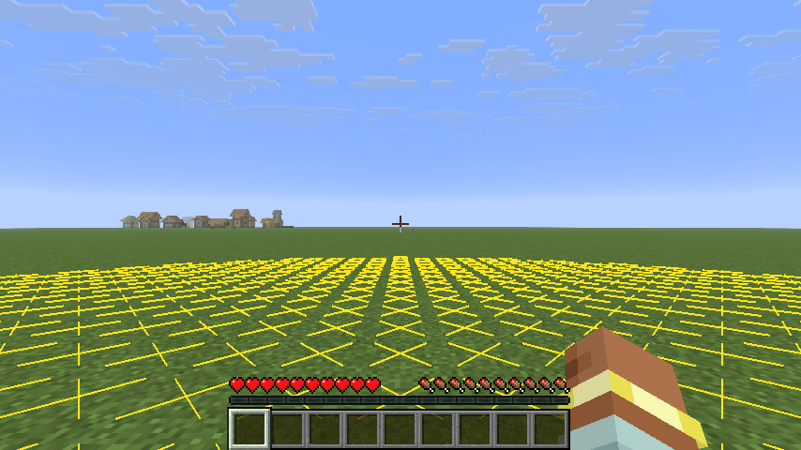
Yellow markers identify surfaces that could become dark enough at night.
Main features
· Red marks positions that pass the mod’s surface and space checks and are currently dark enough. Yellow marks positions that could become dark enough at night.
· Show both colors, current risk only or nighttime risk only. Select cross, square or combined markers.
· Adjust marker colors, opacity, line width, horizontal and vertical scan radii, scan interval and marker limits.
· The overlay updates as you move and clears old markers on world or dimension changes.
· Version 1.1.1 shows a help message when entering a world, using your current toggle binding. A hotbar message confirms when the overlay is switched on or off.
How to use it
Enter a world and press F7 to show the overlay. Press F7 again to hide it. If F7 conflicts with another mod, change it under Options > Controls > Key Binds > Light Level Overlay.
Additional bindings for display mode and scan radius start unassigned. To check the overlay, stand near an unlit stone or dirt floor with room above it, switch it on and place a torch. Lit positions should lose their markers after the next scan.
Lighting example
At night, red markers remain on dark surfaces while the area lit by a torch loses its markers.
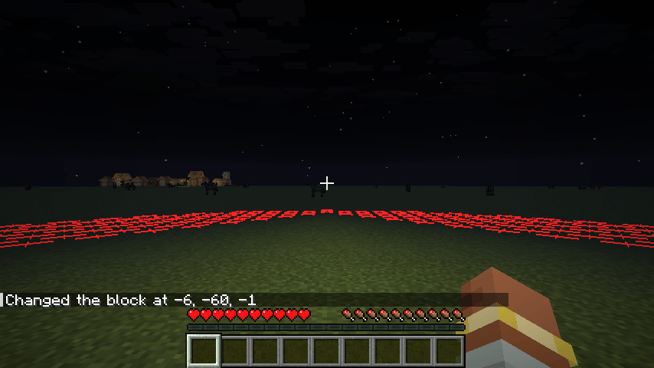
Nighttime view with a lit area in front of the player.
Settings and spawn rules
Settings are stored in config/lightleveloverlay-client.toml. NeoForge provides a Mods-menu configuration screen. Other loaders reload the file when the overlay is turned on.
Markers show light and surface risk, not a guaranteed spawn. Actual spawning also depends on mob type, biome, dimension, player distance, difficulty, mob caps and other game rules.
Installation
Client-side only; no server installation is needed. Minecraft 1.21.1 through 1.21.11 requires Java 21; 26.1, 26.1.1, 26.1.2, 26.2 and 26.3 require Java 25.
Available for Fabric, Quilt, NeoForge and published Forge targets. There is no Forge build for Minecraft 1.21.2. Fabric and Quilt require Fabric API. Choose the file matching your exact Minecraft version and loader.
Project description from CurseForge.
Pick your setup
LightLevelOverlay by Minecraft version and loader
Choose the version and loader you play, then open the matching release.
26.2
4 loader builds26.1.2
4 loader builds26.1.1
4 loader builds26.1
4 loader builds1.21.11
4 loader builds1.21.10
4 loader builds1.21.9
4 loader builds1.21.8
4 loader builds1.21.7
4 loader builds1.21.6
4 loader builds1.21.5
4 loader buildsShowing the newest 12 of 16 game versions. Older files are in the list below.
Check the dependencies, then try the file in a copied instance before changing a world you care about.
Recent files
LightLevelOverlay versions and loaders
lightleveloverlay-neoforge-1.21.7-1.1.1-java21.jar
24 Nov 2026
Looking for an older file? The official CurseForge project page is in Resources.