Kotlin for Forge Needed by No Fog Perfected mc26.3-1.1.1-neoforge
requiredMatching file found Matched file: Kotlin for Forge 6.4.0

CurseForge · Minecraft mod
Removes fog from Minecraft, perfected. Completely customizable, no bad-looking horizon lines. Includes options for clear water and lava.
Quick answer
No Fog Perfected mc26.3-1.1.1-neoforge targets 26.3 with NeoForge. The project page does not say whether this file belongs on the client, dedicated server, or both. All 1 required mods have matching files.
Where it goes
The project page does not say whether this file belongs on the client, dedicated server, or both.
The source does not explicitly classify this release as client-only or server-only.
mc26.3-1.1.1-neoforge. Change the file and its required mods may change too.
Install Kotlin for Forge first. We found matching files for this game-version and loader setup.
We only count dependency files that match this setup. A file for another loader does not fill the gap.
Before you install it
Built for No Fog Perfected mc26.3-1.1.1-neoforge. Pick another file and the loader, install side or required mods may change.
Use mc26.3-1.1.1-neoforge. It targets 26.3 with NeoForge; another release may have different loader, side or dependency requirements.
Install Kotlin for Forge first. We found matching files for this game-version and loader setup.
The project page does not say whether this file belongs on the client, dedicated server, or both.
Use the “Get this file” button beside mc26.3-1.1.1-neoforge. It opens that exact file at the source.
About this project
Removes fog from Minecraft, perfected. Works with both Fabric and NeoForge.
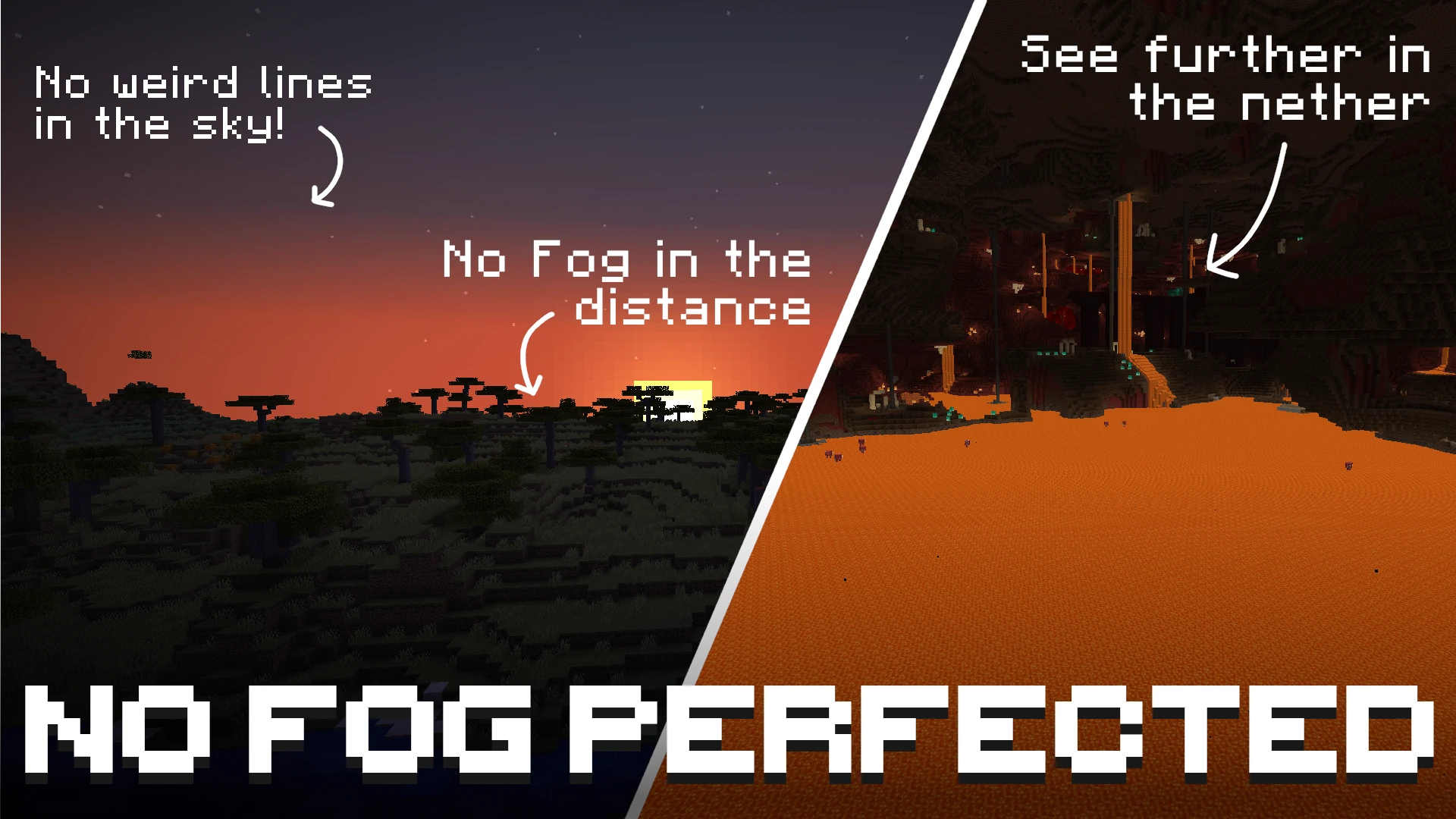
By default, the mod disables fog in the Overworld, the Nether, and the End. No Lava / Water Fog is removed by default, but you have the option to toggle all of them separately! Use with Sodium for a config menu!
Unlike other fog-removal mods, No Fog Perfected achieves a completely clean look with no hard lines or visible cut-offs in the sky. The horizon blends naturally, as if the fog was never there.
Beyond simply removing fog, the mod also lets you customize the fog behavior of fluids and status effects — underwater, lava, powder snow, blindness, and darkness fog can all be toggled and fine-tuned individually.
If you don't want to fully disable fog but instead want to push it further away so you can see more of the world, each fog type has an offset or multiplier slider ranging from 0% to 100%.
Important: the offset and multiplier only have an effect when the fog for that type is enabled. If fog is turned off, it will never be rendered — no matter what offset or multiplier value is configured.
| Minecraft Version | Fabric | NeoForge |
|---|---|---|
| 1.21.11 | ✓ | ✓ |
| 26.1.2 | ✓ | ✓ |
| 26.2 | ✓ | ✓ |
If Sodium is installed, all settings are available directly inside Sodium's video settings screen under the No Fog Perfected category. No commands needed.
When Sodium is not installed, the mod is configured exclusively through in-game chat commands. All settings are saved automatically to config/no-fog.json in your game directory.
| Command | Description |
|---|---|
/nofog |
Show the current state of all fog settings |
/nofog <type> |
Query the current state of a single fog type |
/nofog <type> toggle |
Toggle that fog type on or off |
/nofog <type> set <0-100> |
Set the intensity/distance value (0 = vanilla, 100 = maximum) |
<type> is one of:
| Type | Value control | What it does |
|---|---|---|
overworld |
Multiplier | Multiplies how far away overworld fog starts. 0% = vanilla. |
nether |
Offset | Pushes nether fog further away from you. 0% = vanilla. |
end |
Multiplier | Multiplies how far away end fog starts. 0% = vanilla. |
water |
Offset | Increases visibility range when submerged in water. 0% = vanilla. |
lava |
Offset | Increases visibility range when submerged in lava. 0% = vanilla. |
powder_snow |
Offset | Increases visibility range inside powder snow. 0% = vanilla. |
blindness |
— | Toggle only. No distance control. |
darkness |
— | Toggle only. No distance control. |
/nofog                        → show full config summary
/nofog overworld              → show overworld fog status and current multiplier
/nofog overworld toggle       → turn overworld fog on or off
/nofog overworld set 50       → set overworld fog multiplier to 50%
/nofog water set 75           → push water fog boundary to 75%
/nofog blindness toggle       → toggle blindness fog
If you have any questions about this mod you can ask them here:

This project is available under the MIT license.
Project description from CurseForge.
Pick your setup
Choose the version and loader you play, then open the matching release.
Check the dependencies, then try the file in a copied instance before changing a world you care about.
Recent files
no-fog-perfected-26.3-neoforge-1.1.1.jar
12 Oct 2026
no-fog-perfected-26.2-neoforge-1.1.1.jar
12 Oct 2026
no-fog-perfected-26.3-fabric-1.1.1.jar
12 Oct 2026
no-fog-perfected-26.2-fabric-1.1.1.jar
12 Oct 2026
no-fog-perfected-1.21.11-fabric-1.1.1.jar
12 Oct 2026
no-fog-perfected-1.21.11-neoforge-1.1.1.jar
12 Oct 2026
no-fog-perfected-26.1.2-fabric-1.1.1.jar
12 Oct 2026
no-fog-perfected-26.1.2-neoforge-1.1.1.jar
12 Oct 2026
no-fog-perfected-26.3-neoforge-1.1.1.jar
27 Sept 2026
no-fog-perfected-26.2-neoforge-1.1.1.jar
27 Sept 2026
no-fog-perfected-26.3-fabric-1.1.1.jar
27 Sept 2026
no-fog-perfected-26.2-fabric-1.1.1.jar
27 Sept 2026
Looking for an older file? The official CurseForge project page is in Resources.