Minecraft version
Back to mods 
CurseForge · Minecraft mod
PawnCraft
Write, compile, and run PAWN programs inside CC:Tweaked to control redstone, turtles, and peripherals.
Choose a version Pick your version below, then grab the matching file.
Quick answer
Which PawnCraft release should I use?
Latest stable file pawncraft-0.4.1.jar
Game version 1.21
Loader NeoForge
pawncraft-0.4.1.jar targets 1.21 with NeoForge. The project page does not say whether this file belongs on the client, dedicated server, or both. No extra mods listed for this file.
Where it goes
Is PawnCraft required on the client, server, or both?
The project page does not say whether this file belongs on the client, dedicated server, or both.
Client Source doesn’t say
Dedicated server Source doesn’t say
Loader for this release NeoForge
Required install it here Optional supported, not mandatory Not supported do not install here Source doesn’t say do not assume
The source does not explicitly classify this release as client-only or server-only.
What else does pawncraft-0.4.1.jar need?
pawncraft-0.4.1.jar. Change the file and its required mods may change too.
This file does not list any required mods. Do not add a library just because a different file uses it.
This file does not list any required or optional mods.
Before you install it
Add PawnCraft without breaking your instance.
Built for pawncraft-0.4.1.jar. Pick another file and the loader, install side or required mods may change.
- 01
Stick to this file
Use pawncraft-0.4.1.jar. It targets 1.21 with NeoForge; another release may have different loader, side or dependency requirements.
- 02
Bring the mods it needs
This file does not list any required mods. Do not add a library just because a different file uses it.
- 03
Put it on the correct side
The project page does not say whether this file belongs on the client, dedicated server, or both.
- 04
Pick the file you checked
Use the “Get this file” button beside pawncraft-0.4.1.jar. It opens that exact file at the source.
About this project
What does PawnCraft add?
PAWN meets ComputerCraft
Write a program. Compile it in-game. Make something move.
PawnCraft adds the PAWN scripting language to CC:Tweaked computers and turtles. Control your farm, build a redstone controller, or put together a monitor dashboard using a compact, C-like language. Your normal CraftOS terminal and existing Lua programs stay available.
Meet the Annihilator
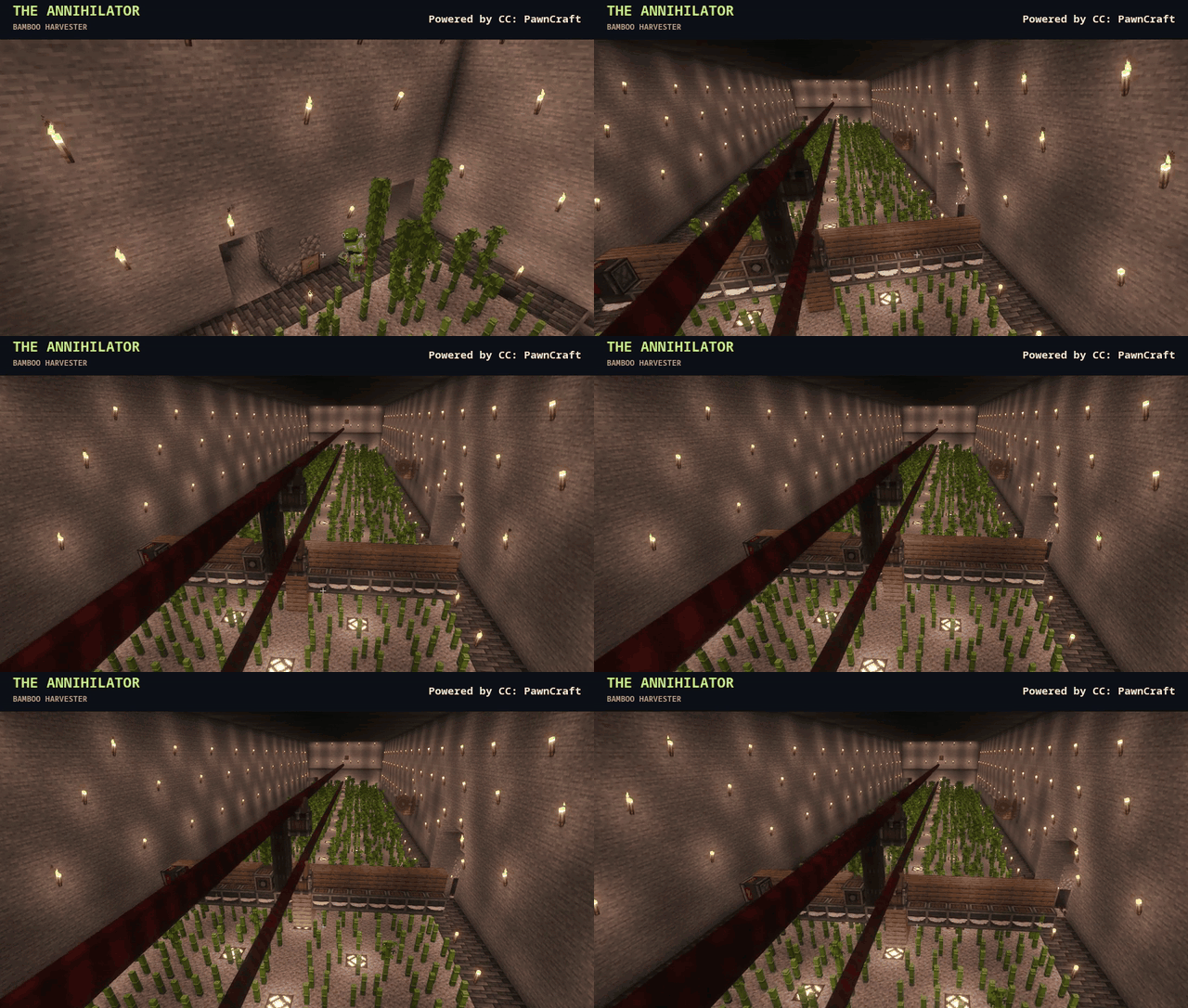
A bamboo harvester controlled by a PAWN redstone state machine. Probably more dramatic than a bamboo farm needs to be.
See how it works and read the script. The machine shown uses other mods; PawnCraft supplies its programmable controller.
What you can do
- Read redstone inputs and control digital, analog, and bundled outputs.
- Program turtles and call methods on connected peripherals.
- Write to monitors, work with files and JSON, and exchange modem messages.
- React to events and timers, with string helpers, formatted output, and float math.
The PAWN compiler and AMX runtime are bundled. No separate PAWN installation or building from source is needed to use the published JAR.
Before you install
The machine running the world must use Linux x86_64 with glibc 2.38 or newer. Windows, macOS, and ARM native binaries are not currently included.
- Minecraft 1.21.1 with NeoForge and Java 21.
- CC:Tweaked 1.120.2 or newer. Tested with 1.120.2 and NeoForge 21.1.248.
- On a dedicated server, install PawnCraft on the server. Connecting players do not need the PawnCraft JAR, and their computers do not need to run Linux.
- For singleplayer, these host requirements apply to your own computer.
Dependency note: CC:Tweaked no longer publishes new versions on CurseForge. Its older CurseForge files do not satisfy PawnCraft's minimum version. See the CC:Tweaked project notice and install a compatible NeoForge build separately.
Stop and back up your instance, then place the PawnCraft JAR from this project's Files tab in mods/ alongside the compatible CC:Tweaked JAR. Start the instance and run help pawn in a ComputerCraft terminal.
Your first program
In the computer's terminal, run:
edit hello.pwn
Enter this program:
#include <computercraft>

main()
{
    if (printf("Hello from PawnCraft!\n") < 0)
        return 1;
    return 0;
}
Press Ctrl, choose Save, then Exit. Compile and run:
pawncc hello.pwn -o hello.amx
pawn hello.amx
Recompile after editing. Hold Ctrl+T to stop a running program. Try the example programs when you're ready for redstone, countdowns, and event loops.
A few things to know
- PawnCraft uses the native CompuPhase PAWN compiler and AMX VM, connected to CC through a Lua bridge. It is not a PAWN-to-Lua transpiler.
- This is PAWN 4.1, not the SA-MP/open.mp API.
- Native execution is not an operating-system sandbox. Enable in-game compilation only for players you trust.
- PawnCraft does not keep chunks loaded. Computer shutdown or chunk unloading stops its programs.
Documentation and support
User guide and API reference | Source code | Report a bug
For bug reports, include your mod versions, host OS, relevant logs, and a small program that reproduces the problem.
PawnCraft's original code is MIT licensed. Bundled third-party components retain their respective licenses and notices.
Project description from CurseForge.
Pick your setup
PawnCraft by Minecraft version and loader
Choose the version and loader you play, then open the matching release.
Check the dependencies, then try the file in a copied instance before changing a world you care about.
Recent files
PawnCraft versions and loaders
pawncraft-0.4.1.jar
7 Oct 2026
Client Source doesn’t say Server Source doesn’t say Dependencies No extras listed Listed on Release listing
Check the 1.21 · NeoForge setup 1.21NeoForge release
Looking for an older file? The official CurseForge project page is in Resources.
 mod
CurseForge · Minecraft
TON 618 Addition
TON 618 Addition, an unofficial addon for TON 618: TA-01 Last Light (TON618 evaporates by Hawking radiation and the world comes back) and TA-02 Quasar Jets (feed a star to TON618, its quasar jet hits the Earth). Needs RimuLib.
 mod
CurseForge · Minecraft
Custom Multiblock Machines
Data-driven multiblock machines for NeoForge.
 mod
CurseForge · Minecraft
Prompt Critical
Industrial complex from the coal mine to the closed nuclear fuel cycle: steel, power grids, oil and gas, chemistry and reactors on real physics, run by relays, PLCs and SCADA that you build.