Minecraft version
Back to mods 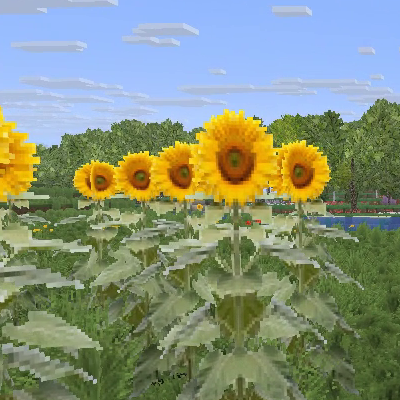
CurseForge · Minecraft mod
Maan's Build
Transform Minecraft into a breathtaking, lifelike experience with hyper-realistic trees, organic grass, dynamic water, and an immersive, natural sky.
Choose a version Pick your version below, then grab the matching file.
Quick answer
Which Maan's Build release should I use?
beta file maanbuilds-0.24.0.jar
Game version 26.2
Loader NeoForge
Maan's Build maanbuilds-0.24.0.jar targets 26.2 with NeoForge. The project page does not say whether this file belongs on the client, dedicated server, or both. No extra mods listed for this file.
Where it goes
Is Maan's Build required on the client, server, or both?
The project page does not say whether this file belongs on the client, dedicated server, or both.
Client Source doesn’t say
Dedicated server Source doesn’t say
Loader for this release NeoForge
Required install it here Optional supported, not mandatory Not supported do not install here Source doesn’t say do not assume
The source does not explicitly classify this release as client-only or server-only.
What else does Maan's Build maanbuilds-0.24.0.jar need?
maanbuilds-0.24.0.jar. Change the file and its required mods may change too.
This file does not list any required mods. Do not add a library just because a different file uses it.
This file does not list any required or optional mods.
Before you install it
Add Maan's Build without breaking your instance.
Built for Maan's Build maanbuilds-0.24.0.jar. Pick another file and the loader, install side or required mods may change.
- 01
Stick to this file
Use maanbuilds-0.24.0.jar. It targets 26.2 with NeoForge; another release may have different loader, side or dependency requirements.
- 02
Bring the mods it needs
This file does not list any required mods. Do not add a library just because a different file uses it.
- 03
Put it on the correct side
The project page does not say whether this file belongs on the client, dedicated server, or both.
- 04
Pick the file you checked
Use the “Get this file” button beside maanbuilds-0.24.0.jar. It opens that exact file at the source.
About this project
What does Maan's Build add?
MaanBuilds — Realistic Trees, Water, Sky, Grass and Flowers
Makes Minecraft's plants look like plants instead of cubes and flat cards. No shaders needed.
What it changes
**Trees** — twelve kinds of tree are drawn as real shapes: a round trunk that tapers, branches that leave at
natural angles, and a crown made of hundreds of leafy twigs. No two are quite alike: each tree takes its
shape, size and the way it faces from where it stands.
Oak, birch, spruce, pine, dark oak, pale oak, jungle, acacia, cherry and azalea, plus the giant spruce and
giant jungle trees.
**Grass** — every grass block grows real blades of grass, coloured by the biome and darker at the roots.
Short grass, tall grass and ferns have new textures to match.
**Flowers** — nineteen flowers grow as clumps of stems with a bloom on each, so they still look like flowers
from above. Sunflowers, lilac, rose bushes and peonies are whole plants two blocks high.
Requirements
- Minecraft **26.2**
- NeoForge **26.2.0.88** or newer
- Needed on the **client and the server**
Good to know
- **Trees appear in newly generated land.** Land you have already explored keeps its old trees. Grass and
flowers change everywhere straight away. - A small readout in the top left corner shows frames per second and how many trees are being drawn.
F1 hides it. - If the meadow is too heavy for your computer, open
config/maanbuilds.jsonand lowergrassCards
(3 is the full look, 0 turns the meadow off), then restart the game.
Not changed yet
Mangrove trees, jungle bushes, fallen logs and the pale oak that holds a creaking heart are still vanilla.
Bee nests, leaf litter, vines and cocoa do not generate on the new trees. Trees do not cast shadows on the
ground.
Licence
MIT.
Project description from CurseForge.
Pick your setup
Maan's Build by Minecraft version and loader
Choose the version and loader you play, then open the matching release.
Check the dependencies, then try the file in a copied instance before changing a world you care about.
Recent files
Maan's Build versions and loaders
maanbuilds-0.24.0.jar
29 Sept 2026
Client Source doesn’t say Server Source doesn’t say Dependencies No extras listed Listed on Release listing
Check the 26.2 · NeoForge setup NeoForge26.2 beta
maanbuilds-0.5.0.jar
28 Sept 2026
Client Source doesn’t say Server Source doesn’t say Dependencies No extras listed Listed on Release listing
Check the 26.2 · NeoForge setup NeoForge26.2 beta
Looking for an older file? The official CurseForge project page is in Resources.