Minecraft version
Back to mods 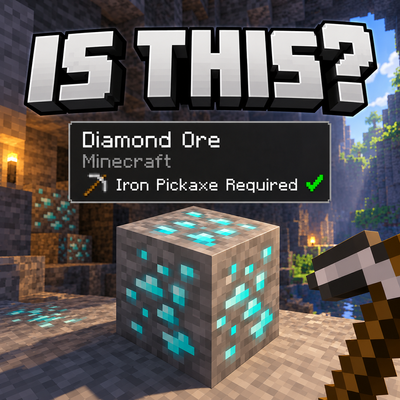
CurseForge · Minecraft mod
Is This
A handy Mod that allows you to see information about what your looking at
Choose a version Pick your version below, then grab the matching file.
Quick answer
Which Is This release matches 26.3?
Best match for your filters isthis-1.0.19.jar
Game version 26.3
Loader Forge
Is This isthis-1.0.19.jar targets 26.3 with Forge. The project page does not say whether this file belongs on the client, dedicated server, or both. No extra mods listed for this file.
Where it goes
Is Is This required on the client, server, or both?
The project page does not say whether this file belongs on the client, dedicated server, or both.
Client Source doesn’t say
Dedicated server Source doesn’t say
Loader for this release Forge
Required install it here Optional supported, not mandatory Not supported do not install here Source doesn’t say do not assume
The source does not explicitly classify this release as client-only or server-only.
What else does Is This isthis-1.0.19.jar need?
isthis-1.0.19.jar on 26.3. Every mod below is checked against that same setup.
This file does not list any required mods. Do not add a library just because a different file uses it.
This file does not list any required or optional mods.
Before you install it
Add Is This without breaking your instance.
Built for Is This isthis-1.0.19.jar on 26.3. Pick another file and the loader, install side or required mods may change.
- 01
Stick to this file
Use isthis-1.0.19.jar. It targets 26.3 with Forge; another release may have different loader, side or dependency requirements.
- 02
Bring the mods it needs
This file does not list any required mods. Do not add a library just because a different file uses it.
- 03
Put it on the correct side
The project page does not say whether this file belongs on the client, dedicated server, or both.
- 04
Pick the file you checked
Use the “Get this file” button beside isthis-1.0.19.jar. It opens that exact file at the source.
About this project
What does Is This add?
This is a simple mod that shows a HUD element that helps identify what block you are looking at with Mod information also.
The HUD is customizable from size of the HUD to the color also. You can also change what information displays in the HUD. These options are accessible through the key bind ("I" by default).
This mod also has a key bind ("R" by default) that will tell you what is needed to craft the minimum tool required to mine the block In the chat.
Key binds can be changed in the Minecraft key binds settings so you can adjust to your liking.
Full Feature Breakdown;
- Block identification
- Block name display
- Vanilla and modded block support
- Source mod identification
- Required tool detection
- Recommended tool detection
- Mining tier detection
- Tool sprite display
- Suitable tool green tick
- Unsuitable tool red cross
- Harvestability detection
- No-tool-required detection
- Modded/custom tool support
- Multiple suitable tool support
- Tool recipe lookup
- Vanilla recipe support
- Modded recipe support
- Modded ingredient support
- Recipe ingredient quantities
- Remappable recipe keybind
- Dynamic recipe key shown on HUD
- Mob/entity identification
- Vanilla and modded mob support
- Mob name display
- Mob source mod identification
- Current and maximum mob health
- Mob health bar
- Live mob health updates
- Configurable HUD
- HUD enable/disable
- Block info toggle
- Tool info toggle
- Mod name toggle
- Mob info toggle
- Health numbers toggle
- Health bar toggle
- Configurable HUD position
- Configurable HUD scale
- 50%, 60%, 75%, 100%, 125%, and 150% HUD sizes
- Configurable HUD opacity
- Custom RGB HUD background colour
- Dynamic HUD sizing
- Long-name handling
- In-game settings menu
- Remappable settings keybind
- Live block HUD preview
- Live mob HUD preview
- Block/Mob preview selector
- Settings automatically saved
- Settings persist between Minecraft restarts
- Reset to Defaults option
- Singleplayer support
- Multiplayer support
- Dedicated server support
- Multiplayer recipe lookup
- Server-safe recipe requests
- Client-side HUD preferences
- Minecraft/Forge tag-based block compatibility
- Registered recipe-based recipe detection
- Generic mod compatibility
- Minecraft 26.3 support
- Forge 66.0.2 support
Project description from CurseForge.
Pick your setup
Is This by Minecraft version and loader
Choose the version and loader you play, then open the matching release.
Check the dependencies, then try the file in a copied instance before changing a world you care about.
Recent files
Is This versions and loaders
isthis-1.0.19.jar
28 Sept 2026
Client Source doesn’t say Server Source doesn’t say Dependencies No extras listed Listed on Release listing
Check the 26.3 · Forge setup Forge26.3 release
Looking for an older file? The official CurseForge project page is in Resources.
 mod
CurseForge + Modrinth · Minecraft
Durability Vewer Continuation
Armor and Tool durability HUD
 mod
CurseForge · Minecraft
Cinnamoroll friends(Halloween Update)
TO Live with Cinnamoroll, Kuromi, My Melody, Hello Kitty, Pompompurin and Pochacco in a cozy town! Talk to them, accept their quests, and uncover an original story with 3 RPG bosses. Fan-made mod, not affiliated with or endorsed by Sanrio.
 mod
CurseForge · Minecraft
Truce Dialogue and Town Lib
Dialogue tree library for Minecraft mods