Minecraft version
Back to mods 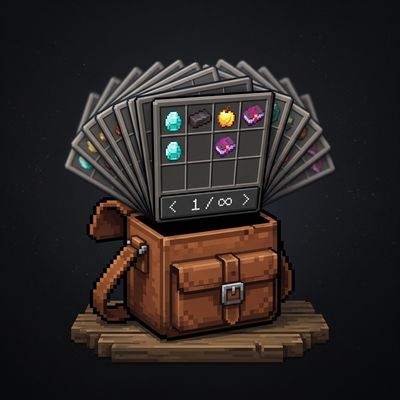
CurseForge · Minecraft mod
OmniPocket
Infinite paginated survival inventory with seamless mouse wheel scrolling, a discreet vanilla-styled notch, automatic empty-page cleanup, and persistent NBT safety.
Choose a version Pick your version below, then grab the matching file.
Quick answer
Which OmniPocket release should I use?
Latest stable file omnipocket-1.2.0.jar
Game version 26.3
Loader Fabric
omnipocket-1.2.0.jar targets 26.3 with Fabric. The project page does not say whether this file belongs on the client, dedicated server, or both. No extra mods listed for this file.
Where it goes
Is OmniPocket required on the client, server, or both?
The project page does not say whether this file belongs on the client, dedicated server, or both.
Client Source doesn’t say
Dedicated server Source doesn’t say
Loader for this release Fabric
Required install it here Optional supported, not mandatory Not supported do not install here Source doesn’t say do not assume
The source does not explicitly classify this release as client-only or server-only.
What else does omnipocket-1.2.0.jar need?
omnipocket-1.2.0.jar. Change the file and its required mods may change too.
This file does not list any required mods. Do not add a library just because a different file uses it.
This file does not list any required or optional mods.
Before you install it
Add OmniPocket without breaking your instance.
Built for omnipocket-1.2.0.jar. Pick another file and the loader, install side or required mods may change.
- 01
Stick to this file
Use omnipocket-1.2.0.jar. It targets 26.3 with Fabric; another release may have different loader, side or dependency requirements.
- 02
Bring the mods it needs
This file does not list any required mods. Do not add a library just because a different file uses it.
- 03
Put it on the correct side
The project page does not say whether this file belongs on the client, dedicated server, or both.
- 04
Pick the file you checked
Use the “Get this file” button beside omnipocket-1.2.0.jar. It opens that exact file at the source.
About this project
What does OmniPocket add?
Warning
If you add this mod to an existing world you could lose your current inventory.
Empty your inventory before adding this mod.
🎒 OmniPocket — Infinite Paginated Survival Inventory
OmniPocket expands the player's survival inventory indefinitely using an elegant, intuitive page system integrated directly into the standard survival inventory screen (E), without breaking vanilla mechanics or creating visual clutter.
✨ Features
📑 1. Minimalist Bottom-Right Notch (< 1 / N >)
- Controls are neatly placed in a custom vanilla-styled tab below the hotbar on the bottom right.
- Zero obstruction to your 2x2 crafting grid, recipe book, armor slots, or main inventory.
- Button
<: Returns to the previous page (disabled on page 1). - Page Counter
X / Y: Rendered in authentic vanilla dark gray (#404040) without blurry drop shadows. - Button
>: Advances to the next page, or automatically creates a new page if you're on the last one.
🖱️ 2. Mouse Wheel Navigation
- Scroll Down: Quickly advances to the next created page.
- Scroll Up: Returns to the previous created page.
- Cursor Item Dragging: Pick up an item stack on Page 1, scroll your mouse wheel to Page 2, and drop it in—completely seamless!
- Strict Bounds: Scrolling only switches between existing created pages, never spawning unwanted blank pages by accident.
🧹 3. Automatic Cleanup of Empty Pages
- Whenever you empty an extra page and navigate away or close your inventory, the empty page deletes itself automatically.
- You never have to manage clutter or end up with dozens of useless blank pages.
- Built-in fail-safe: drops items on the ground if any were remaining so you never lose anything.
🔒 4. Persistent & Death Safety
- Full NBT & Component Persistence: Works with enchanted gear, shulker boxes, bundles, custom names, and modded items using Minecraft 26.3 Codecs.
- Vanilla Death Logic: When
keepInventoryis false, items from all extra pages drop at your death coordinate (configurable in Mod Menu).
⌨️ 5. Hotkeys & In-Game Switching
- Press
[or](configurable in Controls) to flip between pages on the fly without even opening your inventory.
⚙️ Configuration & Mod Menu Support
Compatible with Mod Menu. You can toggle:
- Auto-collecting newly gathered items directly into extra pages when the active inventory is full.
- Auto-creating new pages on full pickup.
- Dropping or preserving extra pages on player death.
📦 Requirements & Installation
- Install Fabric Loader for Minecraft 26.3.
- Install Fabric API.
- Place
omnipocket-1.0.0.jarinto your.minecraft/modsfolder.
Project description from CurseForge.
Pick your setup
OmniPocket by Minecraft version and loader
Choose the version and loader you play, then open the matching release.
Check the dependencies, then try the file in a copied instance before changing a world you care about.
Recent files
OmniPocket versions and loaders
omnipocket-1.2.0.jar
1 Oct 2026
Client Source doesn’t say Server Source doesn’t say Dependencies No extras listed Listed on Release listing
Check the 26.3 · Fabric setup Fabric26.3 release
omnipocket-1.0.0.jar
29 Sept 2026
Client Source doesn’t say Server Source doesn’t say Dependencies No extras listed Listed on Release listing
Check the 26.3 · Fabric setup Fabric26.3 release
Looking for an older file? The official CurseForge project page is in Resources.
 mod
mod CurseForge · Minecraft
Swivel - Better 3rd Person / Third Person Camera, Free Look & Orbit Camera (Controller Support)
A better camera for Minecraft. In first person, hold a key to look around without turning. Swing the third-person camera all the way around your character and still mine, build and aim at whatever is under your crosshair. Controlify controller support now!
 mod
mod CurseForge · Minecraft
Dawn Star: Battle Preparation
This module is based on the Dawn Star module, adding its corresponding derivative items, equipment, and tools to the game. Each piece of equipment and tool has its unique function!
 mod
mod CurseForge · Minecraft
MultiClicker
Auto clicker (autoclicker) and AFK helper for Fabric, NeoForge and Forge: auto attack, auto eat, auto fish, auto farm, auto tool, hotbar refill, anti-AFK and hotkeys for mob farms, mining, farming and fishing.