Minecraft version
Back to mods 
CurseForge · Minecraft mod
Isaac Phone
A smartphone for multiplayer servers: call friends with your real voice, text, share photos, video call and post on a built-in social feed.
Choose a version Pick your version below, then grab the matching file.
Quick answer
Which Isaac Phone release should I use?
Latest stable file isaacphone-forge-1.20.1-1.11.0.jar
Game version 1.20.1
Loader Forge
Isaac Phone isaacphone-forge-1.20.1-1.11.0.jar targets 1.20.1 with Forge. The project page does not say whether this file belongs on the client, dedicated server, or both. No extra mods listed for this file.
Where it goes
Is Isaac Phone required on the client, server, or both?
The project page does not say whether this file belongs on the client, dedicated server, or both.
Client Source doesn’t say
Dedicated server Source doesn’t say
Loader for this release Forge
Required install it here Optional supported, not mandatory Not supported do not install here Source doesn’t say do not assume
The source does not explicitly classify this release as client-only or server-only.
What else does Isaac Phone isaacphone-forge-1.20.1-1.11.0.jar need?
isaacphone-forge-1.20.1-1.11.0.jar. Change the file and its required mods may change too.
This file does not list any required mods. Do not add a library just because a different file uses it.
This file does not list any required or optional mods.
Before you install it
Add Isaac Phone without breaking your instance.
Built for Isaac Phone isaacphone-forge-1.20.1-1.11.0.jar. Pick another file and the loader, install side or required mods may change.
- 01
Stick to this file
Use isaacphone-forge-1.20.1-1.11.0.jar. It targets 1.20.1 with Forge; another release may have different loader, side or dependency requirements.
- 02
Bring the mods it needs
This file does not list any required mods. Do not add a library just because a different file uses it.
- 03
Put it on the correct side
The project page does not say whether this file belongs on the client, dedicated server, or both.
- 04
Pick the file you checked
Use the “Get this file” button beside isaacphone-forge-1.20.1-1.11.0.jar. It opens that exact file at the source.
About this project
What does Isaac Phone add?
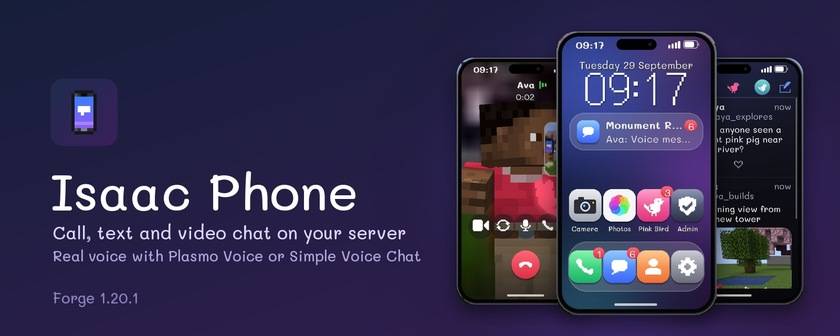
A smartphone for multiplayer servers. Call your friends with your real voice, text them, send photos, video call, and scroll a little social feed, all from a phone you hold in your hand.
Voice goes through Plasmo Voice or Simple Voice Chat, so calls work across the whole world, not just within earshot.
Calls
- Every player gets their own phone number
- Call, answer, decline, missed calls and voicemail
- Your real voice through Plasmo Voice or Simple Voice Chat. It's filtered to sound like a phone and comes from the side you hold it on
- Group calls with up to 8 people
- Speakerphone so people around you hear the call, a room mic, and mute
- Standing next to the person you're calling? You hear their real voice and the phone at the same time, like in real life
- People nearby hear your ringtone
- Hide your caller ID
- Service numbers like 911 ring every player on duty, and on-duty players can call out as the service
- Lost your phone? Call your number from a friend's phone and it rings wherever it is
Video calls
- Front camera: your live 3D character, moving and talking, over your blurred surroundings
- Back camera: shows what you're looking at
- Group video grid, reactions, picture-in-picture, and a small video window on your screen when the phone is closed
Messages
- Texts that arrive even when the other player is offline
- Group chats
- Voice messages
- Photos
- Reactions on messages
- Share your location (with an on-screen arrow to find it)
- Live location for 15 minutes or an hour, so friends can follow you as you move
- Share contacts
- Typing indicator
- Favorites, blocking and quiet hours
Camera & Photos
- Full-screen camera with 1–8× zoom and a selfie mode
- 10 filters, portrait blur, timer, grid and flash
- Photos app: send pictures in chat, post them, or use them as your profile photo
Pink Bird
- A small social feed for your server
- Posts with a photo, likes and replies
- Profiles with their own usernames
- Official service accounts can post and pin important news
For server owners
- Admin app on the phone: change settings live, manage services and their members, handle reports, mute players, change numbers, and send an announcement to every phone
- Commands:
/phone number,lookup,setnumber,reports,mute,unmute,announce,admin - Moderation: spam limits, reporting, banned words, optional link blocking, and limits on image size and uploads
- Easy to switch off: Pink Bird, images, video, location sharing, voicemail and voice messages can each be turned off
Getting started
- Install Isaac Phone on the server and every player. Plasmo Voice or Simple Voice Chat is optional.
- Craft a phone: 6 copper ingots, a glass pane, redstone and an iron ingot.
   C G C
   C R C
   C I C
- Press ↑ (Up arrow) or right-click the phone to open it. You can rebind the key in Controls.
- Swap numbers with a friend: hold your phone and right-click them, then they right-click you back. You can also save numbers by hand. Numbers you haven't saved show only the number, with no name or face. Servers that prefer open contacts can turn on
onlinePlayerList.
Without a voice mod, everything except call audio still works.
Requirements
- Minecraft 1.20.1, Forge 47 or newer
- Optional: Plasmo Voice 2.1+ or Simple Voice Chat 2.5+
- Works with Oculus shader packs. Camera filters turn off while a shader pack is on.
FAQ
I can't see my friend on a video call. Save their number first. Until you do, the phone keeps their name and face hidden, and the call screen shows a "Save to see them" button.
The phone won't open while I'm riding something. Another control, usually a vehicle mod, is also using the Up arrow, so the phone lets it have the key while you ride. Right-click the phone instead, or pick another key in Controls.
Video looks blurry. Every frame goes through the server, so video is kept small to stay kind to the server's bandwidth. Admins can raise videoFrameKB and videoFps in the Admin app.
Modpacks
You're free to include Isaac Phone in any modpack. No need to ask.
Support
Questions and bug reports: Discord
ภาษาไทย
มือถือสำหรับเซิร์ฟมายคราฟ โทรหากันด้วยเสียงจริงผ่าน Plasmo Voice หรือ Simple Voice Chat แชท ส่งรูป วิดีโอคอล แลกเบอร์แค่คลิกขวาใส่กัน แชร์ตำแหน่งสดให้เพื่อนตามมา กล้อง และโซเชียล Pink Bird รองรับภาษาไทยเต็มรูปแบบพร้อมฟอนต์มะลิ ต้องลงทั้งเซิร์ฟและเครื่องผู้เล่น
Project description from CurseForge.
Pick your setup
Isaac Phone by Minecraft version and loader
Choose the version and loader you play, then open the matching release.
Check the dependencies, then try the file in a copied instance before changing a world you care about.
Recent files
Isaac Phone versions and loaders
isaacphone-forge-1.20.1-1.11.0.jar
10 Oct 2026
Client Source doesn’t say Server Source doesn’t say Dependencies No extras listed Listed on Release listing
Check the 1.20.1 · Forge setup 1.20.1Forge release
isaacphone-forge-1.20.1-1.10.2.jar
29 Sept 2026
Client Source doesn’t say Server Source doesn’t say Dependencies No extras listed Listed on Release listing
Check the 1.20.1 · Forge setup 1.20.1Forge beta
Looking for an older file? The official CurseForge project page is in Resources.