


Minecraft version
Back to mods 
CurseForge · Minecraft mod
GGPlays Integration
A companion mod for the GGPlays Cobblemon server!
Choose a version Pick your version below, then grab the matching file.
Quick answer
Which GGPlays Integration release should I use?
Latest stable file GGPlays Integration 1.1.0.1
Game version 1.21.1
Loader Fabric
GGPlays Integration 1.1.0.1 targets 1.21.1 with Fabric. The project page does not say whether this file belongs on the client, dedicated server, or both. No extra mods listed for this file.
Where it goes
Is GGPlays Integration required on the client, server, or both?
The project page does not say whether this file belongs on the client, dedicated server, or both.
Client Source doesn’t say
Dedicated server Source doesn’t say
Loader for this release Fabric
Required install it here Optional supported, not mandatory Not supported do not install here Source doesn’t say do not assume
The source does not explicitly classify this release as client-only or server-only.
What else does GGPlays Integration 1.1.0.1 need?
GGPlays Integration 1.1.0.1. Change the file and its required mods may change too.
This file does not list any required mods. Do not add a library just because a different file uses it.
This file does not list any required or optional mods.
Before you install it
Add GGPlays Integration without breaking your instance.
Built for GGPlays Integration 1.1.0.1. Pick another file and the loader, install side or required mods may change.
- 01
Stick to this file
Use GGPlays Integration 1.1.0.1. It targets 1.21.1 with Fabric; another release may have different loader, side or dependency requirements.
- 02
Bring the mods it needs
This file does not list any required mods. Do not add a library just because a different file uses it.
- 03
Put it on the correct side
The project page does not say whether this file belongs on the client, dedicated server, or both.
- 04
Pick the file you checked
Use the “Get this file” button beside GGPlays Integration 1.1.0.1. It opens that exact file at the source.
About this project
What does GGPlays Integration add?
GGPlays Integration
This mod introduces a variety of features designed specifically for the GGPlays Cobblemon server, and is included in the Official GGPlays Cobblemon Modpack.
Modpack Rewards
Players using the latest version of the Official GGPlays Cobblemon Modpack receive several exclusive rewards and bonuses, which are granted automatically when the server detects that you are playing with the current official modpack.
Emoji Suggestions
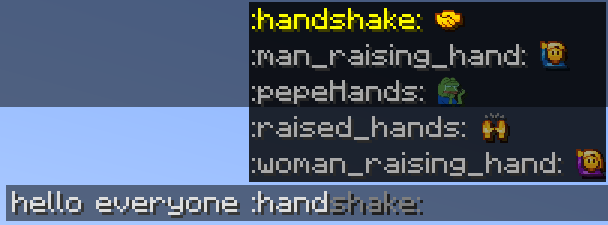
GGPlays Integration automatically suggests any unlocked Emojis while typing in chat. When you begin typing an emoji code, a suggestion menu will appear above the chat box, allowing you to quickly select matching Emojis without needing to memorize every available code.
Cosmetic Previews
GGPlays Integration allows you to preview wearable cosmetics directly from the /cosmetics menu. Hovering over wearable cosmetics will display a preview, making it easier to see how a cosmetic looks before equipping it.

Nameplates
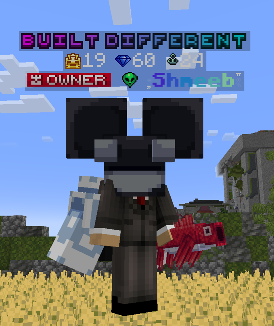
GGPlays Integration improves the vanilla Minecraft nameplate system with custom GGPlays Cobblemon nameplates. These enhanced nameplates allow the server to display additional player information above characters, including Titles, Crown Level, Style Level, and Fishing Level.
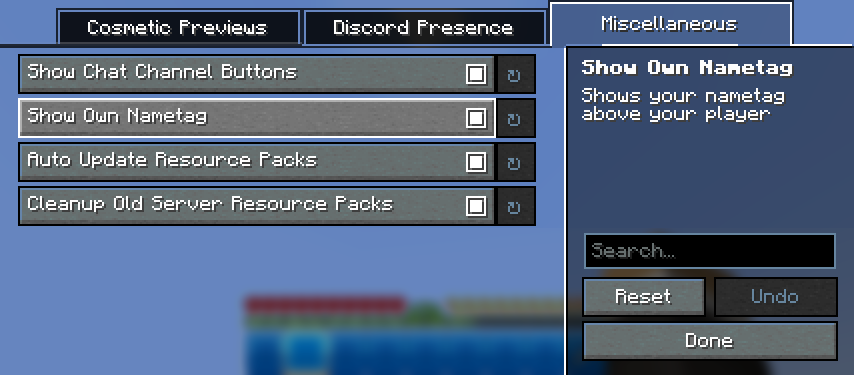
Modpack users can also view their own nameplate while in third-person mode, making it easier to see how their title, levels, and tags appear to other players. Only players using the official modpack can see the full enhanced nameplate display.
Channel Buttons
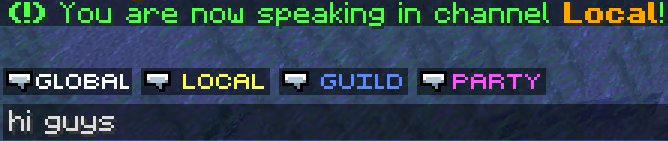
GGPlays Integration adds clickable channel buttons next to the chat box, allowing you to switch chat channels without typing a command. Clicking a channel button instantly changes your active chat channel, making it easier to move between conversations while playing.
PC Hotkey
GGPlays Integration adds a dedicated hotkey for quickly opening your PC. By default, pressing P will open your PC from anywhere, allowing you to manage your Pokémon without needing to run a command or visit a PC block.
Config Menu
GGPlays Integration includes an in-game configuration menu powered through ModMenu. This menu allows you to adjust supported client-side settings directly in-game. Available options include visual preferences, quality-of-life settings, and other GGPlays Integration features.
Quickly access this menu with the shortcut button in the top left of the Minecraft Options menu.
Render Fixes
GGPlays Integration includes several client-side render fixes designed to improve visual consistency.
| Fix | Description |
|---|---|
| Text Background Transparency | Ensures supported text backgrounds render with proper transparency instead of appearing fully opaque |
| Item Stack Labels | Fixes cases where item stack labels, such as damage indicators, could render incorrectly over containers with font-image titles |
Resource Pack Updates
GGPlays Integration automatically keeps supported resource packs up to date while using the Official GGPlays Cobblemon Modpack. When a new version of a resource pack is installed, the updated version is automatically enabled for you, so you do not need to manually adjust your resource pack list.
Bundled Software
This mod bundles a modified version of Cobblenav by gatekeep06, included as a jar-in-jar dependency.
- Original project: https://github.com/gatekeep06/cobblenav
- Our modified source: https://github.com/Shmeeb-Inc/cobblenav
- License: Mozilla Public License 2.0 (MPL-2.0)
The Cobblenav portions remain licensed under MPL-2.0; all other GGPlays Integration code is ©Shmeeb Inc. and not covered by that license.
Project description from CurseForge.
Pick your setup
GGPlays Integration by Minecraft version and loader
Choose the version and loader you play, then open the matching release.
Check the dependencies, then try the file in a copied instance before changing a world you care about.
Recent files
GGPlays Integration versions and loaders
GGPlays Integration 1.1.0.1
ggplaysintegration-1.21.1+1.1.0.1-SNAPSHOT.jar
8 Oct 2026
Client Source doesn’t say Server Source doesn’t say Dependencies No extras listed Listed on Release listing
Check the 1.21.1 · Fabric setup Fabric1.21.1 release
ggplaysintegration-1.21.1+1.1.0-SNAPSHOT.jar
29 Sept 2026
Client Source doesn’t say Server Source doesn’t say Dependencies No extras listed Listed on Release listing
Check the 1.21.1 · Fabric setup Fabric1.21.1 release
Looking for an older file? The official CurseForge project page is in Resources.