Minecraft version
Back to mods 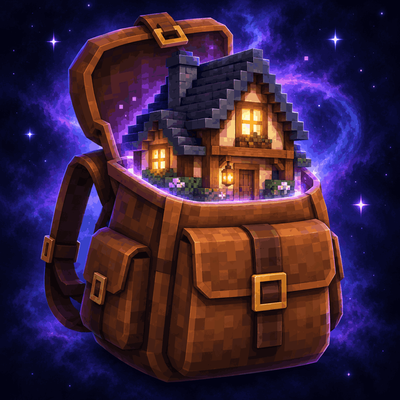
CurseForge · Minecraft mod
HomeSweetHome
HomeSweetHome is a Minecraft mod that turns a carriable backpack into a portable pocket world with customizable homes, expandable rooms, farms, and helpful residents.
Choose a version Pick your version below, then grab the matching file.
Quick answer
Which HomeSweetHome release should I use?
Latest stable file homesweethome-1.9.0.jar
Game version 26.2
Loader Fabric
homesweethome-1.9.0.jar targets 26.2 with Fabric. The project page does not say whether this file belongs on the client, dedicated server, or both. No extra mods listed for this file.
Where it goes
Is HomeSweetHome required on the client, server, or both?
The project page does not say whether this file belongs on the client, dedicated server, or both.
Client Source doesn’t say
Dedicated server Source doesn’t say
Loader for this release Fabric
Required install it here Optional supported, not mandatory Not supported do not install here Source doesn’t say do not assume
The source does not explicitly classify this release as client-only or server-only.
What else does homesweethome-1.9.0.jar need?
homesweethome-1.9.0.jar. Change the file and its required mods may change too.
This file does not list any required mods. Do not add a library just because a different file uses it.
This file does not list any required or optional mods.
Before you install it
Add HomeSweetHome without breaking your instance.
Built for homesweethome-1.9.0.jar. Pick another file and the loader, install side or required mods may change.
- 01
Stick to this file
Use homesweethome-1.9.0.jar. It targets 26.2 with Fabric; another release may have different loader, side or dependency requirements.
- 02
Bring the mods it needs
This file does not list any required mods. Do not add a library just because a different file uses it.
- 03
Put it on the correct side
The project page does not say whether this file belongs on the client, dedicated server, or both.
- 04
Pick the file you checked
Use the “Get this file” button beside homesweethome-1.9.0.jar. It opens that exact file at the source.
About this project
What does HomeSweetHome add?
HomeSweetHome
The first step towards your next adventure should be at home. Take it with you.
The Backpack opens to a portal to your own pocket dimension, where you can relax surrounded by stars and the glow of bright nebulae. And when you're done exploring, simply walk through the return doorway, grab your pack and head to the next adventure.
Choose your start
The first time you open a backpack, choose how and where you want to begin with gold coins.
Skyblock Island (250 coins) includes a standard grassy island, an oak tree, and a chest of starter supplies.
Stone Platform (500 coins) provides an expansive 128x128 stone foundation to build upon.
Prebuilt Home (1000 coins) includes a lovely house with a loft, fireplace, and cellar to expand upon.
Your chosen beginning world is a one-time purchase, and permanent to that backpack. (You aren't billed again when you revisit that backpack.) Every starter option includes a return doorway. Room plans and house remodels for existing homes can be purchased for the Prebuilt home option, while the other backpack beginners leave building the home to you.
Make yourself at home
Expand your prebuilt home with 14 purchasable cellar rooms, including a library, storage room, an aquarium with fish, an observatory, enchantment room, portal room, a swimming pool, and beacon chamber.
Furnish your rooms, add a balcony to admire the galaxy, grow food on a floating farm, or save up for the Grand Medieval Manor remodel. Additional upgrades include a greenhouse, vault, and forge. Completing the cellar unlocks the special Sanctum sky.
Bring your home to life
Hire residents to work for you at home. Buy tools, weapons, and armor at the Smith, purchase potions from the Alchemist, and have the Enchanter upgrade eligible equipment. The Farmer wanders around your home, gathering crops, collecting the harvest, storing supplies, tending the fields, and replanting the crops.
The residents of your home also have unique voice lines for idle chit-chat, successfully purchasing an item, or when they're not happy about it.
More than just a home to sleep
Marvel at the detail in the nebulae, unlockable sky colors, and ambient looping music. The Backpack includes a wearable 3D model, a lid that opens itself, and smooth animations when placing, picking up, and traveling with the pack.
Give a friend a house key, so they can visit your home, and return to where they were when they left. Your home's active beacon effects can accompany you in other dimensions, if you equip the matching backpack.
Purchase upkeep to keep your plot active while you're away, or buy insurance to protect your carried backpacks for one death.
Getting started
Craft a backpack with leather, a chest, and an ender pearl. Gather gold coins as you adventure, then place your new backpack and right-click to open. Right-click again to choose your beginning world.
Simply walk through the included return doorway to exit. Sneak-Right-click a placed backpack to pick it up, and take your home wherever you go.
Gold coins can be used to barter with villagers in place of emeralds for most trade offers, for general use in the game.
Requirements
Minecraft 26.2, Fabric Loader 0.19.3 or newer, Fabric API, and Java 25 or newer.
For use in a server, be sure to install HomeSweetHome and Fabric API for both client and server.
Project description from CurseForge.
Pick your setup
HomeSweetHome by Minecraft version and loader
Choose the version and loader you play, then open the matching release.
Check the dependencies, then try the file in a copied instance before changing a world you care about.
Recent files
HomeSweetHome versions and loaders
homesweethome-1.9.0.jar
30 Sept 2026
Client Source doesn’t say Server Source doesn’t say Dependencies No extras listed Listed on Release listing
Check the 26.2 · Fabric setup Fabric26.2 release
Looking for an older file? The official CurseForge project page is in Resources.