Minecraft version
Back to mods 
CurseForge · Minecraft mod
Luna Overhaul
The Moon and Mars as mining worlds, an overworld of towering mountain ranges, falling stars, gems, accessories and a performance layer for big packs.
Choose a version Pick your version below, then grab the matching file.
Quick answer
Which Luna Overhaul release should I use?
Latest stable file LunaOverhaul-0.8.2.0-neoforge-1.21.1.jar
Game version 1.21.1
Loader NeoForge
Luna Overhaul LunaOverhaul-0.8.2.0-neoforge-1.21.1.jar targets 1.21.1 with NeoForge. The project page does not say whether this file belongs on the client, dedicated server, or both. No extra mods listed for this file.
Where it goes
Is Luna Overhaul required on the client, server, or both?
The project page does not say whether this file belongs on the client, dedicated server, or both.
Client Source doesn’t say
Dedicated server Source doesn’t say
Loader for this release NeoForge
Required install it here Optional supported, not mandatory Not supported do not install here Source doesn’t say do not assume
The source does not explicitly classify this release as client-only or server-only.
What else does Luna Overhaul LunaOverhaul-0.8.2.0-neoforge-1.21.1.jar need?
LunaOverhaul-0.8.2.0-neoforge-1.21.1.jar. Change the file and its required mods may change too.
This file does not list any required mods. Do not add a library just because a different file uses it.
This file does not list any required or optional mods.
Before you install it
Add Luna Overhaul without breaking your instance.
Built for Luna Overhaul LunaOverhaul-0.8.2.0-neoforge-1.21.1.jar. Pick another file and the loader, install side or required mods may change.
- 01
Stick to this file
Use LunaOverhaul-0.8.2.0-neoforge-1.21.1.jar. It targets 1.21.1 with NeoForge; another release may have different loader, side or dependency requirements.
- 02
Bring the mods it needs
This file does not list any required mods. Do not add a library just because a different file uses it.
- 03
Put it on the correct side
The project page does not say whether this file belongs on the client, dedicated server, or both.
- 04
Pick the file you checked
Use the “Get this file” button beside LunaOverhaul-0.8.2.0-neoforge-1.21.1.jar. It opens that exact file at the source.
About this project
What does Luna Overhaul add?
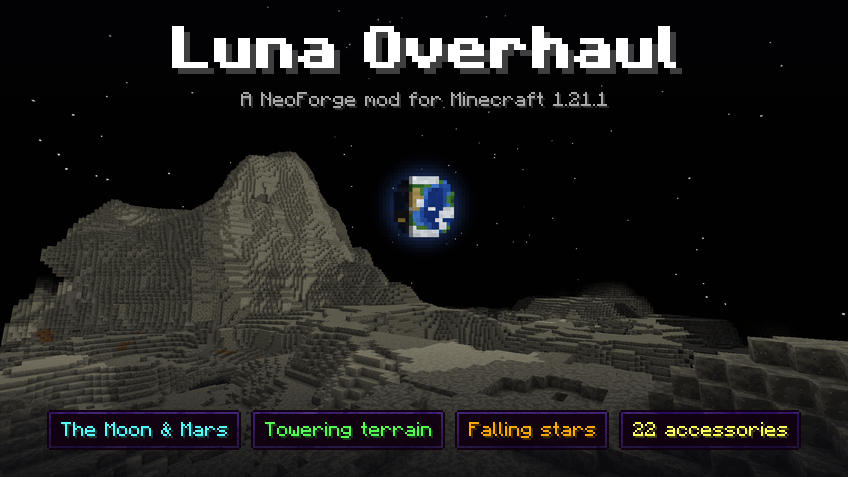
Luna Overhaul adds the Moon and Mars as dimensions you travel to and mine. Each has three regions with their own ground and their own ores, and you pick which one to land in. It also makes the overworld a lot taller, drops falling stars nearby on clear nights, and adds a space suit, plus 22 accessories if you use Curios.
- Two mining dimensions with a black or butterscotch sky, low gravity and no mobs
- Three ore-rich regions on each body, with a landing site in every one
- A catastrophe every 45 to 60 minutes sends everyone home and moves the landing sites
- A taller overworld (up to y=767) with much bigger mountain ranges, and continents 8 times the size
- Falling stars, meteorites and meteoric iron
- 22 Curios accessories that level up with Relics
- Other performance settings not generally covered(small impact or niche use cases)
Getting started
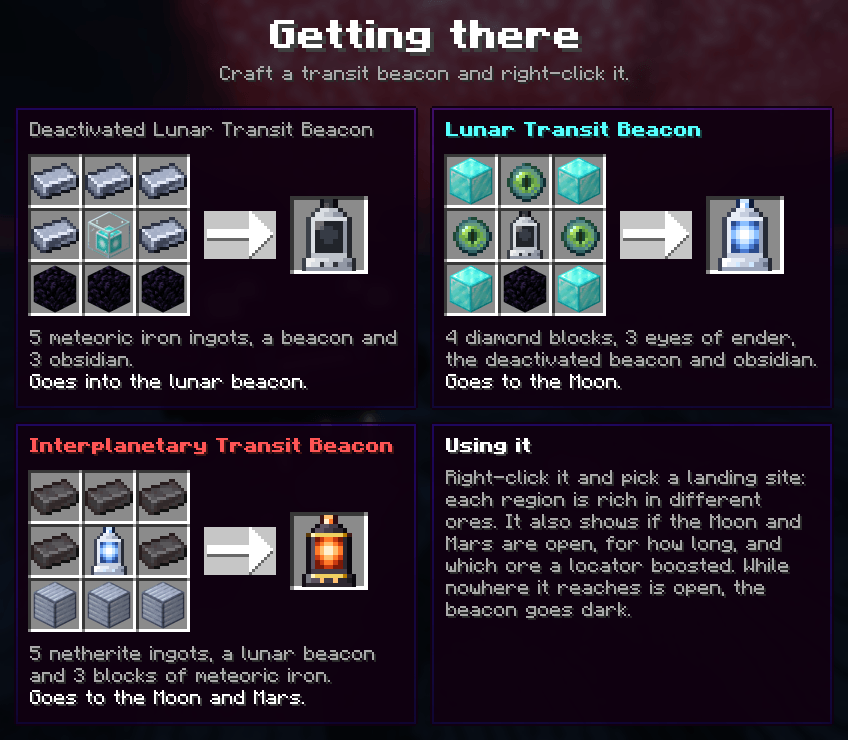
- Find the crashed lander near spawn: smoke by day, a light on its antenna at night. Its chest has supplies, a parachute and the Field Guide.
- Ring a beacon with five meteoric iron ingots, with three obsidian below, for a Deactivated Lunar Transit Beacon. Then craft the Lunar Transit Beacon round it: obsidian below, three eyes of ender and four blocks of diamond.
- Right-click the beacon and pick a landing site. Mine, and right-click it again to come home before the catastrophe.
The Moon and Mars
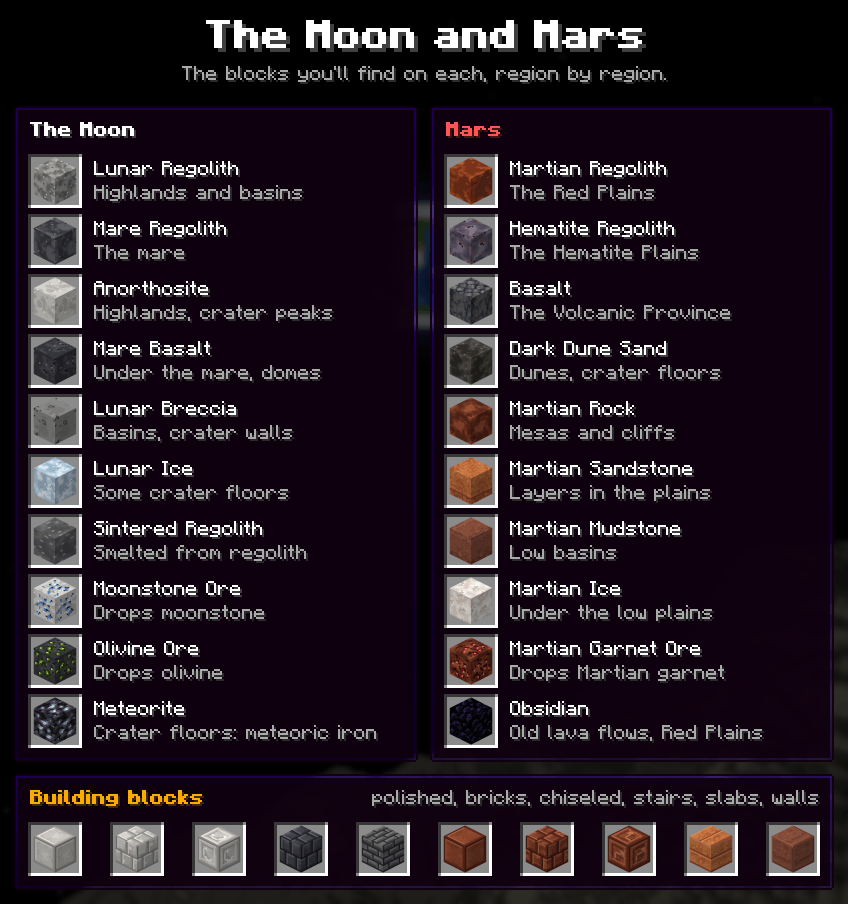
Ore is 3 times as common and 6 times for modded ores, mining gives 3 times the experience, and about one ore in three drops an extra item. The Moon has moonstone and olivine, Mars has Martian garnet, and all the new stone comes in polished, brick and chiseled versions with stairs, slabs and walls.
The Moon has a black sky with Earth over the horizon. Mars has a tan sky by day, blue sunsets and two small moons at night. Gravity is lower on both, so you jump higher and fall slower. There are no mobs.
Regions and landing sites
| Region | What it looks like | Rich in |
|---|---|---|
| Lunar Highlands | Pale ground and hills, strewn with boulders | gold, lapis, moonstone |
| Lunar Mare | Dark basalt plains, low volcanic domes, craters with bright rays | iron, copper, olivine |
| Impact Basin | Shattered breccia, more craters, the big ones with central peaks | diamond, emerald, redstone |
| Red Plains | Red dust over layered rock, ice under the lows | quartz, glowstone |
| Hematite Plains | Grey-violet ground | gold, garnet |
| Volcanic Province | Black basalt and dark dunes | ancient debris |
Catastrophes
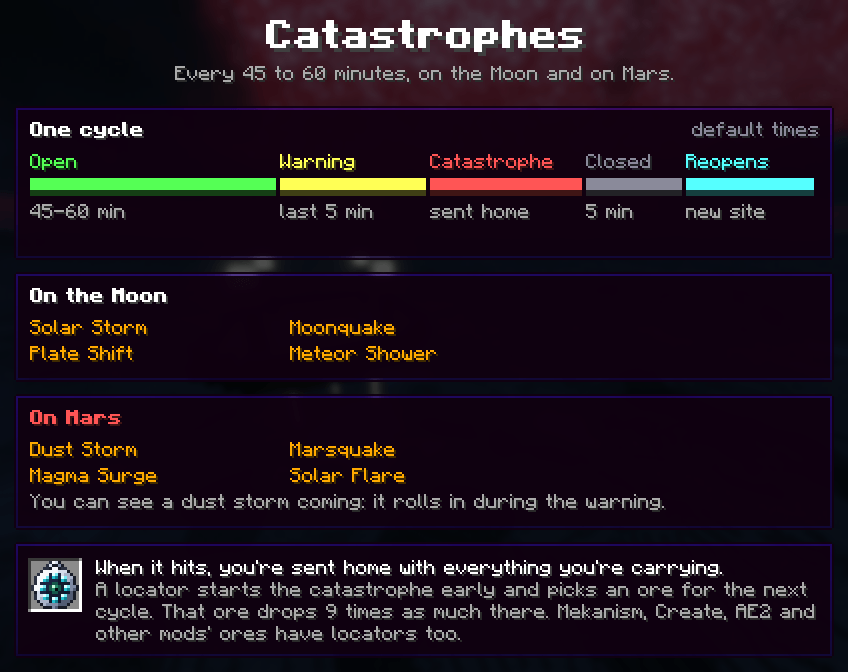
The Moon and Mars each get hit by a catastrophe every 45 to 60 minutes: a moonquake, plate shift, solar storm or meteor shower on the Moon, and a dust storm, marsquake, magma surge or solar flare on Mars. You get a 5 minute warning that says which, then everyone there is sent home with whatever they're carrying. A few minutes later the body opens again with new landing sites.
A locator sets the catastrophe off early and picks which ore the next cycle has more of. That ore drops 9 times as much while it lasts.
Because the sites keep moving (and old ones are deleted when the game closes), the Moon and Mars aren't a place for a base. Go up, mine, come back. If your health gets too low up there, you're pulled home instead of dying.
Space suit
Once you've been to both, you can turn netherite armour into a space suit at a smithing table, with a Space Suit Upgrade and a block of meteoric iron. The upgrade is crafted from diamonds, starweave, moonstone, olivine, Martian garnet and meteoric iron.
Each piece adds a bit of mining speed, reach and extra ore; the full suit gives 30% faster mining, 2 more blocks of reach and a 20% chance of an extra drop from ore, in any dimension.
A bigger overworld
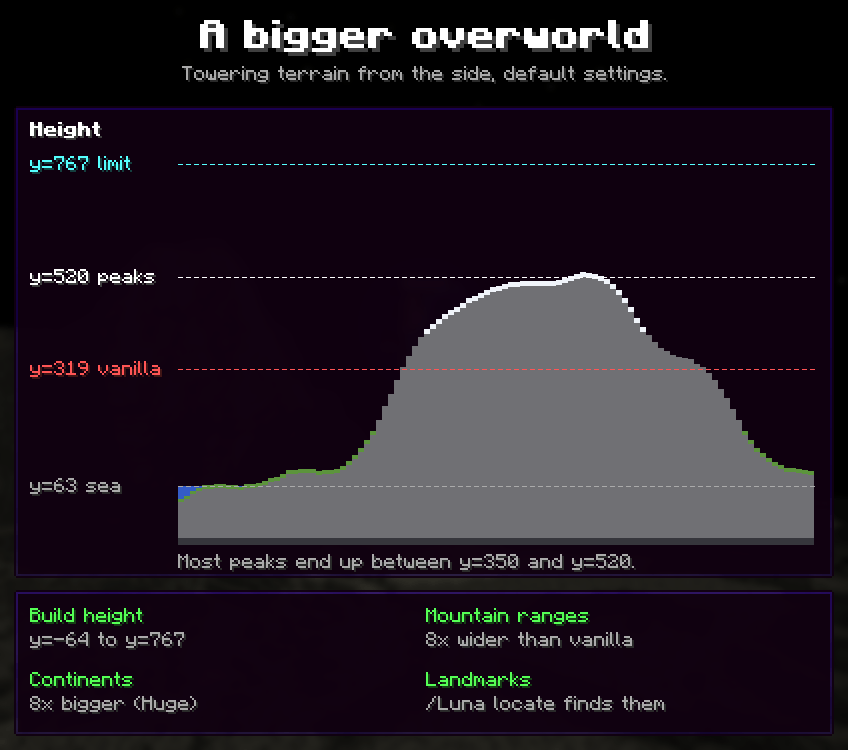
With the default settings the overworld goes up to y=767 and mountain ranges are much wider and taller, with most peaks between y=350 and y=520. Plains, coasts and caves still look like vanilla. Continents, biomes and rivers are 8 times bigger, and if you'd spawn in the ocean you're moved to land.
There are new landmarks to find too: cenotes, natural arches, hoodoos, crater ponds and small mountain lakes. /Luna locate shows the nearest one.
If Towering is too much, there are smaller Scenic and Dramatic settings, or you can switch the terrain back to vanilla in the config.
The crashed lander
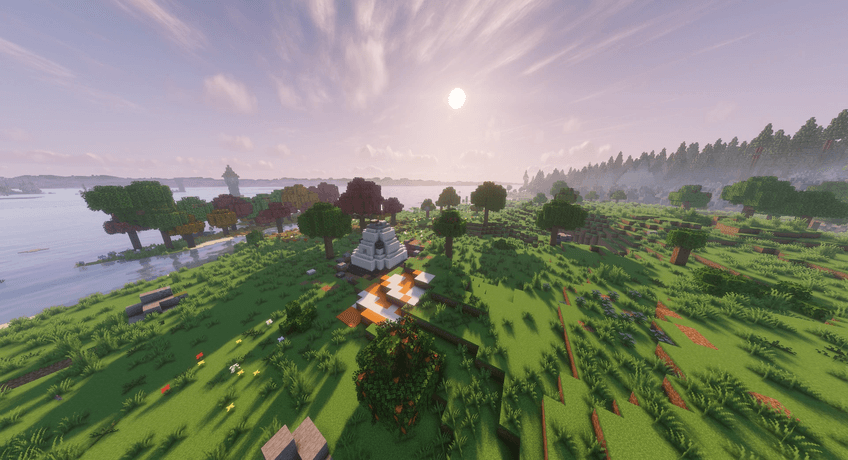
Every world has a crashed lander near spawn. Its chest holds supplies, a spare parachute and the Field Guide, which covers getting there, the regions of both bodies, staying safe, falling stars, accessories and the space suit.
Falling stars
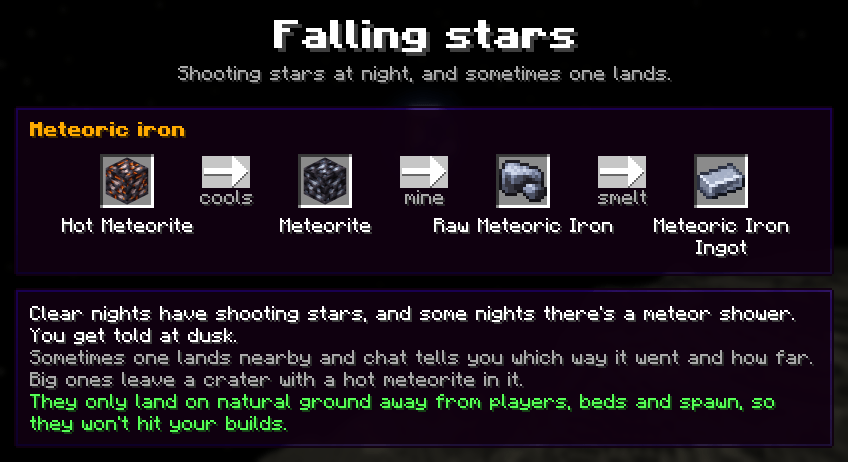 On clear nights you'll see shooting stars, and some nights bring a meteor shower. Now and then one lands close by, and chat tells you which way and how far. The big ones leave a crater with a meteorite you can mine for meteoric iron. They never land near players, beds or spawn, so your base is safe.
Accessories
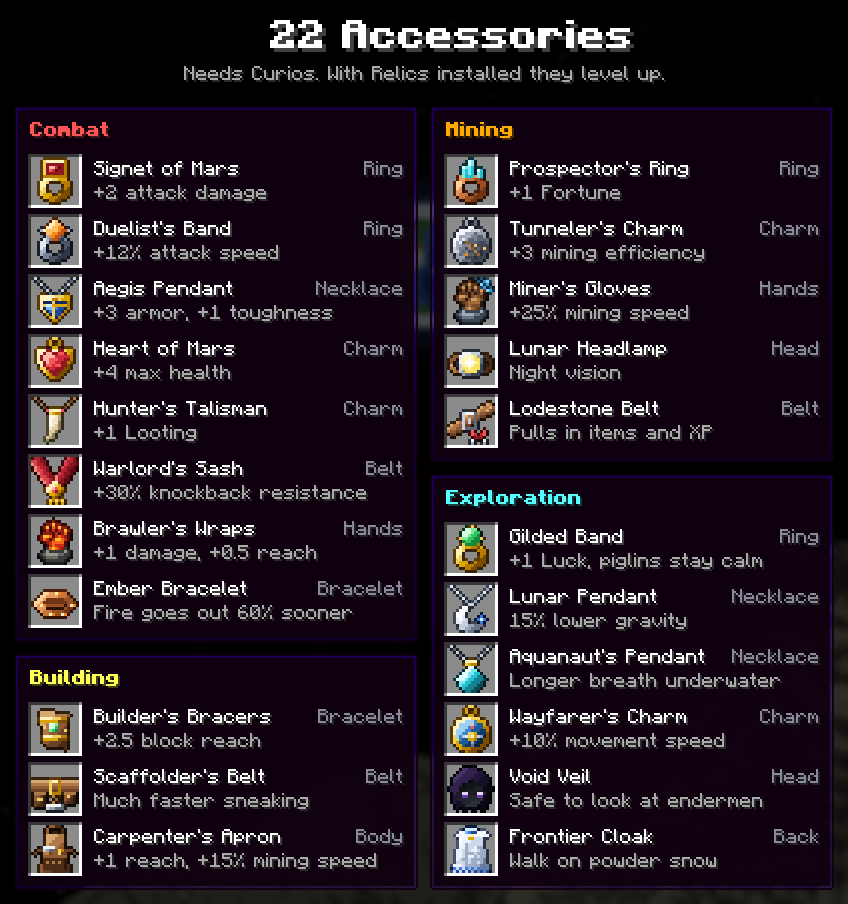
With Curios installed there are 22 accessories, and with Relics (1.21 and 1.21.1) they level up as you use them.
Performance
Luna has optional performance settings for big modpacks. When your FPS drops it limits particles, entities, block entities, name tags and sounds. It can cap your FPS while the game is in the background and skip entities you can't see (unless you have Dynamic FPS or EntityCulling, which do the same). On the server it merges dropped items and stops mobs piling up in one spot.
Every one of these can be turned off, and /Luna perf shows what they're doing. They're meant to run alongside Embeddium, ModernFix and FerriteCore, not replace them.
Commands
/Luna- whether the Moon and Mars are open, and when that changes/Luna worldgen- terrain settings for the current world/Luna perf- performance info
For operators: /Luna sites (this cycle's landing sites), /Luna server (server performance) and /Luna wipe (reset the Moon and Mars at the next clean shutdown). Note the capital L.
Compatibility
Luna has to be installed on both the client and the server.
It works with Distant Horizons, Embeddium, Oculus, Create, Mekanism, Immersive Engineering, Biomes O' Plenty and TerraBlender. Ores from other mods spawn on the Moon and Mars too.
Tectonic, Terralith and William Wythers' Overhauled Overworld change the same terrain files, so they don't mix with Luna's terrain. Pick one, or set heightPack and widthPack to NONE in config/luna-common.toml to keep the rest of Luna.
Shader packs draw their own sky, so on the Moon you'll get the pack's sky and clouds. To get rid of the clouds, add luna:moon to the line starting with dimension.world1= in the pack's shaders/dimension.properties.
Versions
| Minecraft | Loader | Luna |
|---|---|---|
| 1.21.1 | NeoForge | 0.8.2.0 |
| 1.21, 1.21.3, 1.21.4, 1.21.5, 1.21.8, 1.21.10, 1.21.11, 26.1.2 | NeoForge | 0.8.2.0 |
| 1.20.1 | Forge, NeoForge | 0.8.2.0 |
Luna is centered on 1.21.1, but more versions are supported.
FAQ
Can I add it to an existing world? Yes. Everything works except the new terrain, which only shows up in chunks that haven't been generated yet. You'll see a line where the old land meets the new.
It says my world uses experimental settings. Every mod that adds a dimension does that. Click "I know what I'm doing!" and it won't ask again for that world.
Where's the config? config/luna-common.toml, config/luna-performance.toml and config/luna-performance-client.toml, or the Config button in the mods list.
Does it work on servers? Yes. It's been tested on dedicated servers, and the catastrophe timers and landing sites carry over restarts.
Found a bug? You can leave a comment with your https://mclo.gs attached
Luna is translated into 33 languages. If something reads wrong in yours, say so in the comments.
Project description from CurseForge.
Pick your setup
Luna Overhaul by Minecraft version and loader
Choose the version and loader you play, then open the matching release.
Minecraft version
1.21.11
1 loader buildMinecraft version
1.21.10
1 loader buildMinecraft version
1.21.8
1 loader buildMinecraft version
1.21.5
1 loader buildMinecraft version
1.21.4
1 loader buildMinecraft version
1.21.3
1 loader buildMinecraft version
1.21.1
1 loader buildMinecraft version
1.21
1 loader buildMinecraft version
1.20.1
2 loader buildsCheck the dependencies, then try the file in a copied instance before changing a world you care about.
Recent files
Luna Overhaul versions and loaders
LunaOverhaul-0.8.2.0-neoforge-1.21.1.jar
11 Oct 2026
Client Source doesn’t say Server Source doesn’t say Dependencies No extras listed Listed on Release listing
Check the 1.21.1 · NeoForge setup 1.21.1NeoForge release
LunaOverhaul-0.8.2.0-neoforge-26.1.2.jar
11 Oct 2026
Client Source doesn’t say Server Source doesn’t say Dependencies No extras listed Listed on Release listing
Check the 26.1.2 · NeoForge setup NeoForge26.1.2 release
LunaOverhaul-0.8.2.0-neoforge-1.21.11.jar
11 Oct 2026
Client Source doesn’t say Server Source doesn’t say Dependencies No extras listed Listed on Release listing
Check the 1.21.11 · NeoForge setup NeoForge1.21.11 release
LunaOverhaul-0.8.2.0-neoforge-1.21.10.jar
11 Oct 2026
Client Source doesn’t say Server Source doesn’t say Dependencies No extras listed Listed on Release listing
Check the 1.21.10 · NeoForge setup NeoForge1.21.10 release
LunaOverhaul-0.8.2.0-neoforge-1.21.8.jar
11 Oct 2026
Client Source doesn’t say Server Source doesn’t say Dependencies No extras listed Listed on Release listing
Check the 1.21.8 · NeoForge setup 1.21.8NeoForge release
LunaOverhaul-0.8.2.0-neoforge-1.21.5.jar
11 Oct 2026
Client Source doesn’t say Server Source doesn’t say Dependencies No extras listed Listed on Release listing
Check the 1.21.5 · NeoForge setup 1.21.5NeoForge release
LunaOverhaul-0.8.2.0-neoforge-1.21.4.jar
11 Oct 2026
Client Source doesn’t say Server Source doesn’t say Dependencies No extras listed Listed on Release listing
Check the 1.21.4 · NeoForge setup 1.21.4NeoForge release
LunaOverhaul-0.8.2.0-neoforge-1.21.3.jar
11 Oct 2026
Client Source doesn’t say Server Source doesn’t say Dependencies No extras listed Listed on Release listing
Check the 1.21.3 · NeoForge setup 1.21.3NeoForge release
LunaOverhaul-0.8.2.0-neoforge-1.21.jar
11 Oct 2026
Client Source doesn’t say Server Source doesn’t say Dependencies No extras listed Listed on Release listing
Check the 1.21 · NeoForge setup 1.21NeoForge release
LunaOverhaul-0.8.2.0-forge-1.20.1.jar
11 Oct 2026
Client Source doesn’t say Server Source doesn’t say Dependencies No extras listed Listed on Release listing
Check the 1.20.1 · Forge setup 1.20.1ForgeNeoForge release
LunaOverhaul-0.8.0.0-neoforge-26.1.2.jar
2 Oct 2026
Client Source doesn’t say Server Source doesn’t say Dependencies No extras listed Listed on Release listing
Check the 26.1.2 · NeoForge setup NeoForge26.1.2 release
LunaOverhaul-0.8.0.0-neoforge-1.21.11.jar
2 Oct 2026
Client Source doesn’t say Server Source doesn’t say Dependencies No extras listed Listed on Release listing
Check the 1.21.11 · NeoForge setup NeoForge1.21.11 release
Looking for an older file? The official CurseForge project page is in Resources.
 mod
mod CurseForge · Minecraft
SLR: Forgeworks
An addon for Solo Leveling: Reawakening [SLR]. Adds monster material drops and processing for them in various workstations.
 mod
mod CurseForge · Minecraft
Star Wars: Blood & Beskar
Star Wars blasters, lightsabers and beskar for Fabric and NeoForge.
 mod
mod CurseForge · Minecraft
Cam Utilities
Client-side camera control mod: smooth zoom, detached freecam, custom 3rd-person distance, cinematic camera smoothing, and custom perspective presets.