Minecraft version
Back to mods 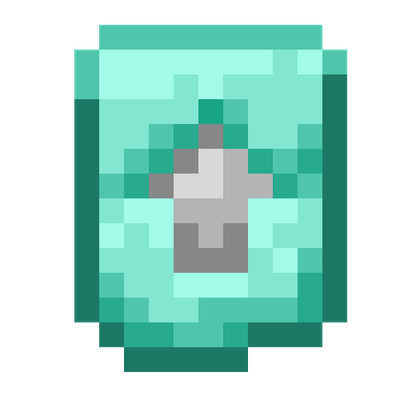
CurseForge · Minecraft mod
Template Progression
Adds a new progression system using custom Smithing Templates, allowing players to upgrade leather and gold equipment through iron and diamond while preserving enchantments.
Choose a version Pick your version below, then grab the matching file.
Quick answer
Which Template Progression release should I use?
Latest stable file template_progression-1.0.0-forge-1.20.1.jar
Game version 1.20.1
Loader Forge
Template Progression template_progression-1.0.0-forge-1.20.1.jar targets 1.20.1 with Forge. The project page does not say whether this file belongs on the client, dedicated server, or both. No extra mods listed for this file.
Where it goes
Is Template Progression required on the client, server, or both?
The project page does not say whether this file belongs on the client, dedicated server, or both.
Client Source doesn’t say
Dedicated server Source doesn’t say
Loader for this release Forge
Required install it here Optional supported, not mandatory Not supported do not install here Source doesn’t say do not assume
The source does not explicitly classify this release as client-only or server-only.
What else does Template Progression template_progression-1.0.0-forge-1.20.1.jar need?
template_progression-1.0.0-forge-1.20.1.jar. Change the file and its required mods may change too.
This file does not list any required mods. Do not add a library just because a different file uses it.
This file does not list any required or optional mods.
Before you install it
Add Template Progression without breaking your instance.
Built for Template Progression template_progression-1.0.0-forge-1.20.1.jar. Pick another file and the loader, install side or required mods may change.
- 01
Stick to this file
Use template_progression-1.0.0-forge-1.20.1.jar. It targets 1.20.1 with Forge; another release may have different loader, side or dependency requirements.
- 02
Bring the mods it needs
This file does not list any required mods. Do not add a library just because a different file uses it.
- 03
Put it on the correct side
The project page does not say whether this file belongs on the client, dedicated server, or both.
- 04
Pick the file you checked
Use the “Get this file” button beside template_progression-1.0.0-forge-1.20.1.jar. It opens that exact file at the source.
About this project
What does Template Progression add?
English
Template Progression
Template Progression expands Minecraft's Smithing Template system by adding new equipment upgrades and custom ways to duplicate the templates.
The mod adds four new Smithing Templates:
- Iron Upgrade: Leather → Iron
- Leather to Gold Upgrade: Leather → Gold
- Gold to Iron Upgrade: Gold → Iron
- Iron to Diamond Upgrade: Iron → Diamond
These upgrades create two different progression paths:
Leather → Iron → Diamond → Netherite
Leather → Gold → Iron → Diamond → Netherite
Template Duplication
Each custom Smithing Template can also be duplicated through a crafting recipe.
For the Iron Upgrade, the recipe uses Leather in the center, the template in the center-top slot, and Iron Ingots in the other seven slots.
For the Leather to Gold Upgrade, the recipe uses Leather in the center, the template in the center-top slot, and Gold Ingots in the other seven slots.
For the Gold to Iron Upgrade, the recipe uses a Gold Block in the center, the template in the center-top slot, and Iron Ingots in the other seven slots.
For the Iron to Diamond Upgrade, the recipe uses an Iron Block in the center, the template in the center-top slot, and Diamonds in the other seven slots.
These recipes allow players to obtain additional copies of the templates instead of having to find them again.
Structure Loot
The new templates can also be found in various vanilla structures, with different chances depending on the structure and progression stage.
Templates can appear in places such as villages, dungeons, temples, shipwrecks, strongholds, Nether structures, Ancient Cities, End Cities, and other vanilla structures.
Template Progression is designed to work alongside Minecraft's existing Smithing Table and Netherite progression while adding more options to equipment progression.
Español
Template Progression
Template Progression amplía el sistema de Moldes de Herrería de Minecraft añadiendo nuevas mejoras de equipamiento y formas personalizadas de duplicar los moldes.
El mod añade cuatro nuevos Moldes de Herrería:
- Mejora de Hierro: Cuero → Hierro
- Mejora de Cuero a Oro: Cuero → Oro
- Mejora de Oro a Hierro: Oro → Hierro
- Mejora de Hierro a Diamante: Hierro → Diamante
Estas mejoras crean dos rutas diferentes de progresión:
Cuero → Hierro → Diamante → Netherite
Cuero → Oro → Hierro → Diamante → Netherite
Duplicación de Moldes
Cada uno de los nuevos Moldes de Herrería también puede duplicarse mediante una receta de crafting.
Para la Mejora de Hierro, la receta utiliza Cuero en el centro, el molde en el centro superior y Lingotes de Hierro en los otros siete espacios.
Para la Mejora de Cuero a Oro, la receta utiliza Cuero en el centro, el molde en el centro superior y Lingotes de Oro en los otros siete espacios.
Para la Mejora de Oro a Hierro, la receta utiliza un Bloque de Oro en el centro, el molde en el centro superior y Lingotes de Hierro en los otros siete espacios.
Para la Mejora de Hierro a Diamante, la receta utiliza un Bloque de Hierro en el centro, el molde en el centro superior y Diamantes en los otros siete espacios.
Estas recetas permiten obtener copias adicionales de los moldes sin tener que volver a encontrarlos.
Loot de Estructuras
Los nuevos moldes también pueden encontrarse en diferentes estructuras vanilla, con distintas probabilidades dependiendo de la estructura y de la etapa de progresión.
Los moldes pueden aparecer en lugares como aldeas, mazmorras, templos, naufragios, fortalezas, estructuras del Nether, Ciudades Antiguas, Ciudades del End y otras estructuras vanilla.
Template Progression está diseñado para funcionar junto al sistema existente de la Mesa de Herrería y la progresión vanilla hacia Netherite, añadiendo nuevas opciones para la progresión del equipamiento.
Project description from CurseForge.
Pick your setup
Template Progression by Minecraft version and loader
Choose the version and loader you play, then open the matching release.
Check the dependencies, then try the file in a copied instance before changing a world you care about.
Recent files
Template Progression versions and loaders
template_progression-1.0.0-forge-1.20.1.jar
1 Oct 2026
Client Source doesn’t say Server Source doesn’t say Dependencies No extras listed Listed on Release listing
Check the 1.20.1 · Forge setup 1.20.1Forge release
Looking for an older file? The official CurseForge project page is in Resources.
 mod
mod CurseForge · Minecraft
ItsUniqueGamer's Mrcrayfish's Vehicle unofficial port
An unofficial port of Mrcrayfish's Vehicle mod for newer versions
 mod
mod CurseForge · Minecraft
mine of tanks
Bring tank warfare to Minecraft with historical vehicles, upgradeable guns and turrets, custom paint schemes, AI battles, base capture, and multiplayer crews. Drive, fight, research, and command your way to victory!
 mod
mod CurseForge · Minecraft
AbyssCore
The official all-in-one server core for Abyss, featuring military radar systems, tactical missiles, rank progression, and an integrated economy.