Minecraft version
Back to mods 
CurseForge · Minecraft mod
Topsy Turvy
Water burns. Lava is a nice warm bath. Zombies burn at night, fish breathe air, and the best mining tool in the game is your fist.
Choose a version Pick your version below, then grab the matching file.
Quick answer
Which Topsy Turvy release should I use?
Latest stable file Topsy Turvy 1.1.4
Game version 26.3
Loader Fabric
Topsy Turvy 1.1.4 targets 26.3 with Fabric. The project page does not say whether this file belongs on the client, dedicated server, or both. No extra mods listed for this file.
Where it goes
Is Topsy Turvy required on the client, server, or both?
The project page does not say whether this file belongs on the client, dedicated server, or both.
Client Source doesn’t say
Dedicated server Source doesn’t say
Loader for this release Fabric
Required install it here Optional supported, not mandatory Not supported do not install here Source doesn’t say do not assume
The source does not explicitly classify this release as client-only or server-only.
What else does Topsy Turvy 1.1.4 need?
Topsy Turvy 1.1.4. Change the file and its required mods may change too.
This file does not list any required mods. Do not add a library just because a different file uses it.
This file does not list any required or optional mods.
Before you install it
Add Topsy Turvy without breaking your instance.
Built for Topsy Turvy 1.1.4. Pick another file and the loader, install side or required mods may change.
- 01
Stick to this file
Use Topsy Turvy 1.1.4. It targets 26.3 with Fabric; another release may have different loader, side or dependency requirements.
- 02
Bring the mods it needs
This file does not list any required mods. Do not add a library just because a different file uses it.
- 03
Put it on the correct side
The project page does not say whether this file belongs on the client, dedicated server, or both.
- 04
Pick the file you checked
Use the “Get this file” button beside Topsy Turvy 1.1.4. It opens that exact file at the source.
About this project
What does Topsy Turvy add?
Minecraft, but someone flipped it over and shook it.
Water burns and lava is a warm bath. Your bed explodes in the Overworld but is the safest place in the Nether. Zombies burn at night, monsters spawn next to your torches, fish suffocate in the ocean, and the best mining tool in the game is your bare fist.
Nothing is retextured (except the rain). Everything looks normal. That's the trap.
| Minecraft | 26.3 (Java 25) |
| Loaders | NeoForge (26.3.0.39-beta+), Forge (66.0.10+), Fabric (Loader 0.19.5+) |
| Needs | Nothing on NeoForge and Forge. Fabric API on Fabric. |
| Multiplayer | Install on the server and every client. Singleplayer, LAN and dedicated servers all work. |
| Settings | Every single change has its own switch, per world. |
Watch this!
 Credit: @Joeysaf
The big ones
- 🔥 Water burns, lava heals. Swimming is an extreme sport. Lava puts you out.
- 🌋 It rains lava. Glowing orange drops that set you on fire.
- 🛏️ Beds explode in the Overworld. Sleep in the Nether instead.
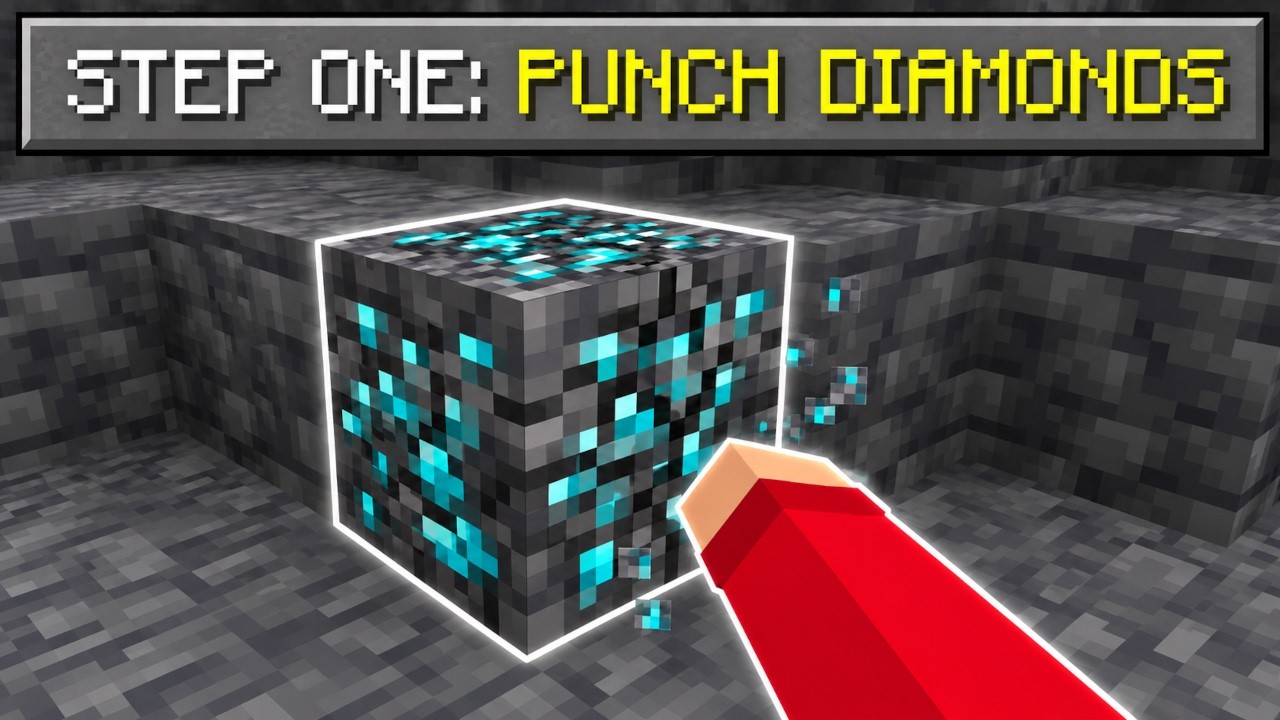
- 👊 Punch stone, shovel dirt. Your fist mines like an iron pickaxe; pickaxes are useless.
- 🧟 Monsters love light. They spawn in daylight and by torches, and burn at night.
- 🐟 Fish breathe air. Zombies and golems swim.
- 🏰 Blazes and piglins swapped homes. And gold calms blazes now, not piglins.
- 💥 Creepers and TNT build. You get a mossy dome instead of a crater.
Everything that's flipped
🛏️ Beds and respawn anchors
- Beds explode in the Overworld. Intentional Game Design.
- Beds are safe in the Nether and the End. Sleep at any hour and set your spawn there.
- A night in a Nether bed also skips the night in the Overworld, so your friends wake up to sunshine.
- Respawn anchors work everywhere except the Nether, where they blow up.
🔥 Water and lava
- Water sets you on fire and hurts like lava. Lava is harmless and puts out flames.
- The water hardens, not the lava. Water source + lava = obsidian, flowing water + lava = cobblestone, water falling onto lava = stone. Nether portals still work, you just build them backwards.
- Water flows slow and short like old lava. Lava flows fast and far and makes infinite sources. Infinite water pools stop working.
- Water works in the Nether: buckets, ice and wet sponges all behave.
- Lava keeps farmland moist. Water doesn't.
- Broken ice always leaves water behind, even in the Nether. Which, reminder, burns.
🌋 Lava rain
- Rain is lava. It sets you on fire, never puts fires out, and fills cauldrons with lava.
- It's drawn as glowing orange drops that smoke when they land.
- It never places lava blocks, so your base survives. You might not.
- Mobs and animals are spared by default so farms don't die on the first rainy day. One switch makes them burn too.
⛏️ Mining
- Your bare fist mines stone like an iron pickaxe. Stone, deepslate, obsidian: punch them.
- Ores only drop for a bare fist. Hit diamond ore with a pickaxe and you get nothing, slowly.
- Pickaxes mine stone at fist speed. Efficiency V doesn't help.
- Dirt and grass are tough. Slow as stone by hand, and they only drop for a shovel.
- Pickaxes dig dirt and grass fast, but you still need a shovel for the drop.
- Ancient debris stays vanilla. Diamond pickaxe, like always. Some things are sacred.
🧟 Mobs
- Zombies, skeletons and phantoms burn at night under the open sky, and stroll around happily in daylight.
- Monsters spawn in the light: in broad daylight or right next to your torches. Dark caves are the safest place in the world.
- Endermen spawn at a quarter of their usual rate in the Overworld, because the new rules made them a bit too excited (adjustable).
- Zombies, skeletons, piglins and iron golems swim. Moats and water traps stop working.
- Fish, squid, dolphins, axolotls, tadpoles and nautiluses live on land and drown in water.
- Witches throw a random potion every time: Harming, Night Vision, a bottle of water… sometimes as a lingering cloud.
- Witches attack anything in range: cows, villagers, zombies, your dog. But once you're in reach, you're their favourite.
Optional chaos (off by default, one switch each):
- Mob Civil War: every hostile and neutral mob attacks every other one. Zombies vs skeletons, creepers vs endermen, wolves vs golems.
- Bones Anger Dogs: hand a wolf a bone and it attacks you. Even your own dog.
- Animals Hunt, Monsters Help: cows, pigs and sheep hunt you, while zombies, skeletons and creepers leave you alone and fight off whatever is after you.
🏰 The Nether
- Blazes live in bastions. New bastions spawn blazes instead of piglins, and the treasure room has a blaze spawner.
- Piglins live in fortresses, and the fortress spawner spawns piglins.
- Piglins ignore gold. Full gold armor won't save you.
- Blazes love gold. Wear one gold piece and they leave you alone… until you hit one. Then every blaze nearby comes for you.
⚡ For speedrunners
- Blazes drop ender pearls. Endermen drop blaze rods. Good luck with your seed.
🌾 Blocks and crops
- Sand drops flint (10% of the time; Silk Touch keeps the sand). Gravel never does.
- Gravel smelts into glass. Sand doesn't.
- Fully grown crops only give back their seed. Break a crop that is still growing to get the full harvest.
⚔️ Raids
- Bad Omen starts a raid wherever you are in the Overworld: in the open, in your base, on your boat…
- …except in a village. Villagers are finally safe.
🍖 Food and farming
- Rotten flesh is the best food in the game. Fills you up like steak, never gives Hunger.
- Milk is poison. It cures nothing and gives you every bad effect (except Instant Damage) for 10 seconds.
- Cows give lava. Bucket + cow = lava bucket.
- Feeding animals makes them younger. An adult cow fed wheat turns back into a calf. No more breeding.
- Bone meal kills plants. Crops and saplings wither into dead bushes, grass turns to dirt.
🔴 Redstone
- Redstone torches are on while powered and off when they aren't.
- Repeaters invert their signal. No input, strong output. Everything is on by default, and old builds do the opposite of what they used to.
💥 Explosions
- TNT builds. It breaks nothing and raises a hollow mossy cobblestone dome around the blast. It still hurts.
- Creepers build too. That hiss now means a dome is about to go up around you. It still hurts, and now you're trapped.
✨ Enchanting
- Enchanting gives you levels. No level requirement, and you walk away with the levels it would have cost (it still uses lapis).
- Curse of Vanishing is a blessing. Those items stay with you when you die and come back when you respawn.
💰 Trading
- Villagers trade backwards. What they used to sell, they now buy from you for emeralds. What they used to buy, they now sell you as junk: dirt, sticks, dead bushes, poisonous potatoes…
- Villagers are scared of iron golems and run from their own bodyguards.
- The wandering trader buys anything. One dirt? 37 emeralds. A stick? 52. One sale per item per trader, so make it count.
🌡️ Climate, lightning and sleep
- Lightning comes out of the ground, bursting upward in sparks, lava and smoke.
- Hot biomes are cold and cold biomes are hot. Deserts, savannas and badlands get snow; snowy plains and icy peaks get (lava) rain. New chunks generate that way too, so snowy dunes are a thing.
- Water in formerly snowy biomes burns twice as hard. Frozen rivers are now the hottest water in the world.
- You can only sleep with monsters nearby. No monsters around? "You may not rest now. There are no monsters nearby."
Settings
Every change above has its own switch, sorted into pages (Beds, Water and Lava, Lava Rain, Mining, Mobs, the Nether, Blocks and Crops, Raids, Food and Farming, Redstone and Explosions, Enchanting, Trading, Climate and Sleep). A few are sliders: the enderman spawn rate, the flint chance, how tough dirt is, and how long lava rain keeps you burning.
How to open them: in a world, press Esc and click Topsy-Turvy Settings in the bottom-left corner of the pause menu. This works on every loader. On NeoForge and Forge the settings are also behind the mod's Config button in the Mods list. Changes apply immediately.
- Per world: every world keeps its own settings, in the world folder under
serverconfig/(topsyturvy-synced.tomlon NeoForge,topsyturvy.jsonon Fabric and Forge). - On a server: the server's settings are sent to everyone who joins, and players see them read-only.
- No config library needed. Fabric and Forge get the mod's own settings screen.
- New stuff only: the bastion, fortress, villager-trade and climate changes affect things generated after you flip them (new chunks, new trades). Everything else applies right away.
Data-pack tags
Want to change what counts as what? These tags are yours:
| Tag | What's in it |
|---|---|
topsyturvy:needs_shovel (blocks) |
Dirt, grass, podzol, mycelium, paths, farmland |
topsyturvy:fist_only (blocks) |
All vanilla ores |
topsyturvy:vanilla_mining (blocks) |
Blocks that skip every mining change (ancient debris) |
topsyturvy:inverted_crops (blocks) |
Wheat, carrots, potatoes, beetroots, nether wart, cocoa |
topsyturvy:learns_to_swim (entities) |
Zombies, skeletons, piglins, golems and friends |
topsyturvy:breathes_air (entities) |
Fish, squid, dolphins, axolotls, tadpoles, nautiluses |
Survival tips from the other side
- Carry fire resistance. Rivers are hazards now.
- Dig down. It's dark and quiet down there and nothing spawns. The surface at noon is the dangerous part.
- Keep torches away from your house. They attract monsters… but you need monsters nearby to sleep. Good luck balancing that.
- Take your pickaxe off before you hit an ore.
- Pack rotten flesh, not steak. And never drink the milk.
- Need levels? Go enchant something.
- Building a portal? Put a water source next to lava. The water turns into obsidian. Pour it on top and you just get stone.
FAQ
Is this a joke mod? Yes. A very thorough one.
Can I turn off the bits I don't like? Yes, every change has its own switch. See Settings.
Which file do I need? The one for your loader: NeoForge, Forge or Fabric. They have the same features and the same settings. The Fabric one also needs Fabric API.
Does it work with other mods? It changes vanilla rules, so most mods are fine. Modded ores are left alone unless you add them to topsyturvy:fist_only. Modded monsters follow the spawn-in-the-light rule if they use the vanilla spawn checks.
Will it wreck my existing world? Only in the ways it's supposed to. Remove the mod and everything goes back to normal. Bastions and fortresses that already generated keep what's in them.
Is there a version for 1.21.1? Not right now. Topsy-Turvy is built for Minecraft 26.3.
Project description from CurseForge.
Pick your setup
Topsy Turvy by Minecraft version and loader
Choose the version and loader you play, then open the matching release.
Check the dependencies, then try the file in a copied instance before changing a world you care about.
Recent files
Topsy Turvy versions and loaders
Topsy Turvy 1.1.4
topsyturvy-fabric-1.1.4.jar
13 Oct 2026
Client Source doesn’t say Server Source doesn’t say Dependencies No extras listed Listed on Release listing
Check the 26.3 · Fabric setup Fabric26.3 release
Topsy Turvy 1.1.4
topsyturvy-forge-1.1.4.jar
13 Oct 2026
Client Source doesn’t say Server Source doesn’t say Dependencies No extras listed Listed on Release listing
Check the 26.3 · Forge setup Forge26.3 release
Topsy Turvy 1.1.4
topsyturvy-neoforge-1.1.4.jar
13 Oct 2026
Client Source doesn’t say Server Source doesn’t say Dependencies No extras listed Listed on Release listing
Check the 26.3 · NeoForge setup NeoForge26.3 release
Topsy Turvy 1.1.3
topsyturvy-forge-1.1.3.jar
10 Oct 2026
Client Source doesn’t say Server Source doesn’t say Dependencies No extras listed Listed on Release listing
Check the 26.3 · Forge setup Forge26.3 release
Topsy Turvy 1.1.3
topsyturvy-fabric-1.1.3.jar
10 Oct 2026
Client Source doesn’t say Server Source doesn’t say Dependencies No extras listed Listed on Release listing
Check the 26.3 · Fabric setup Fabric26.3 release
Topsy Turvy 1.1.3
topsyturvy-neoforge-1.1.3.jar
10 Oct 2026
Client Source doesn’t say Server Source doesn’t say Dependencies No extras listed Listed on Release listing
Check the 26.3 · NeoForge setup NeoForge26.3 release
Topsy Turvy 1.1.2
topsyturvy-1.1.2.jar
6 Oct 2026
Client Source doesn’t say Server Source doesn’t say Dependencies No extras listed Listed on Release listing
Check the 26.3 · NeoForge setup NeoForge26.3 release
Topsy Turvy 1.1.1
topsyturvy-1.1.1.jar
1 Oct 2026
Client Source doesn’t say Server Source doesn’t say Dependencies No extras listed Listed on Release listing
Check the 26.3 · NeoForge setup NeoForge26.3 release
Topsy Turvy 1.0.0
topsyturvy-1.0.0.jar
1 Oct 2026
Client Source doesn’t say Server Source doesn’t say Dependencies No extras listed Listed on Release listing
Check the 26.3 · NeoForge setup NeoForge26.3 release
Looking for an older file? The official CurseForge project page is in Resources.
 mod
mod CurseForge · Minecraft
Many Worlds Market
A Minecraft stock market for singleplayer. Buy and sell items across separate singleplayer worlds.
 mod
mod Modrinth · Minecraft
Adorable Mochi Pets
Adopt, name, breed and carry adorable Mochi companions. 24 pastel colour morphs, cheek pouches, cozy beds, armor & trims, crops, ore & danger sense, shoulder perching and treats. Original tameable GeckoLib pets.
 mod
mod Modrinth · Minecraft
Ducky Quack Pack
Tameable Ducks that form follow‑the‑leader lines, migrate, quack, dab and bring new drops & recipes. Configure their size and speed.