Create Needed by Old is back old_is_back-0.2.0.jar
requiredMatching file found Matched file: Create 6.0.8 for mc1.20.1
CurseForge · Minecraft mod
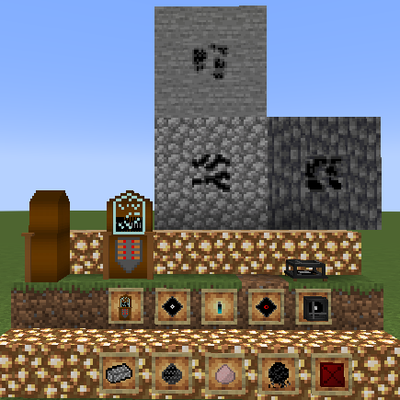
it adds to your minecraft world a jukebox and some vinilis that you can customize and put your own songs in them! you need to use a dropbox link and MP3 files
Quick answer
Old is back old_is_back-0.2.0.jar targets 1.20.1 with Forge. The project page does not say whether this file belongs on the client, dedicated server, or both. All 1 required mods have matching files.
Where it goes
The project page does not say whether this file belongs on the client, dedicated server, or both.
The source does not explicitly classify this release as client-only or server-only.
old_is_back-0.2.0.jar. Change the file and its required mods may change too.
Install Create first. We found matching files for this game-version and loader setup.
We only count dependency files that match this setup. A file for another loader does not fill the gap.
Before you install it
Built for Old is back old_is_back-0.2.0.jar. Pick another file and the loader, install side or required mods may change.
Use old_is_back-0.2.0.jar. It targets 1.20.1 with Forge; another release may have different loader, side or dependency requirements.
Install Create first. We found matching files for this game-version and loader setup.
The project page does not say whether this file belongs on the client, dedicated server, or both.
Use the “Get this file” button beside old_is_back-0.2.0.jar. It opens that exact file at the source.
About this project
treiler della 0.2.0:https://youtu.be/SSyqmcHU-aY
🎵 Old Is Back 0.1.0
Old Is Back is a Minecraft 1.20.1 mod focused on music, machines, and the feeling of bringing old technology back to life.
Create your own music discs, process materials through an industrial production system, and build the OIB Jukebox to bring your favorite music into your Minecraft world.
The mod is designed around a retro-industrial aesthetic inspired by 1980s jukeboxes, arcades, and mechanical systems, with Create integrated into its production mechanics.
«🇮🇹 Made by an Italian developer.
A small Italian touch behind a mod inspired by old machines, music, and memories.»
Old Is Back — because some things from the past deserve to come back.
🎵 What is Old Is Back?
Old Is Back is more than a new jukebox.
The mod introduces a complete system for creating, processing, and playing your own music inside Minecraft. From raw materials and industrial production to the final mastered disc, every step is part of the experience.
Build the machines, manufacture your components, create your music discs, and bring them to life with the OIB Jukebox.
With its retro-industrial design and integration with Create, Old Is Back is designed to make music feel like a real part of your Minecraft world — not just another crafting-table recipe.
⚙️ How does it work?
Creating music in Old Is Back is a small production process.
Gather the materials
Collect the resources needed to manufacture the components.
Create a Blank Disc
Produce a blank disc that can be used to record music.
Prepare your music
Use an OIB USB to provide a supported Dropbox audio link.
Master the disc
Place the USB and Blank Disc into the Masterizer to create a Mastered Disc.
Play your music
Insert the Mastered Disc into an OIB Jukebox and enjoy your music in Minecraft.
«Materials → Production → Mastering → Music 🎵»
🎶 The OIB Jukebox
The OIB Jukebox is the heart of Old Is Back.
Insert a Mastered Disc into the Jukebox and let it play your music directly inside Minecraft. The Jukebox is designed as a physical machine rather than a simple inventory-based block, keeping the interaction focused on the machine itself.
🔊 BUFFER & STREAM
The OIB Jukebox features two playback modes:
BUFFER
The song is loaded before playback, allowing smooth playback once the required data has been cached.
STREAM
The song is played progressively as the audio data is received, reducing the initial loading time for large audio files.
You can switch between BUFFER and STREAM by Shift + Right-Clicking the Jukebox with an empty hand.
The selected mode belongs to the individual Jukebox, not to the Mastered Disc.
«⚠️ Current Audio Limitation
The current version uses 2D global audio. Sound is not yet spatial or distance-based, meaning a Jukebox can still be heard from very far away — potentially even from several kilometers away.
True 3D positional audio is planned for a future update.»
«🎵 One machine. Your music. Your way.»
💾 Audio Cache
Old Is Back uses two different client-side audio caches, each with a specific purpose.
🟢 Local Cache
The Local Cache stores songs that you have downloaded yourself through Old Is Back.
Once a song is stored in the Local Cache, it remains available on your Minecraft installation and can be reused without downloading the file again.
🔵 Client Cache
The Client Cache stores songs that were provided by other players.
This cache is temporary: all files stored in the Client Cache are automatically deleted when Minecraft is closed.
This keeps music received from other players separate from the songs you have downloaded yourself.
«Local Cache = your music
Client Cache = music received from other players 🎵»
⚙️ Create Integration
Old Is Back requires Create and uses it as an important part of its production system.
Create is not simply an optional dependency: it is integrated into the way OIB materials and components are produced.
The production system is designed around a simple idea:
«Raw Material → Processing → Component → Assembly → Machine»
Instead of obtaining everything directly from a standard crafting table, Old Is Back gives its machines and components a more physical and industrial production process.
This makes the creation of your music equipment feel like building an actual machine — not just crafting another Minecraft block.
🔧 Materials & Production
Old Is Back features its own production chain for the materials used to create its machines and music components.
🛢️ Dry Oil → OIB Plastic
Dry Oil Ore can be processed to obtain Dry Oil.
Dry Oil is then combined with Water to produce an Oil Ball, which can be processed into OIB Plastic.
Dry Oil Ore → Dry Oil → Water + Dry Oil → Oil Ball → OIB Plastic
💎 Quartz → Silicon
Quartz Dust is processed into Silicon, providing another important component for the production chain.
Quartz Dust → Silicon
💿 Creating a Blank Disc
Once the required components have been produced, they can be assembled into a Blank Disc:
OIB Plastic + Silicon + Paper → Blank Disc
The Blank Disc is then used as the starting point for creating a Mastered Disc.
«Gather → Process → Manufacture → Assemble → Play. 🎵»
💿 The Masterizer
The Masterizer is the machine used to turn a Blank Disc into a playable Mastered Disc.
First, configure an OIB USB with a supported Dropbox audio link. Then place the USB and a Blank Disc into the Masterizer.
The machine processes both components and produces a Mastered Disc containing the information required by the OIB Jukebox to identify and play the music.
Once the disc has been mastered, it can be inserted directly into an OIB Jukebox.
«Blank Disc + USB → Masterizer → Mastered Disc 🎵»
🔌 OIB USB
The OIB USB is used to prepare your music before mastering it onto a Blank Disc.
Insert an OIB USB into the USB interface and enter a supported Dropbox audio link.
Once the link is saved, the USB stores the information needed by the Masterizer to create a Mastered Disc.
How it works
«OIB USB + Blank Disc → Masterizer → Mastered Disc»
The OIB USB is consumed during the mastering process.
Your music. Your USB. Your disc.
📋 Requirements & Installation
Before installing Old Is Back, make sure your Minecraft installation meets the following requirements:
Old Is Back is designed around the Create mod and uses its systems as part of the OIB production chain.
Create is therefore not optional and must be installed for Old Is Back to work correctly.
🔧 Installation
«Old Is Back + Create = the complete production system.»
For the best experience, make sure all installed mods are compatible with Minecraft 1.20.1 and your Forge environment.
🥚 Easter Eggs
Old Is Back contains a few hidden musical surprises for curious players. 👀
These Easter Eggs feature very old Italian songs and special hidden content.
They are not part of the normal Survival progression.
We won't reveal which songs are hidden inside the mod, or how these secrets can be discovered.
If you discover one of the hidden songs, leave its title in the comments of the mod page.
Players who discover the hidden songs may have the opportunity to influence what gets added to a future Old Is Back update.
Of course, all suggestions must respect copyright, licensing, and the legal requirements of the project.
Some things are better found than explained. 😉
«🇮🇹 A little piece of Italian musical history is hidden inside Old Is Back.»
🚀 Future Updates — Version 2.0
Old Is Back is only getting started.
Version 2.0 is planned to expand the music system with new machines, gameplay features, and deeper integration with Create.
🎵 Planned Features
🥚 Easter Egg Changes
Easter Eggs may change location between updates.
However, this will only happen when an Easter Egg has already been discovered by the community.
If a secret has not yet been found, its location will remain unchanged.
Once an Easter Egg is discovered, its location may be changed in a future update — keeping the hunt alive for everyone. 👀
🛠️ Development
These features represent the current direction planned for Old Is Back 2.0.
The final implementation may change during development, and additional features may be added based on testing, feedback, and community suggestions.
«Old Is Back 1.0 brings the music back.
Version 2.0 will make the machine come alive. 🎵⚙️»
Project description from CurseForge.
Pick your setup
Choose the version and loader you play, then open the matching release.
Check the dependencies, then try the file in a copied instance before changing a world you care about.
Recent files
19 Nov 2026
old_is_back-0.1.0.jar
1 Oct 2026
Looking for an older file? The official CurseForge project page is in Resources.
 mod
A Create addon that brings living creatures into the factory. | 一个把活体生物接进工厂里的机械动力附属模组。
 mod
🤑 Influence trades - 🧱sand/dirt/glass Slabs - 🎁linked chest inventory- 🛠️place random block
 mod
A Library Mod that simplifies Configs with an automated UI, Grid-Based UI-Layouts, Simplified Network management and other usefull utilities.