Minecraft version
Back to mods 
CurseForge · Minecraft mod
Bundle Stash
See everything inside every bundle on a sidebar, with search and one-click take-out.
Choose a version Pick your version below, then grab the matching file.
Quick answer
Which Bundle Stash release should I use?
Latest stable file bundle-stash-neoforge-1.0.1+26.1.jar
Game version 26.1, 26.1.1, 26.1.2
Loader NeoForge
Bundle Stash bundle-stash-neoforge-1.0.1+26.1.jar targets 26.1, 26.1.1, 26.1.2 with NeoForge. The project page does not say whether this file belongs on the client, dedicated server, or both. No extra mods listed for this file.
Where it goes
Is Bundle Stash required on the client, server, or both?
The project page does not say whether this file belongs on the client, dedicated server, or both.
Client Source doesn’t say
Dedicated server Source doesn’t say
Loader for this release NeoForge
Required install it here Optional supported, not mandatory Not supported do not install here Source doesn’t say do not assume
The source does not explicitly classify this release as client-only or server-only.
What else does Bundle Stash bundle-stash-neoforge-1.0.1+26.1.jar need?
bundle-stash-neoforge-1.0.1+26.1.jar. Change the file and its required mods may change too.
This file does not list any required mods. Do not add a library just because a different file uses it.
This file does not list any required or optional mods.
Before you install it
Add Bundle Stash without breaking your instance.
Built for Bundle Stash bundle-stash-neoforge-1.0.1+26.1.jar. Pick another file and the loader, install side or required mods may change.
- 01
Stick to this file
Use bundle-stash-neoforge-1.0.1+26.1.jar. It targets 26.1, 26.1.1, 26.1.2 with NeoForge; another release may have different loader, side or dependency requirements.
- 02
Bring the mods it needs
This file does not list any required mods. Do not add a library just because a different file uses it.
- 03
Put it on the correct side
The project page does not say whether this file belongs on the client, dedicated server, or both.
- 04
Pick the file you checked
Use the “Get this file” button beside bundle-stash-neoforge-1.0.1+26.1.jar. It opens that exact file at the source.
About this project
What does Bundle Stash add?
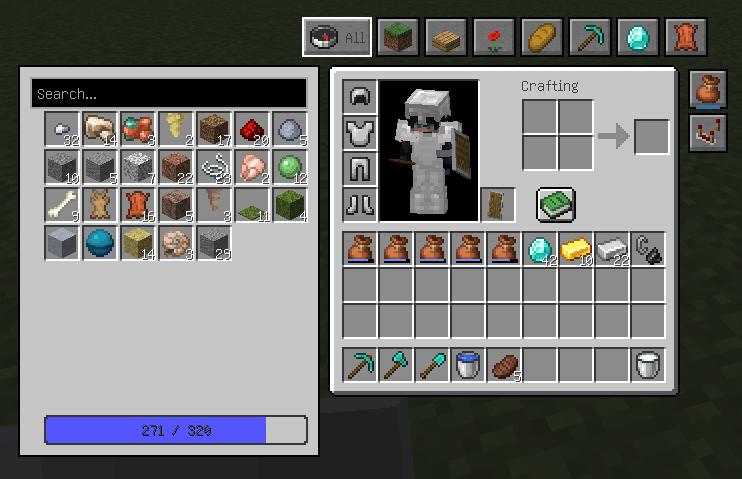
Bundle Stash puts every bundle in your inventory on a sidebar next to container screens, so you can see what is inside all of them at once and get things out with a single click.
The problem it solves
Taking one item out of a bundle in vanilla is a slow loop: hover the bundle, use the scroll wheel to step through the items shown in the tooltip until the right one is selected, then right-click to pull it out. Do it again for the next item. With several bundles you first have to figure out which one even holds what you are looking for, and the tooltip only shows so many items at a time.
Bundles are great for storage. Getting back what you put in is the tedious part. Bundle Stash removes that loop:
- open any inventory,chest or crafting screen and every bundle's contents appear in a sidebar, laid out like inventory slots
- click an item to take it onto your cursor, or Shift-click to send it straight to a free slot
- click the panel while carrying something and it goes into the first bundle that fits
- hover an item and the bundle it came from lights up in your inventory
Features
- See everything at once - all bundles, all contents, one grid, with the usual progress bar showing how full your bundles are
- Search - by item name or registry id; when the game runs in Chinese you can also search in pinyin, initials included
- Categories - Blocks, Partial Blocks, Plants, Food, Tools & Equipment, Minerals and Misc, assigned from item tags, so newly added and modded items land in the right tab without waiting for an update
- Bulk moves - hold Space and click a slot to push the whole stack into a bundle
- Vanilla look - drawn entirely with vanilla sprites and colors, so it stays out of the way of your resource pack
- Adjustable - panel on either side (it steps aside when the recipe book opens), rows and columns in the settings popup, and a corner button to hide or show it
- Lightweight - client side only; when your inventory has not changed the sidebar does essentially nothing
Notes
- Client side only. Works on vanilla servers: the mod only sends the clicks a player could make by hand, and never touches stored data.
- Requires Fabric Loader. No Fabric API dependency. Minecraft 26.3.
- Drop the jar into your
modsfolder; settings are written toconfig/bundle-stash.json. - Source code: https://github.com/xinyang-gao/bundle-stash (MIT)
中文说明
Bundle Stash(探囊取物) 把背包里所有收纳袋的内容搬到容器界面旁边的侧栏上, 一眼看全,一键取放。
它解决的问题
原版从收纳袋里取东西需要慢循环:鼠标停在袋子上,滚轮在提示框里一项一项翻到目标, 再右键点一下才取出来;取下一个还得从头再来。袋子多了,还得先挨个翻,找哪个装了你要的 东西,而提示框一次也只显示得了那么几项。
所以收纳袋是能装,但装满之后想拿回来就有点费劲了。侧栏把这个循环直接去掉:
- 打开背包、箱子或工作台,所有收纳袋的内容像背包格子一样排在侧栏里
- 点一下取到鼠标,Shift + 点一下直接放进空格子
- 手上拿着东西点面板,自动塞进第一个装得下的袋子
- 悬停某个条目时,它所在的收纳袋会在背包里高亮出来
功能
- 一次看全:所有袋子的所有内容排成一格一格,底部进度条照常显示装了多少
- 搜索:物品名、注册 id;中文环境下能用拼音搜,首字母也行
- 分类:方块、不完整方块、植物、食物、工具与装备、矿物、杂物,按物品标签自动归类, 新版本和模组物品不用等更新就能落进对应分类
- 批量操作:按住空格点击槽位,整堆收进袋子
- 原版观感:全部用原版贴图和配色绘制,换资源包也不突兀
- 可调:面板左右可换(打开合成书会自动让开),设置弹窗改行数列数, 角落按钮随时隐藏或呼出
- 轻量:纯客户端,背包没变化时侧栏基本不做任何计算
说明
- 纯客户端,兼容原版服务器:发出的只是玩家手动也能点出来的交互,不改动任何存储数据
- 需要 Fabric Loader,不依赖 Fabric API,适用于 Minecraft 26.3
- 把 jar 丢进
mods文件夹即可,配置写在config/bundle-stash.json - 源码:https://github.com/xinyang-gao/bundle-stash(MIT 协议)
Project description from CurseForge.
Pick your setup
Bundle Stash by Minecraft version and loader
Choose the version and loader you play, then open the matching release.
Minecraft version
26.2
2 loader buildsMinecraft version
26.1.2
2 loader buildsMinecraft version
26.1.1
2 loader buildsMinecraft version
26.1
2 loader buildsCheck the dependencies, then try the file in a copied instance before changing a world you care about.
Recent files
Bundle Stash versions and loaders
bundle-stash-neoforge-1.0.1+26.1.jar
3 Oct 2026
Client Source doesn’t say Server Source doesn’t say Dependencies No extras listed Listed on Release listing
Check the 26.1.2 · NeoForge setup NeoForge26.126.1.126.1.2 release
bundle-stash-fabric-1.0.1+26.1.jar
3 Oct 2026
Client Source doesn’t say Server Source doesn’t say Dependencies No extras listed Listed on Release listing
Check the 26.1.2 · Fabric setup Fabric26.126.1.126.1.2 release
bundle-stash-neoforge-1.0.1+26.2.jar
3 Oct 2026
Client Source doesn’t say Server Source doesn’t say Dependencies No extras listed Listed on Release listing
Check the 26.2 · NeoForge setup NeoForge26.2 release
bundle-stash-fabric-1.0.1+26.2.jar
3 Oct 2026
Client Source doesn’t say Server Source doesn’t say Dependencies No extras listed Listed on Release listing
Check the 26.2 · Fabric setup Fabric26.2 release
bundle-stash-neoforge-1.0.1+26.3.jar
3 Oct 2026
Client Source doesn’t say Server Source doesn’t say Dependencies No extras listed Listed on Release listing
Check the 26.3 · NeoForge setup NeoForge26.3 release
bundle-stash-fabric-1.0.1+26.3.jar
3 Oct 2026
Client Source doesn’t say Server Source doesn’t say Dependencies No extras listed Listed on Release listing
Check the 26.3 · Fabric setup Fabric26.3 release
bundle-stash-1.0.0.jar
1 Oct 2026
Client Source doesn’t say Server Source doesn’t say Dependencies No extras listed Listed on Release listing
Check the 26.3 · Fabric setup Fabric26.3 release
Looking for an older file? The official CurseForge project page is in Resources.