Minecraft version
Back to mods 
CurseForge · Minecraft mod
Iris - Dimension Engine
A Beautiful, Incredibly fast, fully customizable world generator. Create your own dimensions!
Choose a version Pick your version below, then grab the matching file.
Quick answer
Which Iris - Dimension Engine release matches 26.1.2 NeoForge?
Best match for your filters Iris v4.3.5 [NeoForge] 26.1.2+26.1.2.116.jar
Game version 26.1.2
Loader NeoForge
Iris - Dimension Engine Iris v4.3.5 [NeoForge] 26.1.2+26.1.2.116.jar targets 26.1.2 with NeoForge. The project page does not say whether this file belongs on the client, dedicated server, or both. No extra mods listed for this file.
Where it goes
Is Iris - Dimension Engine required on the client, server, or both?
The project page does not say whether this file belongs on the client, dedicated server, or both.
Client Source doesn’t say
Dedicated server Source doesn’t say
Loader for this release NeoForge
Required install it here Optional supported, not mandatory Not supported do not install here Source doesn’t say do not assume
The source does not explicitly classify this release as client-only or server-only.
What else does Iris - Dimension Engine Iris v4.3.5 [NeoForge] 26.1.2+26.1.2.116.jar need?
Iris v4.3.5 [NeoForge] 26.1.2+26.1.2.116.jar on 26.1.2 NeoForge. Every mod below is checked against that same setup.
This file does not list any required mods. Do not add a library just because a different file uses it.
This file does not list any required or optional mods.
Before you install it
Add Iris - Dimension Engine without breaking your instance.
Built for Iris - Dimension Engine Iris v4.3.5 [NeoForge] 26.1.2+26.1.2.116.jar on 26.1.2 NeoForge. Pick another file and the loader, install side or required mods may change.
- 01
Stick to this file
Use Iris v4.3.5 [NeoForge] 26.1.2+26.1.2.116.jar. It targets 26.1.2 with NeoForge; another release may have different loader, side or dependency requirements.
- 02
Bring the mods it needs
This file does not list any required mods. Do not add a library just because a different file uses it.
- 03
Put it on the correct side
The project page does not say whether this file belongs on the client, dedicated server, or both.
- 04
Pick the file you checked
Use the “Get this file” button beside Iris v4.3.5 [NeoForge] 26.1.2+26.1.2.116.jar. It opens that exact file at the source.
About this project
What does Iris - Dimension Engine add?
Create a world of your own with Iris
Explore a world pack, customize it for your server, or build a dimension from scratch. Iris gives you control over terrain, biomes, caves, structures, wildlife, and loot through editable, shareable packs.
The Iris client mod is optional for multiplayer. Generation runs on the server. The client adds a map, inspection overlay, pregeneration HUD, and Studio notifications.
Explore Iris worlds
Overworld and Underworld
- Overworld landscapes include redwood forests, alpine peaks, dunes, oases, swamps, rainforests, volcanic islands, and fungal terrain.
- Underground biomes include lantern grottos, sculk cathedrals, frost vaults, sulfur chambers, and mineral formations.
- Underworld reimagines the same geography with different materials, lighting, fluids, and ecology.
- Matching Overworld and Underworld seeds share landforms and coordinates.
- Underworld uses an open, full-height landscape without a Nether roof.
World packs are separate downloads. Installing Iris does not replace your existing world.
Terrain, rivers, and caves
- Mountains, valleys, plateaus, coasts, and flatter building areas.
- Overhangs, undercuts, ledges, fissures, and decorated rock shelves.
- Floating islands with their own vegetation, objects, and wildlife.
- Rivers with tributaries, rapids, waterfalls, and coastal inlets.
- Underground waterways, grottos, and deep-fluid bodies.
- Cave profiles with custom shapes, depths, fluids, and floor, wall, and ceiling materials.
- Faults, cenotes, lava tubes, travertine basins, and connected chambers.
Content varies by pack.
Design your own generation
Terrain and geography
- Arrange continents, oceans, coastlines, regions, and biomes.
- Set terrain height, sea level, biome scale, and transitions.
- Combine noise, mathematical expressions, and image inputs.
- Shape 3D terrain, floating islands, ceilings, and stacked layers.
- Control river sources, routes, and outlets.
Trees, reefs, formations, and ruins
Generate trees, fungi, coral, crystals, rocks, and ruins with configurable materials, shapes, density, and placement.
- Trees with custom trunks, branches, forks, roots, and canopies.
- Arches, hoodoos, sea stacks, boulders, basalt columns, icebergs, and spires.
- Procedural variations alongside saved builds.
Buildings and structures
- Save and place builds with rotation, terrain alignment, height, and biome rules.
- Assemble multi-piece Iris jigsaw structures.
- Generate villages, forts, towers, and underground complexes.
- Include native Minecraft, datapack, and mod structures.
Saved Iris jigsaws generate on every supported platform. Jigsaw Studio authoring is plugin-only.
Biomes, wildlife, and loot
- Custom soil, rock, surface palettes, vegetation, deposits, ores, and underwater decoration.
- Sky, fog, water, grass, and foliage colors.
- Temperature, precipitation, and ambient particles.
- Vanilla or modded creatures with equipment, names, attributes, passengers, and death loot.
- Spawning rules for location, time, weather, and nearby populations.
- Loot by biome, region, dimension, or structure.
- Custom block drops and marker-based encounters.
- Regional sounds, particles, potion effects, and commands.
Image maps
Use PNGs for heightmaps, biomes, regions, surface materials, and masks. Scale, move, rotate, mirror, or blend them with procedural generation.
Paint island outlines, plan server geography, or reserve areas for specific biomes.
Image Map Studio requires a desktop environment. Headless servers use the same resources through JSON.
Authoring and server tools
Studio and pack editing
Create temporary Studio worlds and preview pack changes in new terrain.
- Hot reload for supported pack changes.
- VS Code workspaces, JSON schemas, and content-aware autocomplete.
- Object selection, saving, pasting, rotation, and undo.
- Pack validation, compatibility checks, and packaging.
- Generated-content search and inspection.
- Reusable snippets.
Some dimension changes require reopening Studio or restarting. Edits affect new generation.
Worlds and pregeneration
- Create multiple dimensions and teleport between them.
- Pregenerate terrain with progress, pause, resume, and stop controls.
- Stage pack updates for new chunks with transition bands.
- Preserve existing terrain and generation history.
- Inspect generation metrics and compatibility reports.
- Extend generation through APIs for content, terrain, pregeneration, and stored world data.
Large terrain changes can still leave visible seams.
What the optional client mod adds
- Vision map: Press M for a full-screen map with pan and zoom.
- What overlay: Press J for biome, region, cave-biome, and height information.
- Pregeneration HUD: Press H for progress, speed, ETA, and pause status.
- Studio notifications: Pack reload feedback with refreshed map and inspection data.
World packs stay on the server.
Getting started
For a dedicated server:
- Install the matching Iris loader jar in
mods/and start the server. - Run
/iris download pack=overworldand wait. - Restart to load the pack's registry data.
- Run
/iris create myworld overworld 1337. - Enter with
/iris tp irisworldgen:myworld.
Download Underworld with /iris download pack=underworld.
In singleplayer, install Iris locally and prepare your packs. They appear as Iris World Types during world creation.
Compatibility & Notes
- This listing is for the Iris mod: Minecraft 26.3 only, on Fabric, Forge, and NeoForge. Requires Java 25.
- The original Spigot server plugin is available separately.
- Client tools require matching Iris and Minecraft versions.
- Iris-generated worlds work without the client mod. Other mods used by a pack may require client installation.
- Packs can use installed mods' blocks, items, and entities.
- Native structures are enabled by default. Native placed features, including modded ores and trees, need pack configuration.
- Iris controls terrain generation. Other generators' terrain, carvers, and surface rules do not automatically combine with it.
- WorldEdit imports, schematic conversion, and some authoring tools are plugin-only.
- This is VolmitSoftware's world-generation engine. Iris Shaders is a separate project.
Project description from CurseForge.
Pick your setup
Iris - Dimension Engine by Minecraft version and loader
Choose the version and loader you play, then open the matching release.
Minecraft version
26.2
3 loader buildsMinecraft version
26.1.2
3 loader buildsMinecraft version
1.21.1
3 loader buildsCheck the dependencies, then try the file in a copied instance before changing a world you care about.
Recent files
Iris - Dimension Engine versions and loaders
Iris v4.3.5 [NeoForge] 26.1.2+26.1.2.116.jar
22 Oct 2026
Client Source doesn’t say Server Source doesn’t say Dependencies No extras listed Listed on Release listing
Check the 26.1.2 · NeoForge setup NeoForge26.1.2 release
Iris v4.3.4 [NeoForge] 26.1.2+26.1.2.116.jar
18 Oct 2026
Client Source doesn’t say Server Source doesn’t say Dependencies No extras listed Listed on Release listing
Check the 26.1.2 · NeoForge setup NeoForge26.1.2 release
Looking for an older file? The official CurseForge project page is in Resources.
 mod
CurseForge · Minecraft
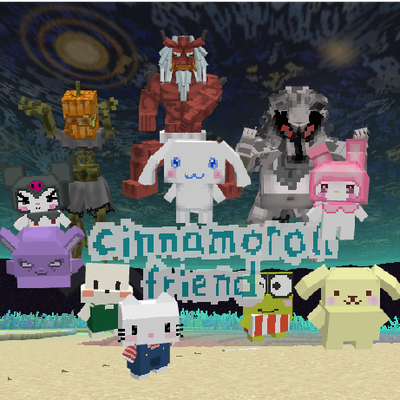
Cinnamoroll friends
Live with Cinnamoroll, Kuromi, My Melody, Hello Kitty, Pompompurin and Pochacco in a cozy town! Talk to them, accept their quests, and uncover an original story with 3 RPG bosses,and a new dimension. Fan-made mod, not affiliated with or endorsed by Sanrio.
 mod
CurseForge · Minecraft
Villages Beyond - New Villages and Villager expansion
Villages Beyond adds villager life to the Jungles, Mushroom Fields and Cherry Groves of the overworld. Explore new whimsical village structures and new villager types in Villages Beyond!
 mod
CurseForge · Minecraft
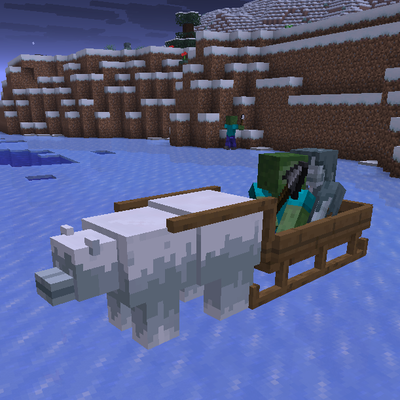
To Meet Monsters
To meet new monsters: zombie polar bears haul war sleds across the ice peak and frozen shores,;war dogs following illagers in raid , goat illager knight wear spears , woven into patrols, raids and icy coasts.