Minecraft version
Back to mods 
CurseForge · Minecraft mod
Inspector 🔎
A survival-friendly implementation of the ability to view block history via a new item — the magnifying glass.
Choose a version Pick your version below, then grab the matching file.
Quick answer
Which Inspector 🔎 release should I use?
Latest stable file inspector-0.13-fabric-26.3.jar
Game version 26.3
Loader Fabric
Inspector 🔎 inspector-0.13-fabric-26.3.jar targets 26.3 with Fabric. The project page does not say whether this file belongs on the client, dedicated server, or both. No extra mods listed for this file.
Where it goes
Is Inspector 🔎 required on the client, server, or both?
The project page does not say whether this file belongs on the client, dedicated server, or both.
Client Source doesn’t say
Dedicated server Source doesn’t say
Loader for this release Fabric
Required install it here Optional supported, not mandatory Not supported do not install here Source doesn’t say do not assume
The source does not explicitly classify this release as client-only or server-only.
What else does Inspector 🔎 inspector-0.13-fabric-26.3.jar need?
inspector-0.13-fabric-26.3.jar. Change the file and its required mods may change too.
This file does not list any required mods. Do not add a library just because a different file uses it.
This file does not list any required or optional mods.
Before you install it
Add Inspector 🔎 without breaking your instance.
Built for Inspector 🔎 inspector-0.13-fabric-26.3.jar. Pick another file and the loader, install side or required mods may change.
- 01
Stick to this file
Use inspector-0.13-fabric-26.3.jar. It targets 26.3 with Fabric; another release may have different loader, side or dependency requirements.
- 02
Bring the mods it needs
This file does not list any required mods. Do not add a library just because a different file uses it.
- 03
Put it on the correct side
The project page does not say whether this file belongs on the client, dedicated server, or both.
- 04
Pick the file you checked
Use the “Get this file” button beside inspector-0.13-fabric-26.3.jar. It opens that exact file at the source.
About this project
What does Inspector 🔎 add?

A survival-friendly implementation of the ability to view block history via a new item — the magnifying glass.
Every block break, place, container transaction, entity kill, redstone interaction, and explosion is logged to a SQLite database with full player attribution. Right-click any block with the magnifier to open a GUI showing its complete history, including player heads, item icons, and relative timestamps.

Features
- Magnifier Item - craftable tool (256 durability) for inspecting block history at a glance
- Block Event Logging - breaks, places, fluid changes with player, position, and timestamp
- Container Diffing - snapshots container contents on open/close, logs individual item additions and removals with full NBT data (enchantments, lore, etc.)
- Entity Kill Logging - tracks entity kills by players
- Redstone Interaction Logging - button, lever, door, trapdoor, pressure plate, note block, fence gate, repeater, comparator usage
- Anvil Tracking - logs anvil use and breakage
- Explosion Logging - logs every block destroyed by player-caused explosions
- History GUI - custom screen with player heads, item icons, color-coded actions, relative timestamps, and full tooltips on hover
- Block Glow Overlay - semi-transparent highlight on the targeted block with smooth animation
/inspectCommand - query player or block history from chat with autocomplete- SQLite Database - persistent storage with WAL mode, async batched writes, in-memory caching
- Configurable - database path, batch settings, glow animation toggle, player head rendering toggle
Crafting Recipe
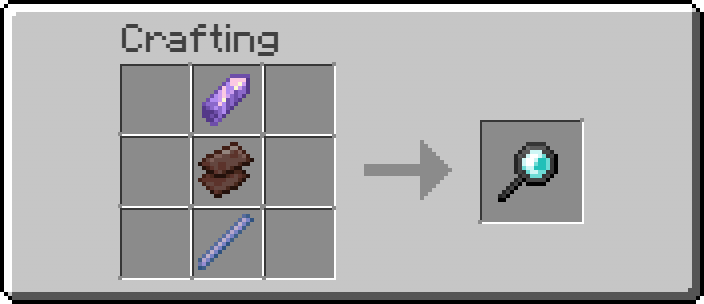
Usage
- Craft the magnifier and hold it in your main hand
- Sneak + scroll to adjust inspection depth offset
- Right-click on a block to view its history
- The targeted block is highlighted with a colored glow overlay
Dependencies
- NeoForge (required)
- YetAnotherConfigLib (required, client-side)
Project description from CurseForge.
Pick your setup
Inspector 🔎 by Minecraft version and loader
Choose the version and loader you play, then open the matching release.
Minecraft version
26.2
1 loader buildMinecraft version
1.21.4
1 loader buildMinecraft version
1.21.3
1 loader buildMinecraft version
1.21.2
1 loader buildMinecraft version
1.21.1
1 loader buildCheck the dependencies, then try the file in a copied instance before changing a world you care about.
Recent files
Inspector 🔎 versions and loaders
inspector-0.13-fabric-26.3.jar
2 Oct 2026
Client Source doesn’t say Server Source doesn’t say Dependencies No extras listed Listed on Release listing
Check the 26.3 · Fabric setup Fabric26.3 release
inspector-0.13-fabric-26.2.jar
2 Oct 2026
Client Source doesn’t say Server Source doesn’t say Dependencies No extras listed Listed on Release listing
Check the 26.2 · Fabric setup Fabric26.2 release
inspector-0.13.jar
2 Oct 2026
Client Source doesn’t say Server Source doesn’t say Dependencies No extras listed Listed on Release listing
Check the 1.21.4 · NeoForge setup 1.21.41.21.11.21.3NeoForge release
Looking for an older file? The official CurseForge project page is in Resources.
 mod
CurseForge + Modrinth · Minecraft
Neo ECO AE Extension
Neo ECO AE Extension is an addon for Applied Energistics 2, Provides higher-performance components
 mod
CurseForge · Minecraft
TuKuai Card Games
Craft a card table and play Dou Dizhu, UNO, Guandan and more with friends or computer players, with the cards right on the table in the world. (斗地主, 掼蛋, 跑得快, 麻将, 棋牌)
 mod
CurseForge · Minecraft
Place Signs Easy
Prevents the Sign edit GUI opening when placing Signs