Minecraft version
Back to mods 
CurseForge · Minecraft mod
Noisy Neighbors
Silence those noisy neighbors in Minecraft. Control each mob’s volume and how often it makes sounds. Easily create sound zones to quiet your farms while staying immersed in the rest of your Minecraft world.
Choose a version Pick your version below, then grab the matching file.
Quick answer
Which Noisy Neighbors release should I use?
Latest stable file Noisy Neighbors v0.3.0-mc1.21.1-neoforge
Game version 1.21.1
Loader NeoForge
Noisy Neighbors v0.3.0-mc1.21.1-neoforge targets 1.21.1 with NeoForge. The project page does not say whether this file belongs on the client, dedicated server, or both. No extra mods listed for this file.
Where it goes
Is Noisy Neighbors required on the client, server, or both?
The project page does not say whether this file belongs on the client, dedicated server, or both.
Client Source doesn’t say
Dedicated server Source doesn’t say
Loader for this release NeoForge
Required install it here Optional supported, not mandatory Not supported do not install here Source doesn’t say do not assume
The source does not explicitly classify this release as client-only or server-only.
What else does Noisy Neighbors v0.3.0-mc1.21.1-neoforge need?
Noisy Neighbors v0.3.0-mc1.21.1-neoforge. Change the file and its required mods may change too.
This file does not list any required mods. Do not add a library just because a different file uses it.
This file does not list any required or optional mods.
Before you install it
Add Noisy Neighbors without breaking your instance.
Built for Noisy Neighbors v0.3.0-mc1.21.1-neoforge. Pick another file and the loader, install side or required mods may change.
- 01
Stick to this file
Use Noisy Neighbors v0.3.0-mc1.21.1-neoforge. It targets 1.21.1 with NeoForge; another release may have different loader, side or dependency requirements.
- 02
Bring the mods it needs
This file does not list any required mods. Do not add a library just because a different file uses it.
- 03
Put it on the correct side
The project page does not say whether this file belongs on the client, dedicated server, or both.
- 04
Pick the file you checked
Use the “Get this file” button beside Noisy Neighbors v0.3.0-mc1.21.1-neoforge. It opens that exact file at the source.
About this project
What does Noisy Neighbors add?


Noisy Neighbors
Enjoy Minecraft's sounds everywhere… except the ones that wear out their welcome.
Noisy Neighbors is a client-side Minecraft mod for players who want a peaceful base without making the rest of the world feel silent. Turn down a crowded cow farm, make villagers less chatty, or quiet a pet-filled house while keeping normal sounds everywhere else.
Give each catalogued vanilla mob its own Volume and Chattiness setting, then create coloured 3D sound zones for places such as animal farms, trading halls, mob grinders, and stables. It works in single-player and on multiplayer servers with no server installation.
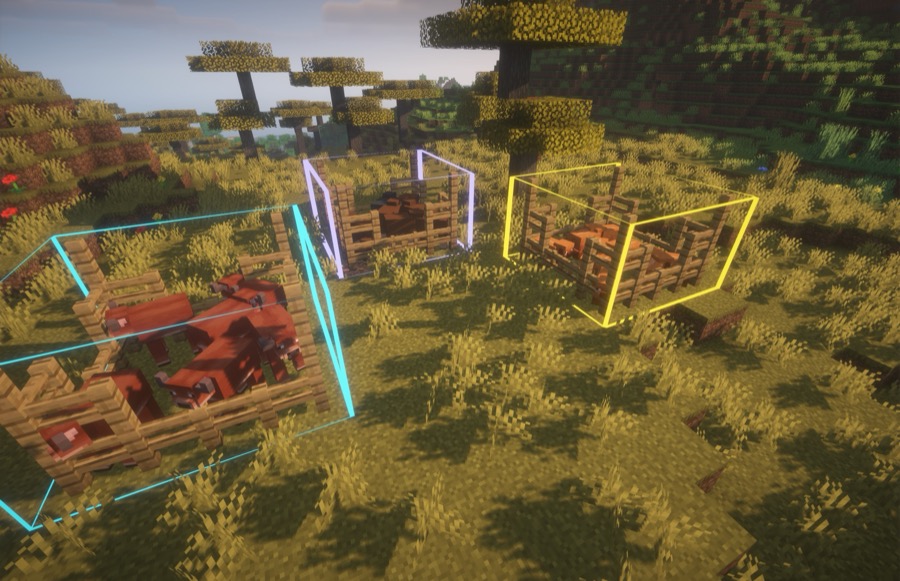
What you can do
- Set the volume of each catalogued vanilla mob from 0–100%.
- Set how often a mob's catalogued sounds are allowed to play with Chattiness.
- Quickly search through a list of all vanilla mobs.
- Fine-tune individual sound events with Advanced Volume Controls.
- Create named, coloured sound zones by quickly and easily creating in-game cubes.
- Apply different volume and chattiness settings inside each zone.
- Keep all settings local to your client and separate zones by world/server.
Quick start
- Install Noisy Neighbors, Fabric Loader, and Fabric API for Minecraft 26.3.
- In Minecraft, open Options → Music & Sound → Advanced Sound Controls.
- Search for a mob, then set its Volume and Chattiness sliders.
- To quiet only part of a world, choose Edit World Zones and create a zone.
Noisy Neighbors is entirely client-side. Install it once on your own client; it works in single-player, Realms-style multiplayer, and ordinary vanilla or modded servers without requiring anyone else to install it.
Hotkeys
All Noisy Neighbors hotkeys can be changed in Minecraft's Controls menu:
- Z — Create Zone — start a two-corner zone selection; press it again to cancel.
- U — Open World Zones — open the zone manager for the current world.
- K — Toggle Zone Outlines — show or hide saved zone boundaries.
Volume, chattiness, and advanced controls
Every mob has two simple controls:
- Volume changes how loud its catalogued sounds are.
- Chattiness changes how often those sounds start. At 100%, every matching sound plays normally; at 50%, approximately half play; at 0%, matching sounds are silent.
Use ⚙ Advanced Volume Controls beside a mob when one particular sound needs different treatment. For example, you can lower a villager's ambient chatter while leaving its trade sound louder. Advanced controls are available only for sound events that Noisy Neighbors can confidently associate with that mob.
Global settings are your default everywhere. Zone settings apply on top when a sound originates inside that zone, so a cow farm can be quiet while cows outside remain normal. If zones overlap, their settings combine.
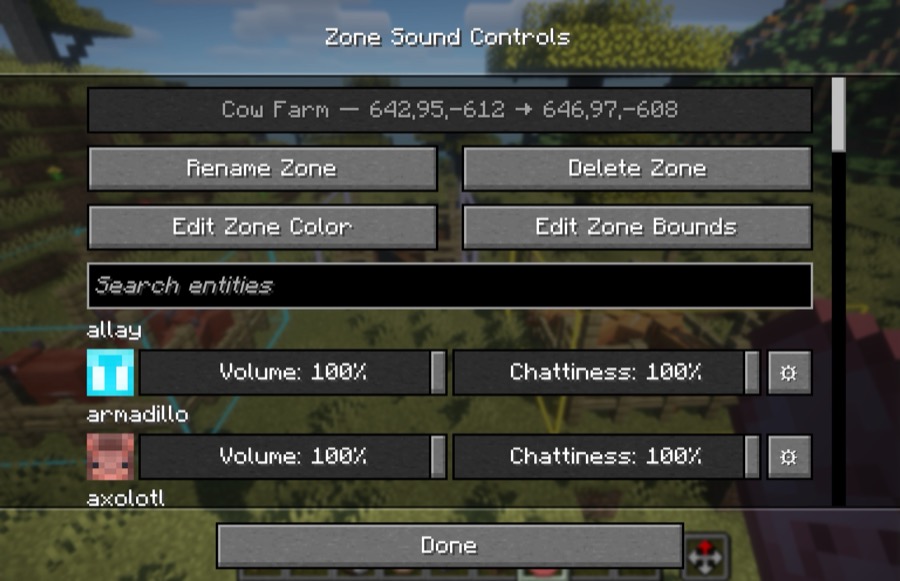
Create a sound zone
Use a sound zone whenever you only want a location to be calmer—an animal farm, mob grinder, trading hall, stable, or pet room.
- Open Options → Music & Sound → Advanced Sound Controls → Edit World Zones.
- Select Create Zone.
- Right-click two opposite corner blocks to set its bounds. The action bar guides you through the selection.
- Open the new zone and adjust the mobs' Volume, Chattiness, or individual sound-event volume.
Press your configured Create Zone key again while selecting corners to cancel.
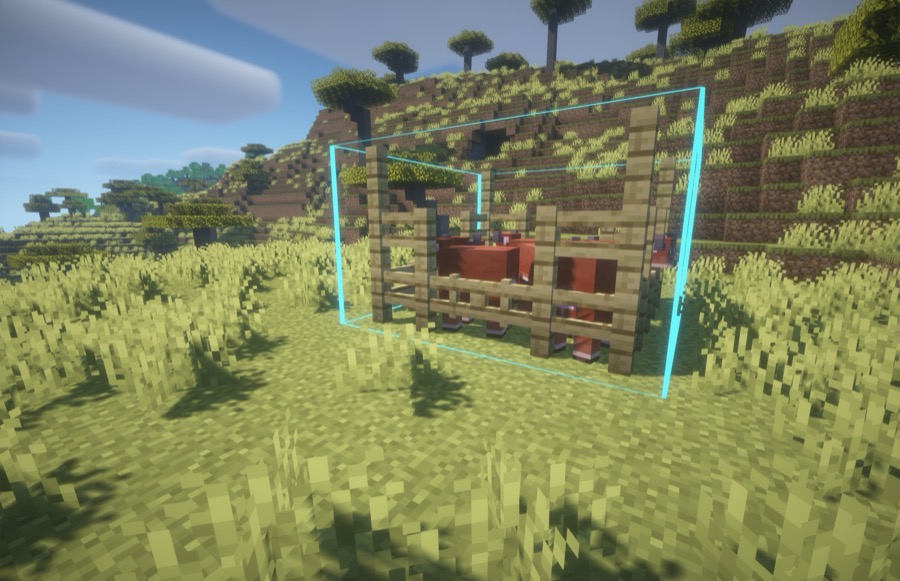
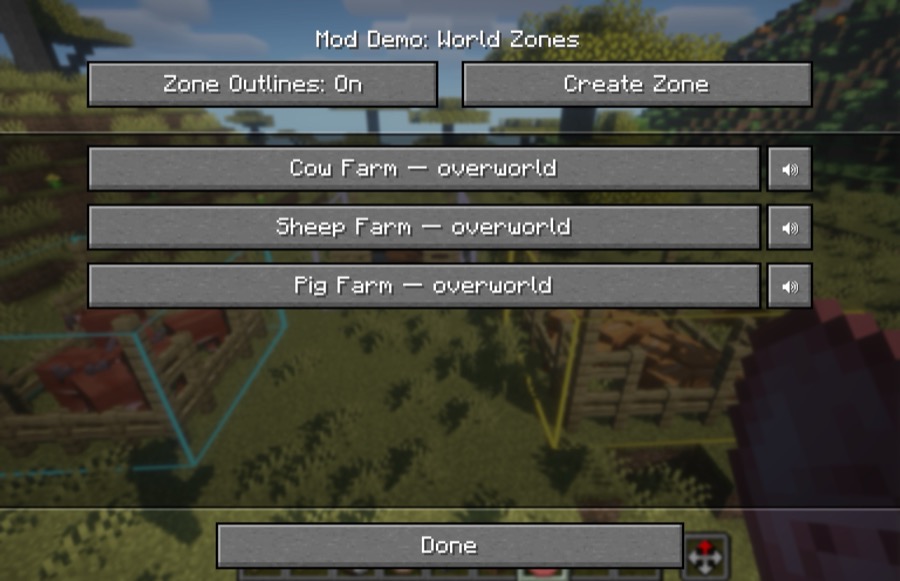
Manage zones quickly
Open Minecraft's Controls menu and look under Noisy Neighbors to configure these shortcuts:
- Create Zone — start or cancel a two-corner selection.
- Open World Zones — manage zones for the current world.
- Toggle Zone Outlines — show or hide zone boundaries.
From a zone's screen, you can rename it, change its outline colour, edit its bounds, or delete it.
What Noisy Neighbors changes
Noisy Neighbors changes only its catalogued vanilla mob sounds. Player, block, unknown, and modded sounds continue to use Minecraft's normal audio behaviour. Some sounds shared by several entities cannot be safely attributed on a client-only installation and are left alone unless Minecraft provides their source.
Settings are stored locally in config/noisy-neighbors.json.
Requirements
- Minecraft Java Edition 26.3
- Fabric Loader 0.19.5 or newer
- Fabric API
- Java 25 or newer
Contributing
Looking to contribute to the Noisy Neighbors mod? See CONTRIBUTING.
License
MIT. See LICENSE.
Credits
- Simplexity-Development/Entity-Icons - For some of the mob sprites provided! (Released under CC0-1.0 license)
Project description from CurseForge.
Pick your setup
Noisy Neighbors by Minecraft version and loader
Choose the version and loader you play, then open the matching release.
Minecraft version
1.21.1
2 loader buildsCheck the dependencies, then try the file in a copied instance before changing a world you care about.
Recent files
Noisy Neighbors versions and loaders
Noisy Neighbors v0.3.0-mc1.21.1-neoforge
noisy-neighbors-0.3.0-mc1.21.1-neoforge.jar
5 Nov 2026
Client Source doesn’t say Server Source doesn’t say Dependencies No extras listed Listed on Release listing
Check the 1.21.1 · NeoForge setup 1.21.1NeoForge release
Noisy Neighbors v0.3.0-mc1.21.1-fabric
noisy-neighbors-0.3.0-mc1.21.1-fabric.jar
5 Nov 2026
Client Source doesn’t say Server Source doesn’t say Dependencies 1 required · 1 unchecked Listed on Release listing
Check the 1.21.1 · Fabric setup Fabric1.21.1 release
Noisy Neighbors v0.2.4-mc1.21.1-fabric
release.jar
4 Nov 2026
Client Source doesn’t say Server Source doesn’t say Dependencies 1 required · 1 unchecked Listed on Release listing
Check the 1.21.1 · Fabric setup Fabric1.21.1 release
Noisy Neighbors v0.2.3-mc1.21.1-fabric
release.jar
4 Nov 2026
Client Source doesn’t say Server Source doesn’t say Dependencies 1 required · 1 unchecked Listed on Release listing
Check the 1.21.1 · Fabric setup Fabric1.21.1 release
Noisy Neighbors v0.2.3-mc26.3-fabric
release.jar
6 Oct 2026
Client Source doesn’t say Server Source doesn’t say Dependencies 1 required · 1 unchecked Listed on Release listing
Check the 26.3 · Fabric setup Fabric26.3 release
Noisy Neighbors v0.2.2-mc26.3-fabric
noisy-neighbors-0.2.2.jar
5 Oct 2026
Client Source doesn’t say Server Source doesn’t say Dependencies 1 required · 1 unchecked Listed on Release listing
Check the 26.3 · Fabric setup Fabric26.3 release
Noisy Neighbors v0.2.1-mc26.3-fabric
noisy-neighbors-0.2.1.jar
5 Oct 2026
Client Source doesn’t say Server Source doesn’t say Dependencies 1 required · 1 unchecked Listed on Release listing
Check the 26.3 · Fabric setup Fabric26.3 release
Noisy Neighbors v0.2.0-mc26.3-fabric
noisy-neighbors-0.2.0.jar
5 Oct 2026
Client Source doesn’t say Server Source doesn’t say Dependencies 1 required · 1 unchecked Listed on Release listing
Check the 26.3 · Fabric setup Fabric26.3 release
Noisy Neighbors v0.0.1-mc26.3-fabric
noisy-neighbors-0.0.1.jar
4 Oct 2026
Client Source doesn’t say Server Source doesn’t say Dependencies 1 required · 1 unchecked Listed on Release listing
Check the 26.3 · Fabric setup Fabric26.3 release
Looking for an older file? The official CurseForge project page is in Resources.
 mod
CurseForge + Modrinth · Minecraft
Hold To Attack
Simple. Hold to Attack. Nothing complicated. Precise.
 mod
CurseForge + Modrinth · Minecraft
Oka's Better Desert
Oka's Better Desert is a vanilla friendly mod that improves the Desert Biome by adding new blocks, items and structures.
 mod
CurseForge · Minecraft
Mochos Esenciales (Essentials)
Essentials with real screens instead of commands: players and friend groups, homes and warps, land claims, a Ceitil coin economy with bank and shop, a new chat with commands, Markdown help pages and a full admin panel.