Minecraft version
Back to mods 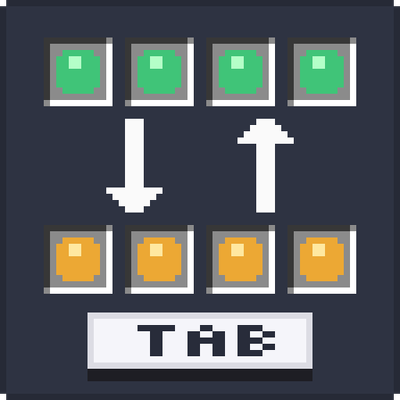
CurseForge · Minecraft mod
TabSwap
Cycle your hotbar through your inventory with Tab, and lock the slots you never want to move.
Choose a version Pick your version below, then grab the matching file.
Quick answer
Which TabSwap release should I use?
Latest stable file hotbar-swap-1.0.0.jar
Game version 26.1, 26.1.1, 26.1.2
Loader Fabric
TabSwap hotbar-swap-1.0.0.jar targets 26.1, 26.1.1, 26.1.2 with Fabric. The project page does not say whether this file belongs on the client, dedicated server, or both. No extra mods listed for this file.
Where it goes
Is TabSwap required on the client, server, or both?
The project page does not say whether this file belongs on the client, dedicated server, or both.
Client Source doesn’t say
Dedicated server Source doesn’t say
Loader for this release Fabric
Required install it here Optional supported, not mandatory Not supported do not install here Source doesn’t say do not assume
The source does not explicitly classify this release as client-only or server-only.
What else does TabSwap hotbar-swap-1.0.0.jar need?
hotbar-swap-1.0.0.jar. Change the file and its required mods may change too.
This file does not list any required mods. Do not add a library just because a different file uses it.
This file does not list any required or optional mods.
Before you install it
Add TabSwap without breaking your instance.
Built for TabSwap hotbar-swap-1.0.0.jar. Pick another file and the loader, install side or required mods may change.
- 01
Stick to this file
Use hotbar-swap-1.0.0.jar. It targets 26.1, 26.1.1, 26.1.2 with Fabric; another release may have different loader, side or dependency requirements.
- 02
Bring the mods it needs
This file does not list any required mods. Do not add a library just because a different file uses it.
- 03
Put it on the correct side
The project page does not say whether this file belongs on the client, dedicated server, or both.
- 04
Pick the file you checked
Use the “Get this file” button beside hotbar-swap-1.0.0.jar. It opens that exact file at the source.
About this project
What does TabSwap add?
TabSwap
**Swap your hotbar with your inventory in one keypress, and lock the slots that should never move.**
How it works
Press **Tab** and your hotbar cycles through your inventory rows:
- Your bottom inventory row moves up to the hotbar
- Your hotbar moves to the top inventory row
- Every other row shifts down by one
Four presses bring everything back to where it started. Keep a building row, a mining row and a combat row, and flip between them instantly.
Lock your important slots
Tired of your sword or pickaxe getting shuffled away?
**Hold Tab** to open the lock screen and click any hotbar slot to lock it. Locked slots stay exactly where they are when you cycle rows, so your essential tools are always in the same place.
- A small **gold padlock** shows on every locked slot
- Locks are **saved** and stay after restarting the game
- Hold Tab again anytime to unlock
Features
- One key cycles your hotbar through all three inventory rows
- Hold the key to lock or unlock individual hotbar slots
- Padlock icon on locked slots
- Locks are remembered between sessions
- Key can be changed in **Options > Controls**
- English and Hebrew translations
Client-side only
TabSwap only needs to be installed on **your** game. It works in singleplayer and on any multiplayer server, even if the server doesn't have the mod.
Requirements
- Minecraft **26.1 – 26.1.2**
- **Fabric Loader**
- **Fabric API**
Tip
Tab is also Minecraft's default key for the player list. If you play on servers, you may want to move one of them to a different key in **Options > Controls**.
Project description from CurseForge.
Pick your setup
TabSwap by Minecraft version and loader
Choose the version and loader you play, then open the matching release.
Minecraft version
26.1.1
1 loader buildMinecraft version
26.1
1 loader buildCheck the dependencies, then try the file in a copied instance before changing a world you care about.
Recent files
TabSwap versions and loaders
hotbar-swap-1.0.0.jar
2 Oct 2026
Client Source doesn’t say Server Source doesn’t say Dependencies No extras listed Listed on Release listing
Check the 26.1.2 · Fabric setup Fabric26.126.1.126.1.2 release
Looking for an older file? The official CurseForge project page is in Resources.