Quick answer
Which Auto-Perspective release matches 1.20.1 Forge?
Best match for your filters 1.1.2 - Auto Perspective
Game version 1.20.1
Loader Forge
Auto-Perspective 1.1.2 - Auto Perspective targets 1.20.1 with Forge. The project page does not say whether this file belongs on the client, dedicated server, or both. No extra mods listed for this file.
Where it goes
Is Auto-Perspective required on the client, server, or both?
The project page does not say whether this file belongs on the client, dedicated server, or both.
Client Source doesn’t say
Dedicated server Source doesn’t say
Loader for this release Forge
Required install it here Optional supported, not mandatory Not supported do not install here Source doesn’t say do not assume
The source does not explicitly classify this release as client-only or server-only.
What else does Auto-Perspective 1.1.2 - Auto Perspective need?
1.1.2 - Auto Perspective on 1.20.1 Forge. Every mod below is checked against that same setup.
This file does not list any required mods. Do not add a library just because a different file uses it.
4 listed on this file 13 pulled in by those mods
Matching file found Matched file: Seramicx's Smooth F5 v1.1.1 (Forge)
Matching file found Matched file: Sophisticated Building 5.1.2 - Forge/NeoForge 1.20.1
Matching file found Matched file: Effortless Building 3.11 (1.20.1)
Epic Fight Optional for Auto-Perspective 1.1.2 - Auto Perspective optionalMatching file found Matched file: 20.14.17-mc1.20.1-forge
Matching file found Matched file: sophisticatedbackpacks-1.20.1-3.26.22.2264.jar
Curios API Needed by Effortless Building: Sophisticated (Enhanced Fork) pulled inMatching file found Matched file: curios-forge-5.14.1+1.20.1.jar
Matching file found Matched file: 15.75.0.244 for Forge 1.20.1
Matching file found Matched file: craftingtweaks-forge-1.20.1-18.2.9.jar
Matching file found Matched file: trashslot-forge-1.20.1-15.1.5.jar
Chipped Needed by Sophisticated Backpacks pulled inMatching file found Matched file: [Forge] Chipped 3.0.7
Matching file found Matched file: sophisticatedcore-1.20.1-1.5.41.2500.jar
Matching file found Matched file: ItemBorders-1.20.1-forge-1.2.2.jar
Matching file found Matched file: MezzConfig 0.7.1 for Forge 1.20.1
Matching file found Matched file: MezzConfig GUI mc1.20.1-0.7.2 for Forge
Balm Needed by Crafting Tweaks pulled inMatching file found Matched file: balm-forge-1.20.1-7.3.44.jar
Matching file found Matched file: [Forge] Resourceful Lib 2.1.29
Matching file found Matched file: [Forge] Athena 3.1.2
13
extra mods were pulled in by other dependencies.
Indented rows show who needs each one. We only count dependency files that match this setup. A file for another loader does not fill the gap.
Before you install it
Add Auto-Perspective without breaking your instance.
Built for Auto-Perspective 1.1.2 - Auto Perspective on 1.20.1 Forge. Pick another file and the loader, install side or required mods may change.
- 01
Stick to this file
Use 1.1.2 - Auto Perspective. It targets 1.20.1 with Forge; another release may have different loader, side or dependency requirements.
- 02
Bring the mods it needs
This file does not list any required mods. Do not add a library just because a different file uses it.
- 03
Put it on the correct side
The project page does not say whether this file belongs on the client, dedicated server, or both.
- 04
Pick the file you checked
Use the “Get this file” button beside 1.1.2 - Auto Perspective. It opens that exact file at the source.
About this project
What does Auto-Perspective add?
Auto-Perspective is a dynamic Quality Of Life mod which allows automatically switching between 1st person and back to 3rd depending on various conditions!
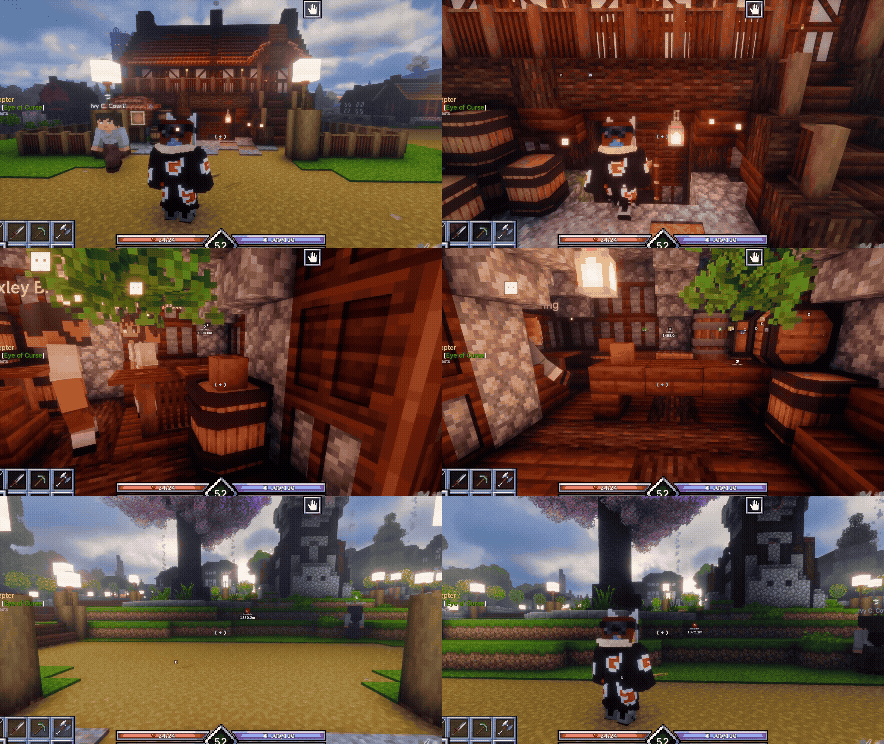
[Conditions]
1. Ceiling - Blocks above your head
2. Camera view obstruction - self explainitory
3. Small Room (Flood Fill) - hard to explain the math, but in short uses flood fill to detect small spaces.
3. Mining Blocks Time - If you are mining blocks past a short amount of time
4. Build Mode (Effortless Building/Sophistocated Building Compat)- if you are in build-mode from effortlessd building mod!
[Compat]
This mod also has compat between these mods: -Effortless Building / Sophistocated Building - When present & the config option is checked (Default=true); The auto-perspective will switch to 1st person, when in build/break mode.
-Epic Fight - When present, if you are holding a weapon the block break/mining timer for auto-switch mechanism is disabled
-Seramicxs Smooth F5 + Epic Fight - When present, the smooth 5F mechanism now works with Epic Fight present!
-Shoulder Surfing Reloaded - When present, Shoulder Surfing Reloaded's camera get's switched when switching back to thrid person.
If you still have issues, you can enabled Shoulder Surfing Reloaded's config option 'Replace Default perspective'.. The config option is located in 'Shoulder Surfing Reloaed Config > Client > Perspective > (Here)'. Enable this if it sometimes switches to default third person!
Enjoy!
Project description from CurseForge.
Pick your setup
Auto-Perspective by Minecraft version and loader
Choose the version and loader you play, then open the matching release.
Minecraft version
1.21.1
1
loader build Minecraft version
1.20.1
1
loader build Check the dependencies, then try the file in a copied instance before changing a world you care about.
Recent files
Auto-Perspective versions and loaders
Auto-Perspective-1.1.2.jar
28 Nov 2026
Client Source doesn’t say Server Source doesn’t say Dependencies No extras listed Listed on Release listing
Check the 1.20.1 · Forge setup → Auto-Perspective-Neoforge-1.1.1.jar
26 Nov 2026
Client Source doesn’t say Server Source doesn’t say Dependencies No extras listed Listed on Release listing
Check the 1.20.1 · Forge setup → Auto-Perspective-1.1.1.jar
26 Nov 2026
Client Source doesn’t say Server Source doesn’t say Dependencies No extras listed Listed on Release listing
Check the 1.20.1 · Forge setup → Auto Perspective-1.1.0.jar
8 Oct 2026
Client Source doesn’t say Server Source doesn’t say Dependencies No extras listed Listed on Release listing
Check the 1.20.1 · Forge setup → Auto Perspective-1.0.jar
3 Oct 2026
Client Source doesn’t say Server Source doesn’t say Dependencies No extras listed Listed on Release listing
Check the 1.20.1 · Forge setup → 
 mod
 mod
 mod