Minecraft version
Back to mods 
CurseForge · Minecraft mod
Ascensions
Make every adventure matter. Ascension adds 256 levels, seven Masteries, skill trees, quests, equipment requirements, titles, and prestige to vanilla Minecraft, with balanced perks and a Minecraft-style UI. No new blocks, items, or mobs.
Choose a version Pick your version below, then grab the matching file.
Quick answer
Which Ascensions release should I use?
Latest stable file Ascension-1.0.2+mc26.3.jar
Game version 26.3
Loader Fabric
Ascensions Ascension-1.0.2+mc26.3.jar targets 26.3 with Fabric. The project page does not say whether this file belongs on the client, dedicated server, or both. No extra mods listed for this file.
Where it goes
Is Ascensions required on the client, server, or both?
The project page does not say whether this file belongs on the client, dedicated server, or both.
Client Source doesn’t say
Dedicated server Source doesn’t say
Loader for this release Fabric
Required install it here Optional supported, not mandatory Not supported do not install here Source doesn’t say do not assume
The source does not explicitly classify this release as client-only or server-only.
What else does Ascensions Ascension-1.0.2+mc26.3.jar need?
Ascension-1.0.2+mc26.3.jar. Change the file and its required mods may change too.
This file does not list any required mods. Do not add a library just because a different file uses it.
This file does not list any required or optional mods.
Before you install it
Add Ascensions without breaking your instance.
Built for Ascensions Ascension-1.0.2+mc26.3.jar. Pick another file and the loader, install side or required mods may change.
- 01
Stick to this file
Use Ascension-1.0.2+mc26.3.jar. It targets 26.3 with Fabric; another release may have different loader, side or dependency requirements.
- 02
Bring the mods it needs
This file does not list any required mods. Do not add a library just because a different file uses it.
- 03
Put it on the correct side
The project page does not say whether this file belongs on the client, dedicated server, or both.
- 04
Pick the file you checked
Use the “Get this file” button beside Ascension-1.0.2+mc26.3.jar. It opens that exact file at the source.
About this project
What does Ascensions add?
 Ascensions
Minecraft, but everything you do matters.
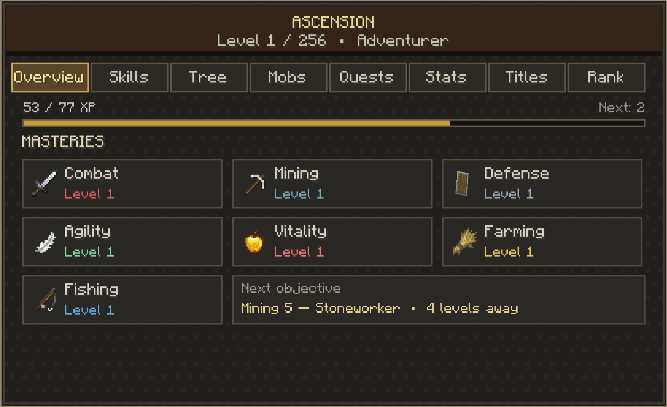
Ascension adds deeper RPG progression to vanilla Minecraft without adding new blocks, items, mobs, or dimensions. Mine, fight, farm, fish, and explore to develop your character naturally.
- Player leveling: Progress toward level 256, separate from vanilla XP.
- Seven Masteries: Combat, Mining, Defense, Agility, Vitality, Farming, and Fishing.
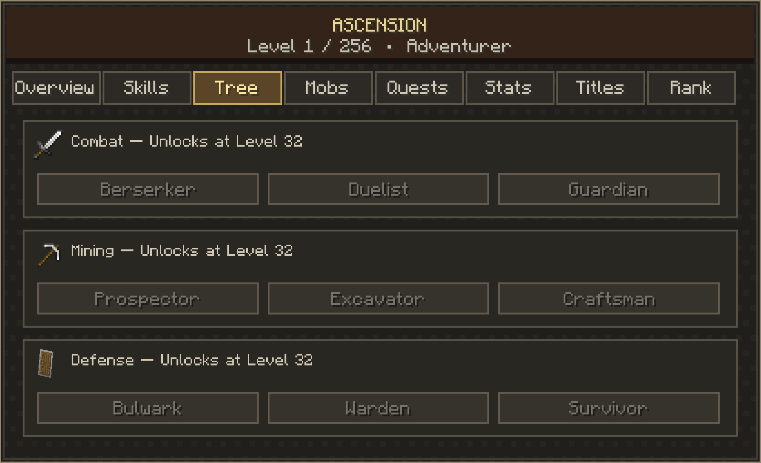
- Milestone perks: Unlock useful mechanics, conveniences, rare bonuses, and powerful, but balanced capstones.
- Skill trees: Choose specializations that suit your playstyle.
- Equipment progression: Work toward stronger vanilla equipment, with accessible early-game requirements.
- Mob and Boss Mastery: Build knowledge and earn rewards against specific enemies.
- Quests and challenges: Pursue daily, weekly, and long-term objectives.
- Titles, statistics, and prestige: Show your accomplishments and continue progressing through Ascension.
A Minecraft-inspired interface puts your next unlock within reach, while subtle notifications celebrate important milestones without cluttering your screen.
Easy to begin. Satisfying to progress. Prestigious to master.
For Minecraft 26.3 · Fabric
Requires Fabric API. Press V to open Ascension.
Project description from CurseForge.
Pick your setup
Ascensions by Minecraft version and loader
Choose the version and loader you play, then open the matching release.
Check the dependencies, then try the file in a copied instance before changing a world you care about.
Recent files
Ascensions versions and loaders
Ascension-1.0.2+mc26.3.jar
3 Oct 2026
Client Source doesn’t say Server Source doesn’t say Dependencies No extras listed Listed on Release listing
Check the 26.3 · Fabric setup Fabric26.3 release
Looking for an older file? The official CurseForge project page is in Resources.
 mod
mod CurseForge · Minecraft
enigmatic-delicacy-legacy
Addons for enigmaticlegacy-legacy & enigmatic-addons-legacy
 mod
mod CurseForge · Minecraft
Iron Spells X Epic Fight
This mod Is just like my other mod it makes Iron's Spells 'n Spellbooks armors and weapons compatible with Epic Fights animations ....
 mod
mod CurseForge · Minecraft
Twilight:Dusk
Twilight Forest: Dusk is an expansion mod for Twilight Forest on Minecraft 1.20.1.It aims to add plenty of new content, giving players the opportunity to explore and learn more about the classic Twilight Forest mod.