Dragon Survival Needed by dragontoggle-forge1,20.1-1.0.0.jar
requiredMatching file found Matched file: dragonsurvival-1.20.1-23.07.2026-all.jar
CurseForge · Minecraft mod
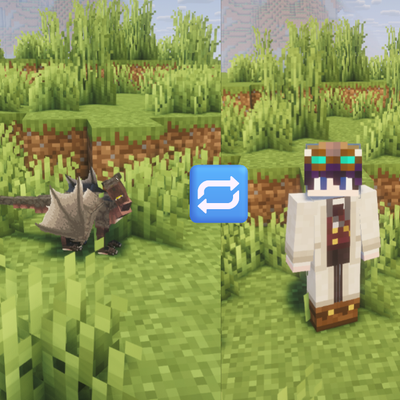
An addon for Dragon Survival: switch between your dragon and human form at any time and keep all your progress.
Quick answer
dragontoggle-forge1,20.1-1.0.0.jar targets 1.20.1 with Forge. The project page does not say whether this file belongs on the client, dedicated server, or both. All 2 required mods have matching files.
Where it goes
The project page does not say whether this file belongs on the client, dedicated server, or both.
The source does not explicitly classify this release as client-only or server-only.
dragontoggle-forge1,20.1-1.0.0.jar. Change the file and its required mods may change too.
Install Dragon Survival, GeckoLib first. We found matching files for this game-version and loader setup. 1 comes through another mod in the chain.
1 extra mod was pulled in by another dependency. Indented rows show who needs each one. We only count dependency files that match this setup. A file for another loader does not fill the gap.
Before you install it
Built for dragontoggle-forge1,20.1-1.0.0.jar. Pick another file and the loader, install side or required mods may change.
Use dragontoggle-forge1,20.1-1.0.0.jar. It targets 1.20.1 with Forge; another release may have different loader, side or dependency requirements.
Install Dragon Survival, GeckoLib first. We found matching files for this game-version and loader setup. 1 comes through another mod in the chain.
The project page does not say whether this file belongs on the client, dedicated server, or both.
Use the “Get this file” button beside dragontoggle-forge1,20.1-1.0.0.jar. It opens that exact file at the source.
About this project
An addon for Dragon Survival: switch between your dragon and human form at any time and keep all your progress.
In Dragon Survival, turning back into a human normally means losing your dragon. With Dragon Toggle you just press a key: you become human, and when you press it again your dragon comes back exactly as it was.
So nobody switches back and forth in the middle of a fight, there are a few limits. Every value can be changed in serverconfig/dragontoggle-server.toml:
| Option | Default | Description |
|---|---|---|
cooldownSeconds |
60 | Wait time between two transformations |
combatLockSeconds |
15 | No transformation after dealing or taking damage |
blockWhileFlying |
true | You must land before turning human (prevents fall deaths) |
Players in Creative mode are not affected by the cooldown or the combat lock.
English, German (in-game messages)
Dragon Toggle is an unofficial addon and is not affiliated with the Dragon Survival team. Dragon Survival is not included and must be installed separately.
Project description from CurseForge.
Pick your setup
Choose the version and loader you play, then open the matching release.
Check the dependencies, then try the file in a copied instance before changing a world you care about.
Recent files
3 Oct 2026
Looking for an older file? The official CurseForge project page is in Resources.
 mod
modSave your MC bandwidth with big quantities.
 mod
modLeaves a gravestone with your whole inventory when you die and restores every item to its exact slot, with compasses to guide you back.
 mod
modAdds the ability to create data driven music discs and various other fun sound related items